Currently only a subset of user (requester) attributes are available to be used as variables (placeholders) in automations. This is particularly troublesome when you need to check multiple attributes.
All user attributes should be made available via placeholder for requester, actual_requester, requester.reporting_manager and actual_requester.reporting_manager.
Currently unsupported user attributes:
- active
- background_information
- can_see_all_changes_from_associated_departments
- can_see_all_tickets_from_associated_departments
- created_at
- department_ids
- department_names
- external_id
- has_logged_in
- is_agent
- job_title
- language
- location_id
- secondary_emails
- time_format
- time_zone
- updated_at
- vip_user
- work_phone_number
Example use case: “For this service request, skip the manager approval step if the manager submitted the request for the user, the requester is a VIP, or if the request is submitted on behalf of a VIP (actual_requester).
Because the vip status of a user is not available via placeholders, you can not use this hypothetical Build Expression to make all three checks:
'{{ticket.actual_requester.reporting_manager.id}}'=='{{ticket.requester.id}}' || '{{ticket.actual_requester.vip_user}}'=='true' || '{{ticket.requester.vip_user}}'=='true'
You CAN use the basic match expression for VIP checks:
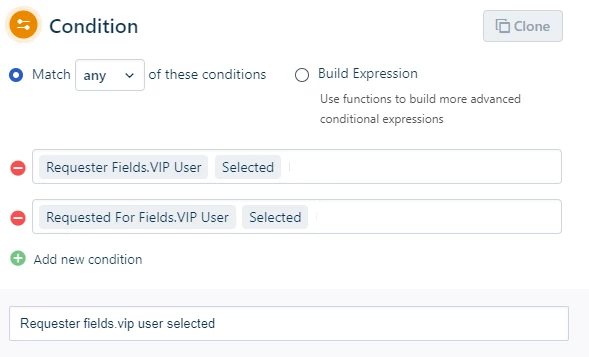
However you can’t do the “Did the manager submit this ticket” check, so you end up with two separate workflow branches that do the same thing and have to be maintained.
Making all user attributes available via placeholder would solve this issue