New Idea

Make Service Catalog Thumbnails Easier to Read

Related products:Freshservice
  • December 19, 2023
  • 3 replies
  • 51 views

Forum|alt.badge.img

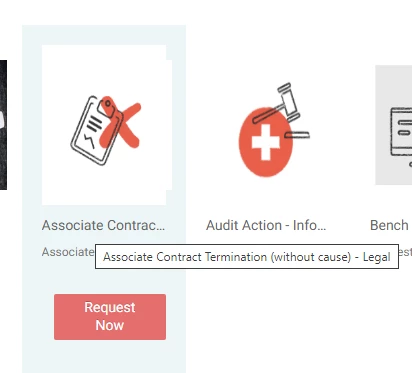
It’s frustrating that the service catalog view cannot be modified to enable the full name of an icon to be seen without having to hover over the icon. Couldn’t we add mutliple view settings like “List, Details, Large Tiles, Small Tiles” etc like you can in Windows File Explorer?

Here’s a simple example where the title is cut off:

Some of our less obvious service catalog items are not easy to understand without hovering over the tile to reveal the name:

 

3 replies

msconfig87
Top Contributor ⭐
Forum|alt.badge.img+10
  • Top Contributor ⭐
  • December 21, 2023

Hi, I used this code to “uncut” the service catalog items. It is placed in the Portal customization in the footer below everything else:

<script>
//uncut service catalog titles
$(document).on("PageUpdate", function (event) {
if (event.detail.page !== "catalog_items") return;

var listItemsContainer = $("#list-items");
var updateItemNames = function (items) {
items.forEach(function (item) {
listItemsContainer
.find('a[href="/support/catalog/items/' + item.id + '"] .item-name')
.text(item.name);
});
};

updateItemNames(event.detail.data.items.catalog_items);

listItemsContainer.off("NewContent.nameupdate");
listItemsContainer.on("NewContent.nameupdate", function (event) {
updateItemNames(event.detail.items.catalog_items);
});
});
</script>


mbackwater42
Top Contributor ⭐
Forum|alt.badge.img+8
  • Top Contributor ⭐
  • July 31, 2024

Hi, I used this code to “uncut” the service catalog items. It is placed in the Portal customization in the footer below everything else:

<script>
//uncut service catalog titles
$(document).on("PageUpdate", function (event) {
if (event.detail.page !== "catalog_items") return;

var listItemsContainer = $("#list-items");
var updateItemNames = function (items) {
items.forEach(function (item) {
listItemsContainer
.find('a[href="/support/catalog/items/' + item.id + '"] .item-name')
.text(item.name);
});
};

updateItemNames(event.detail.data.items.catalog_items);

listItemsContainer.off("NewContent.nameupdate");
listItemsContainer.on("NewContent.nameupdate", function (event) {
updateItemNames(event.detail.items.catalog_items);
});
});
</script>


Thank you for this, our Service Catalog looks much better now!


  • Community Debut
  • December 17, 2025

Hi, I used this code to “uncut” the service catalog items. It is placed in the Portal customization in the footer below everything else:

<script>
//uncut service catalog titles
$(document).on("PageUpdate", function (event) {
if (event.detail.page !== "catalog_items") return;

var listItemsContainer = $("#list-items");
var updateItemNames = function (items) {
items.forEach(function (item) {
listItemsContainer
.find('a[href="/support/catalog/items/' + item.id + '"] .item-name')
.text(item.name);
});
};

updateItemNames(event.detail.data.items.catalog_items);

listItemsContainer.off("NewContent.nameupdate");
listItemsContainer.on("NewContent.nameupdate", function (event) {
updateItemNames(event.detail.items.catalog_items);
});
});
</script>


@msconfig87 Thank you for this! Where did you go to input this code by chance? I am unable to see an option to update the code for my service catalog in the rebrand your service desk option.