


Closed for Voting

Make the Ticket Properties Panel 'Float'

Related products:Freshdesk
  • June 16, 2016
  • 12 replies
  • 35 views

Forum|alt.badge.img+1

Hi,


With long tickets (where I have the scroll), it would be useful if the ticket properties panel would float down to the right when I'm scrolling down through the ticket, as naturally the latest response is at the bottom by default.


At the moment, I have to scroll to the top of the page to amend the properties and also resolve/close the ticket (I know that you can close it with the down arrow next to the 'Send' button'.


Cheers,

Jake
12 replies

  • Contributor
  • June 16, 2016

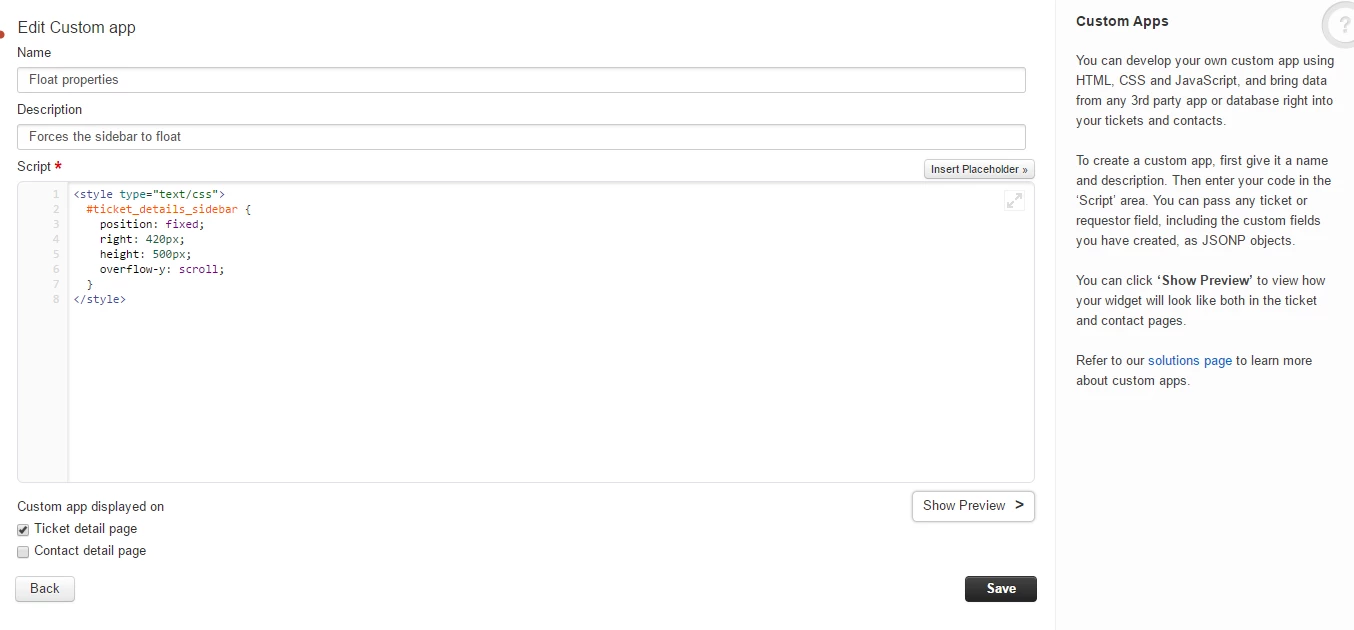
Here is a temporary hack if you're interested.  It's not pretty but it works and could easily be improved.  Let me know if you need help adding a custom app.


<style type="text/css">
  #ticket_details_sidebar {
  	position: fixed;
    right: 420px;
    height: 500px;
    overflow-y: scroll;
  }
</style>


  • Contributor
  • June 16, 2016

Updated:


<style type="text/css">
  #ticket_details_sidebar {
    position: fixed;
    right: 420px;
    top: 200px;
    bottom: 10px;
    width: 335px !important;
    overflow-y: scroll;
    padding-right: 20px;
  }
</style>


  • Contributor
  • June 16, 2016

Apparently I replied to a reply that hadn't been approved, sorry about that.


The CSS above can be added to a custom app to provide a temporary solution to your request.  Let me know if you need help.


Forum|alt.badge.img+1
Hi, Can I add this CSS customisation on the Sprout package? Cheers

  • Contributor
  • June 16, 2016

I think so but I'm not sure.


Forum|alt.badge.img+1

Hi Scott,


Work's perfectly! Added as a custom app with the CSS you've provided.. I modified the vertical height for my personal preference as I have a 4K screen.


Cheers,

Jake


  • Contributor
  • June 17, 2016

Try the second version I posted, no need for changing the height.


Forum|alt.badge.img+1

Works even better! Cheers.


  • Contributor
  • September 16, 2017

Holy Scroll panes, Batman! I was just about to request a UI enhancement to have those scroll independently. I have to tweak the left pane as it is overlapping a little but man, this is beautiful!


Now, if I could get the menu buttons at the top to be fixed/frozen so that they don't scroll away. 


  • Contributor
  • September 16, 2017

Adding the following position: fixed; to the `sticky-header` element with class `tkt-details-sticky` almost gets me what I want: 

  .tkt-details-sticky {
    border-bottom: solid 1px #eee;    
    margin-left: -20px;    
    margin-right: -20px;    
    padding: 10px 20px;    
    background: #FFF;    
    position: fixed;
}

But at rest, the ticket details overlay the menu buttons and once you start scrolling, then it is all good. So just need to get this element to hold its ground when the pan is scrolled all the way up. Maybe someone with actual CCS skillz can help (Scott?).


  • Contributor
  • September 16, 2017

Many thanks to Scott. Why hasn't Freshdesk just baked this into the UI or at least make it a configurable option.


And I was able to prevent the button menu bar from scrolling off the screen but that led to the change due date dialog getting hidden behind the ticket conversation panel. So I repositioned it to be under the due date display.


<style type="text/css">
  #ticket_details_sidebar {
    position: fixed;
    right: 400px;
    top: 200px;
    bottom: 10px;
    width: 335px !important;
    overflow-y: scroll;
    padding-right: 20px;
  }

  #due-date-dialog {
    top: 70px !important;
    left: 25px !important;
  }
</style>


aravind.sundararajan
Skilled Expert
Forum|alt.badge.img+12

Hello,


With the new MINT interface, you don't have to worry about the ticket properties pane being hidden on long threads. The quick actions menu, ticket conversations & the ticket properties act as separate components and they are scroll independent of each other. 


Cheers!


