a very useful way to allow users to meet their own reporting needs.
Zen Desk is doing this very successfully.
Curtis
a very useful way to allow users to meet their own reporting needs.
Zen Desk is doing this very successfully.
Curtis
Power BI Integration would be great. So please count my vote.
I tried the Radiare solution and found it did not meet our needs as we could only use the dashboard they create and not access our data.
I ended up spending some time and finally managed to get Power BI to pull ticket data from the Freshservice API v2. A significant caveat is that I have not successfully managed to get the Power BI queries to handle the pagination gracefully. Rather, I pull up to 5000 records of tickets created after a hard-coded date.
I also needed to manually add a few tables to map ids for 'Status', 'Priorities', 'Source Type', 'Agents' and 'Department'.
These two pages were very helpful in figuring out how to do it - The technique on the first page worked great on the desktop application, however did not work with Scheduled Refresh on published reports.
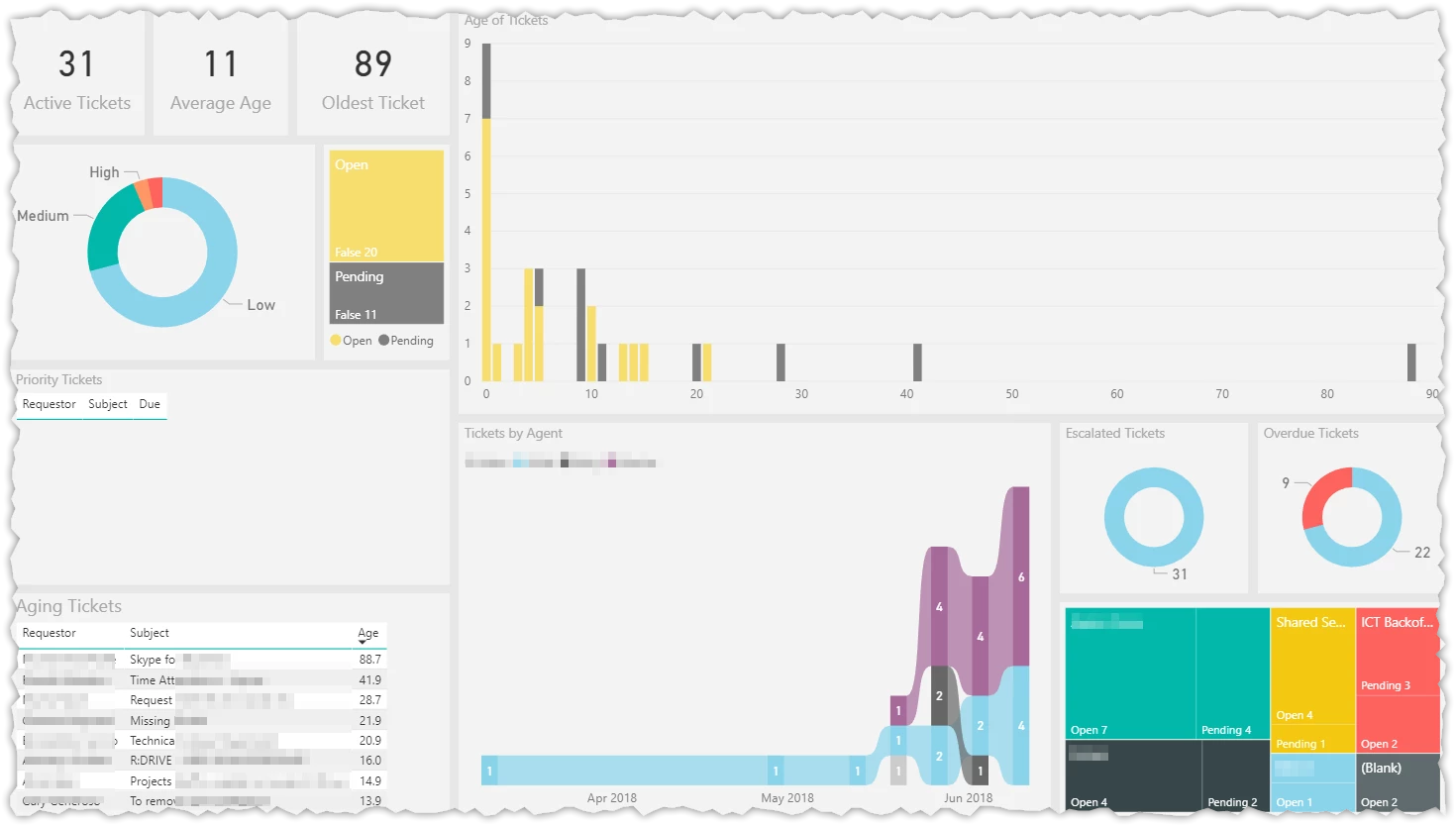
Below is a very rough guide which may help people comfortable working in the Power BI Query Editor.
Two queries are needed one uses the other to load the tickets. You will also need to set up your security settings in Power BI. I used my credentials rather than an API key, but this can be changed. Do this via 'Data Source Settings' → 'Edit Permissions'
Query 1 "GetData"
(page as number) as table =>
let
    Source = Json.Document(Web.Contents("https://XXXXXXX.freshservice.com/api/v2/tickets?per_page=100&include=requester&updated_since=2016-01-01T00:00:00Z",
    [Query=[page=Number.ToText(page)]]
)),
    tickets = Source[tickets],
    #"Converted to Table" = Table.FromList(tickets, Splitter.SplitByNothing(), null, null, ExtraValues.Error),
    #"Expanded Column1" = Table.ExpandRecordColumn(#"Converted to Table", "Column1", {"cc_emails", "fwd_emails", "reply_cc_emails", "fr_escalated", "spam", "email_config_id", "group_id", "priority", "requester_id", "responder_id", "source", "status", "subject", "to_emails", "department_id", "id", "type", "due_by", "fr_due_by", "is_escalated", "description", "description_text", "category", "sub_category", "item_category", "custom_fields", "created_at", "updated_at", "deleted", "requester"}, {"cc_emails", "fwd_emails", "reply_cc_emails", "fr_escalated", "spam", "email_config_id", "group_id", "priority", "requester_id", "responder_id", "source", "status", "subject", "to_emails", "department_id", "id", "type", "due_by", "fr_due_by", "is_escalated", "description", "description_text", "category", "sub_category", "item_category", "custom_fields", "created_at", "updated_at", "deleted", "requester"}),
    #"Expanded requester" = Table.ExpandRecordColumn(#"Expanded Column1", "requester", {"id", "name", "email", "mobile", "phone"}, {"id.1", "name", "email", "mobile", "phone"}),
    #"Changed Type" = Table.TransformColumnTypes(#"Expanded requester",{{"id.1", Int64.Type}, {"updated_at", type datetime}, {"created_at", type datetime}, {"fr_due_by", type datetime}, {"due_by", type datetime}, {"id", Int64.Type}, {"department_id", Int64.Type}, {"status", Int64.Type}, {"source", Int64.Type}, {"priority", Int64.Type}, {"requester_id", Int64.Type}, {"responder_id", Int64.Type}, {"group_id", Int64.Type}, {"email_config_id", Int64.Type}, {"fr_escalated", type logical}, {"spam", type logical}, {"is_escalated", type logical}, {"deleted", type logical}})
in
    #"Changed Type"
Query 2 "API v2 All Tickets"
This essentially runs "Query 1" 50 times (this can be changed on line 2, but be careful of your API limit)
let
    Source = {1..50},
    #"Converted to Table" = Table.FromList(Source, Splitter.SplitByNothing(), null, null, ExtraValues.Error),
    #"Renamed Columns" = Table.RenameColumns(#"Converted to Table",{{"Column1", "Page"}}),
    #"Added Custom" = Table.AddColumn(#"Renamed Columns", "Custom", each GetData([Page])),
    #"Expanded Custom" = Table.ExpandTableColumn(#"Added Custom", "Custom", {"cc_emails", "fwd_emails", "reply_cc_emails", "fr_escalated", "spam", "email_config_id", "group_id", "priority", "requester_id", "responder_id", "source", "status", "subject", "to_emails", "department_id", "id", "type", "due_by", "fr_due_by", "is_escalated", "description", "description_text", "category", "sub_category", "item_category", "custom_fields", "created_at", "updated_at", "deleted", "id.1", "name", "email", "mobile", "phone"}, {"cc_emails", "fwd_emails", "reply_cc_emails", "fr_escalated", "spam", "email_config_id", "group_id", "priority", "requester_id", "responder_id", "source", "status", "subject", "to_emails", "department_id", "id", "type", "due_by", "fr_due_by", "is_escalated", "description", "description_text", "category", "sub_category", "item_category", "custom_fields", "created_at", "updated_at", "deleted", "id.1", "requester.name", "requester.email", "requester.mobile", "requester.phone"}),
    #"Changed Type" = Table.TransformColumnTypes(#"Expanded Custom",{{"id.1", Int64.Type}, {"updated_at", type datetime}, {"created_at", type datetime}, {"fr_due_by", type datetime}, {"due_by", type datetime}, {"id", Int64.Type}, {"department_id", Int64.Type}, {"status", Int64.Type}, {"source", Int64.Type}, {"priority", Int64.Type}, {"requester_id", Int64.Type}, {"responder_id", Int64.Type}, {"group_id", Int64.Type}, {"email_config_id", Int64.Type}, {"fr_escalated", type logical}, {"spam", type logical}, {"is_escalated", type logical}, {"deleted", type logical}}),
    #"Renamed Columns1" = Table.RenameColumns(#"Changed Type",{{"requester.name", "Requestor"}, {"subject", "Subject"}, {"due_by", "Due"}, {"created_at", "Created"}, {"status", "status num"}, {"source", "source num"}, {"priority", "priority num"}}),
    #"Removed Columns" = Table.RemoveColumns(#"Renamed Columns1",{"id.1"})
in
    #"Removed Columns"
I am not a PowerBI expert, but would it be possible to query the amount of pages/tickets and query only the amount of pages that you need instead of coding 50 runs. That is if I am reading this correctly.
On the topic of PowerBI integration. Freshservice could probably develop a pbix file to download which uses the API. Let us change the URL and the credentials. This would probably be the easiest way to accomplish this. I think a competent PowerBI person and a someone who understands the Freshservice API could crank through the process in a day. Seems like it could be an easy win for the FS team.
@Patrick: Re your first question about querying the number of pages, I haven't managed to figure out an elegant way to do this yet. The FreshService API (v2) doesn't appear to return a variable for the number of pages. But it does eventually indicate that there is 'no more pages' via the 'link header'. As I am still learning the Power BI 'm query' language, I have not managed to leverage this yet, however, it would need to be triggered in the middle of the run, rather than setting 'X' pages at the beginning of the run.
With respect to publishing a PBIX file, I have attached a template which should work once configured. Hopefully this doesn't lead to a bunch of people hammering the API servers, but I have included an allowance to limit the number of tickets retrieved. In practice, this only limits the number of pages requested, users will need to ensure they don't refresh too many times per hour, or try to retrieve too many tickets. Eg to retrieve 5000 tickets will be 50 pages @ 3 API credits per page = 150 credits. Thus an entry level plan (Sprout) can easily pull up to 30,000 tickets per hour assuming they aren't using the API elsewhere.
This is by no means a professionally developed file, but it suits my purposes and may work for others. It is provided 'as is', and I am not in a position to support it I'm afraid. That being said, if people improve it, please share it back! Just be sure to save as a template as this stops your data & credentials going with it.
Instructions for FreshService.pbit template file
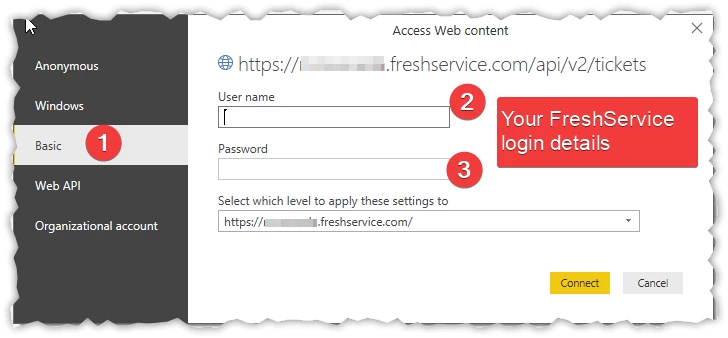
I am very happy to share any of my work developed from this file. I am thinking that a Github project should probably be created for this. I would probably just fork the project and do work from the fork.
Again this is really cool stuff. Thanks again.
Thank you
Is anyone using this to get the time tracking information? I can get total time on the tickets but cannot get time tracked by agent. Seems that is in a different API or something.
Something as critical as scheduled exports, time tracking per agent, etc seems like a huge miss for Fresh Service on their reporting and/or analytics.
https://api.freshservice.com/#time-entries
If you are using powerBI it should be easy to putt this data out.
For groups, I don't use these much for reporting, but I have added a column called 'Group'. You can play with this on the second tab or add it to other reports.
In order to pull Group, Department and Agent info, I had to revert to using the old V1 API, so this may break at some future point if it gets disabled.
Thank Adam for the update. This is really helpful.
Finally I managed to retrieve the Agent / Department / Group from the FS and imported into Power BI.
Sort of having a basic reporting with customization on the Power BI now. Further feature that I am now look into are the "Re-Open" case count and "User Satisfaction" but I don't think they have related API on V1 and V2 now.
let me know if you have any experiences on that. Thank you.
Adam, I am just now getting back to this but am having trouble getting authentication to work. We use SSO and I noticed your readme says (not SSO details if used). Honestly, this has been my issue all along. I can't get PowerBI to authenticate with my FreshService URL no matter what I do.
If you use SSO to login, you should still be able to access your helpdesk by going to https:/XXXX.freshservice.com/support/login
From here you should be able to confirm your 'non-SSO' login details or at least reset them.
Alternatively, if you are feeling adventurous, you could try and set up authentication using an API Key, I confident this works as I have seen other Power BI queries use it. You would need to edit the queries in the editor to accomplish this. If you do do this, it would be good to share the file via Github Project Page so we can incorporate it into the main pbix file for others to use.
Adam,
I''m just now circling back to this. I have struggled with getting the API authentication to work. I tried https:/XXXX.freshservice.com/support/login But it just redirects to my ADFS logon page. API has been quite a pain. Even though the Power BI UI gives me a place to enter my API key it needs more done with Web.Contents from what I can find. I think I am beyond this part but now I get errors about like below
An error occurred in the ‘’ query. Expression.Error: The name 'Converted to Table' wasn't recognized. Make sure it's spelled correctly.
Below is the modified version of your query for Tickets
let
    url=FreshServiceURL,
    maxPages = MaxTickets / 100,
    Source = Json.Document(Web.Contents(url & "/helpdesk/tickets.json"),
    #"Converted to Table" = Table.FromList(Source, Splitter.SplitByNothing(), null, null, ExtraValues.Error),
    #"Renamed Columns" = Table.RenameColumns(#"Converted to Table",{{"Column1", "Page"}}),
    #"Added Custom" = Table.AddColumn(#"Renamed Columns", "Custom", each GetData([Page])),
    #"Expanded Custom" = Table.ExpandTableColumn(#"Added Custom", "Custom", {"cc_emails", "fwd_emails", "reply_cc_emails", "fr_escalated", "spam", "email_config_id", "group_id", "priority", "requester_id", "responder_id", "source", "status", "subject", "to_emails", "department_id", "id", "type", "due_by", "fr_due_by", "is_escalated", "description", "description_text", "category", "sub_category", "item_category", "custom_fields", "created_at", "updated_at", "deleted", "id.1", "name", "email", "mobile", "phone"}, {"cc_emails", "fwd_emails", "reply_cc_emails", "fr_escalated", "spam", "email_config_id", "group_id", "priority", "requester_id", "responder_id", "source", "status", "subject", "to_emails", "department_id", "id", "type", "due_by", "fr_due_by", "is_escalated", "description", "description_text", "category", "sub_category", "item_category", "custom_fields", "created_at", "updated_at", "deleted", "id.1", "requester.name", "requester.email", "requester.mobile", "requester.phone"}),
    #"Changed Type" = Table.TransformColumnTypes(#"Expanded Custom",{{"id.1", Int64.Type}, {"updated_at", type datetime}, {"created_at", type datetime}, {"fr_due_by", type datetime}, {"due_by", type datetime}, {"id", Int64.Type}, {"department_id", Int64.Type}, {"status", Int64.Type}, {"source", Int64.Type}, {"priority", Int64.Type}, {"requester_id", Int64.Type}, {"responder_id", Int64.Type}, {"group_id", Int64.Type}, {"email_config_id", Int64.Type}, {"fr_escalated", type logical}, {"spam", type logical}, {"is_escalated", type logical}, {"deleted", type logical}}),
    #"Renamed Columns1" = Table.RenameColumns(#"Changed Type",{{"requester.name", "Requestor"}, {"subject", "Subject"}, {"due_by", "Due"}, {"created_at", "Created"}, {"status", "status num"}, {"source", "source num"}, {"priority", "priority num"}}),
    #"Removed Columns" = Table.RemoveColumns(#"Renamed Columns1",{"id.1"})
    [ApiKeyName]=("APIToken"))
in
    #"Removed Columns"
Hi Justin, I sent you down the wrong path, sorry, to get to your 'non SSO' login page, go to https://xxx.freshservice.com/login/normal (not support/login) hopefully that will get you up and running quickly. I admit the API side of things is a bit of a pain. Possibly try the original pbix file from the Github Project Page with the credentials you iron out from https://xxx.freshservice.com/login/normal and take it from there.
I'm not sure, but I suspect the error you are getting may be due to to the query not getting the ticket list as a json table, possibly due to an authentication error. (Line 5 or 6).
Adam, that URL does present a login. Now I just need to find my password :) I'll keep you posted on my results. I work on this in my spare time as my daily responsibilities prevent me from devoting much time to it.
Hello everyone,
Scheduled Data Exports in Analytics is now live - Freshservice customers can schedule Freshservice data to be exported periodically through an API url. This can be fed into any reporting tool (that can pull data from the API) to generate powerful reports and visualizations. This is available as a feature inside Analytics.
To use this feature, simply start with pre-existing widgets under the 'Data Exports' view in Analytics, select the fields that need to be exported, choose the schedule frequency and enable the schedule. The output format is a URL with the exported file (csv), that needs to be configured as the source in the BI tool. Please find the solution article here.
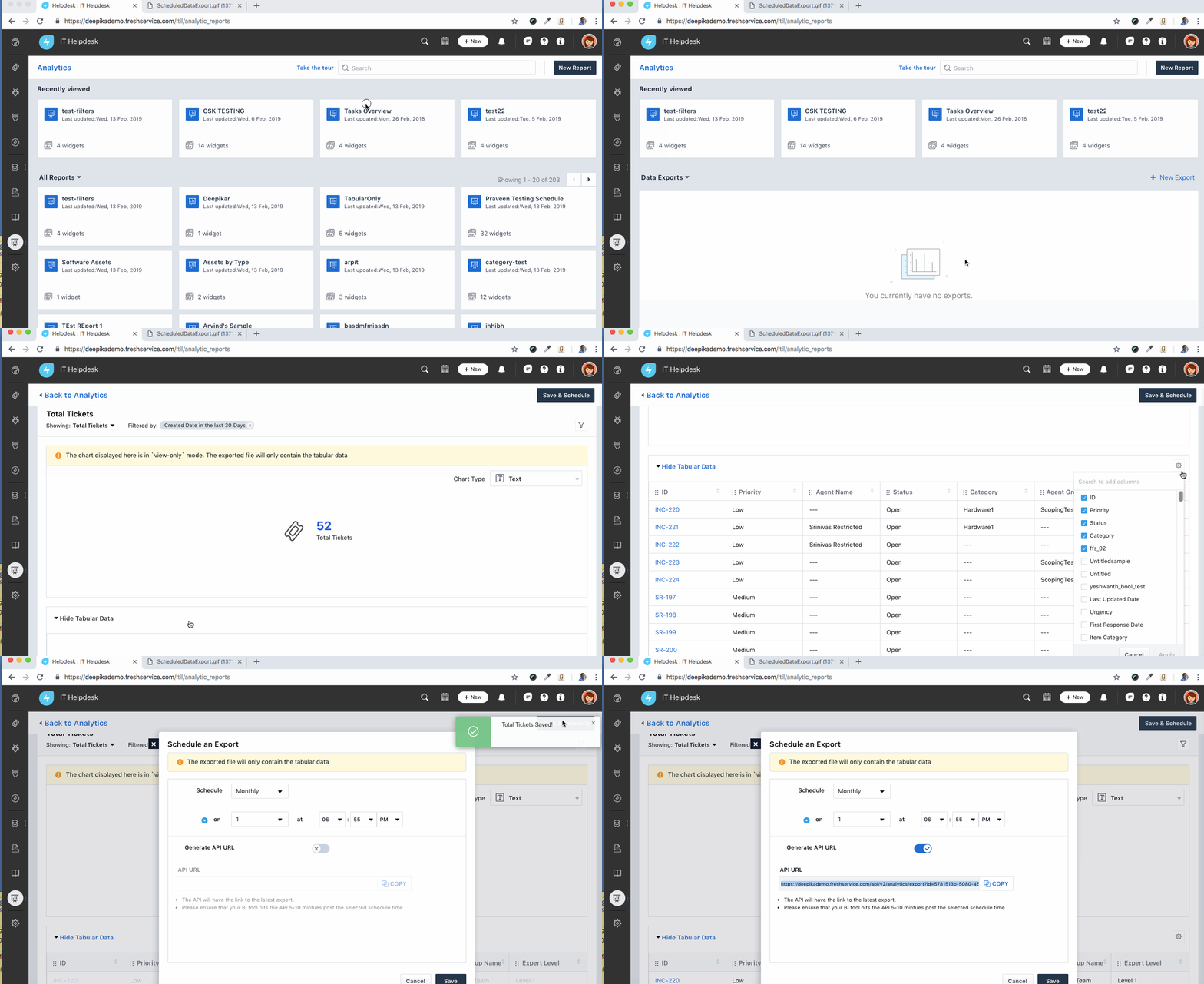
For those of you trying to figure out how to get this into Power BI, the following may help
I have set up a sample data export but it is advising me that I have no downloads available.. Can I confirm the timezone setting on the export is the same as that of the instance ?
I will try and set this up in PowerBI as well per the instruction from Adam above. See if that shows any data
I'm failing at the first hurdle! Notes say, inside analytics click on the drop down in the top left corner??
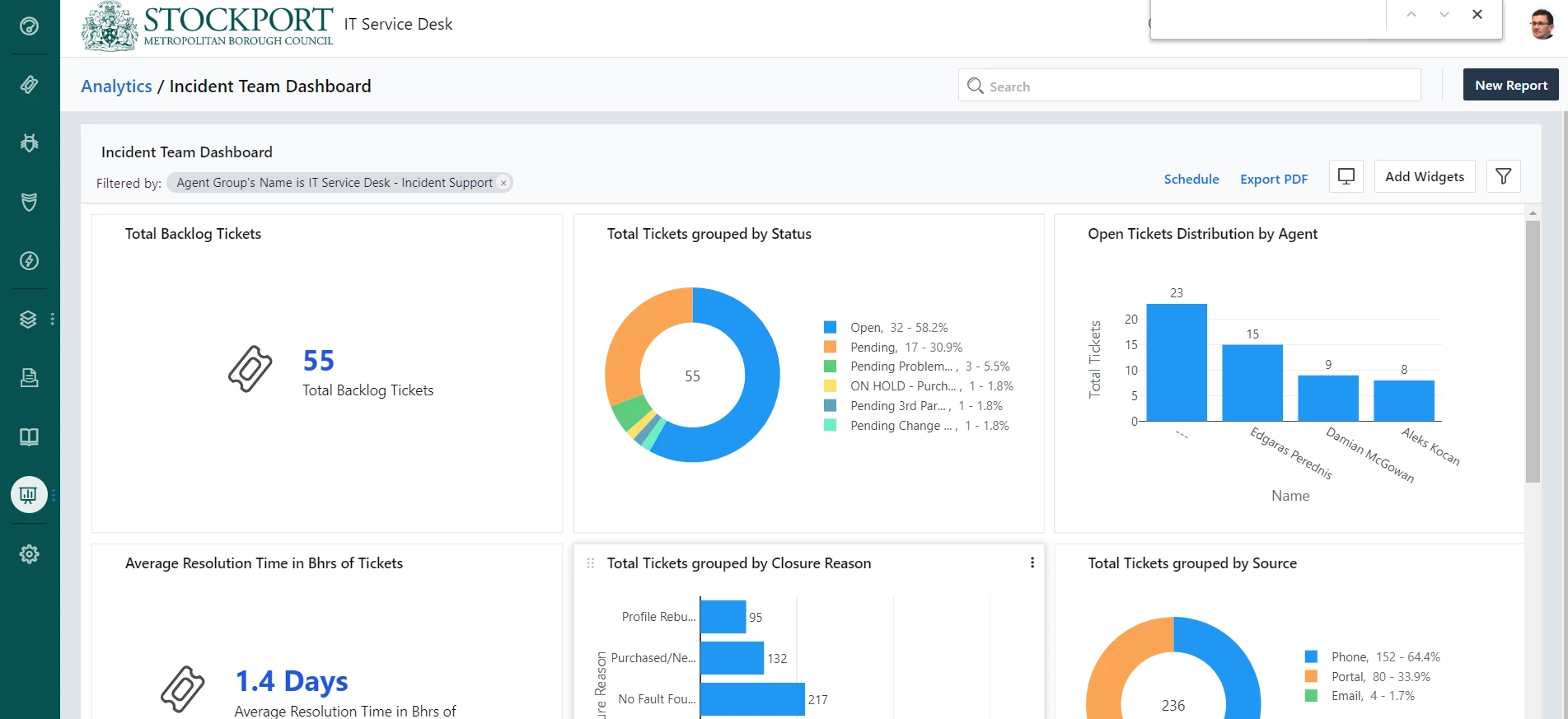
Nice--I was able to get this working, with Adam's posts. Thanks, Adam!
Already have an account? Login
No account yet? Create an account
Enter your E-mail address. We'll send you an e-mail with instructions to reset your password.