Closed for Voting

multi-language for submit ticket form

Related products:Freshdesk
  • September 15, 2017
  • 8 replies
  • 48 views

We want to offer multi-language support to our customers and wonder why the submit ticket form is not providing multi-language. From my point of view, multi-language is not just a topic for some parts of Freshdesk, but all - including the ticket form as well.

8 replies

aravind.sundararajan
Skilled Expert
Forum|alt.badge.img+12

Hi Lara,


Although the option to configure the custom ticket fields per language isn't available, we can still customise it to an extent using the portal customisation option available on the Estate plan. Can you please let me know the number of fields & languages that you're looking at?


Cheers!


I want to second this request. I have the Estate plan. I am providing knowledge base articles in English, Traditional Chinese, and later, Simplified Chinese and Mexican Spanish. Users can set their language preference in their profile. But the ticket form itself cannot be presented in multiple languages. Any text fields I create are single language only, and this is most of our (extensive) ticket form. 

How can I overcome this language barrier in Freshdesk? Please give specific recommendations.


  • Contributor
  • June 13, 2018

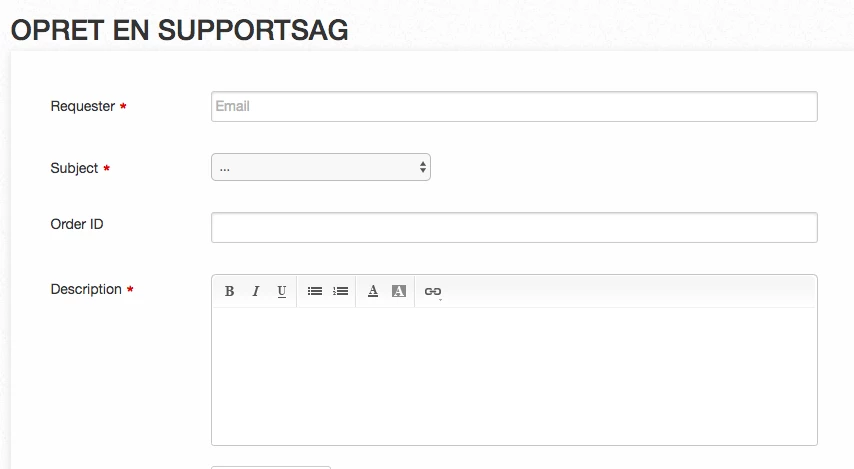
I have a similar issue, where we run an FAQ solutions database in difference language. However, the name for each field name in the ticket form cannot only be translated for our main portal in FD. So if I change the ticket field name for "Requester" into the Danish word for this, this will also appear in Danish for our Swedish site. 


It would be nice if this could be changes individually for each site in their respective languages, to avoid having multiple FD accounts. 


Thank you!

sk_c3_a6rmbillede2018-06-13kl.13.49.58_33288.png

  • Apprentice
  • October 18, 2018

I'd like to add that since the labels have to be written in English to be understood by all/most users, it may lead some to type in English and then they will miss automatic solutions suggestions as it only search in the active portal language.


  • Community Debut
  • September 18, 2019

I made a temporary work around for this, whilst we await the update - hope it helps others:


NOTES:

my default language here is english "en", the language I wish to show the form labels in is German "de".

To find your language codes go here:

https://support.freshdesk.com/support/solutions/articles/221416-multilingual-portal


I put this code into customise portal > layout and pages > portal pages > new ticket

if you need any help, please do ask (tessa@jenlu.com)


{% if portal.current_language.code == "en" %}

{% snippet new_ticket_form %}

{% elsif portal.current_language.code == "de" %}

<style>
.requester-label:before {content: "replacement text for requestor here";visibility:visible !important;}
.requester-label{visibility:hidden;}
.subject-label:before {content: "replacement text for subject here";visibility:visible !important;}
.subject-label{visibility:hidden;}
.description-label:before {content: "replacement text for description here";visibility:visible !important;}
.description-label{visibility:hidden;}
</style>

{% snippet new_ticket_form %}{% endif %}


hi Lara Hiess,


you can convert your ticket page view any language by adjusting this code.


Copy paste this code on your portal "New ticket page" (End Portion)

< script >
 jQuery(document).ready(function ()
	//ready() will execute once the DOM has been loaded 
	{
		var lang = "{{portal.current_language.code}}";
		if (lang == "ko")
		//to check the language which you have selected in the drop-down value in the Freshdesk portal home page
		{
			jQuery('#helpdesk_ticket_email').closest('.control-group').find('label').text("???")
			//translation for Requester label 
			jQuery('#helpdesk_ticket_subject').closest('.control-group').find('label').text("??")
			//translation for Subject label      
			jQuery('#helpdesk_ticket_custom_field_cf_address_1014713').closest('.control-group').find('label').text("??")
			//translation for custom field label      
			jQuery('#helpdesk_ticket_ticket_body_attributes_description_html').closest('.control-group').find('label').text("??")
			//translation for description label      
			jQuery('#helpdesk_ticket_ticket_type').closest('.control-group').find('label').text("??")
			//translation for type label      
			var type_val = {
				"Issue date": "???",
				"Issue status": "?? ??",
				"Comments": "???"
			};
			//declaring variables in the drop-down value      
			jQuery.each(type_val, function (key, val) {
				jQuery('#helpdesk_ticket_ticket_type option[value="' + key + '"]').text(val);
				for -loop which would translate the values in the drop - down value
			});
			jQuery('#helpdesk_ticket_custom_field_cf_error_messagename_1014713').closest('.control-group').find('label').text("?? ??? / ??")
			//translation for custom field value           
			jQuery('#helpdesk_ticket_ticket_type').change(function () {
				//used change function here to translate dependent field values        
				jQuery('#helpdesk_ticket_custom_field_cf_date_1014713').closest('.control-group').find('label').text("??")
				jQuery('#helpdesk_ticket_custom_field_cf_others_1014713').closest('.control-group').find('label').text("?? ??")
				jQuery('#helpdesk_ticket_custom_field_cf_comments_1014713').closest('.control-group').find('label').text("???")
				jQuery('#helpdesk_ticket_custom_field_cf_issue_status_1014713').closest('.control-group').find('label').text("?? ??")
				var type_vall = {
					"Resolved": "???",
					"Not resolved": "???? ??"
				};
				jQuery.each(type_vall, function (key, val) {
					jQuery('#helpdesk_ticket_custom_field_cf_issue_status_1014713 option[value="' + key + '"]').text(val);
				});
			})
		}
	}); <
/script>


if you want any help please contact us our email:- info@helpdesktheme.com and our website


i will help you.


Thanks

Helpdesk Team

Experts in freshdesk and freshservice


  • Community Debut
  • January 10, 2020

Thank you for this discussion. Have now made my own rule when using multiple multi-lauguage. In this example If NL, DE or FR is there, translate it. Otherwise to EN.

See;


Replace the code on youre portal in the "New ticket page" code of:

{% snippet new_ticket_form%}


to;


{%case portal.current_language.code%}
          {%when 'nl'%}
    		{% snippet new_ticket_form %}
  				<style>
  					.requester-label:before {content: "E-mailadres";visibility:visible !important;}
  					.requester-label{visibility:hidden;}
  					.subject-label:before {content: "Onderwerp";visibility:visible !important;}
  					.subject-label{visibility:hidden;}
 					.description-label:before {content: "Omschrijving";visibility:visible !important;}
  					.description-label{visibility:hidden;}
 				</style>
          {%when 'de'%}
			{% snippet new_ticket_form %}
  				<style>
  					.requester-label:before {content: "Ihre E-mail";visibility:visible !important;}
  					.requester-label{visibility:hidden;}
  					.subject-label:before {content: "Betreff";visibility:visible !important;}
  					.subject-label{visibility:hidden;}
 					.description-label:before {content: "Beschreibung";visibility:visible !important;}
  					.description-label{visibility:hidden;}
 				</style>
            {%when 'fr'%}
			{% snippet new_ticket_form %}
  				<style>
  					.requester-label:before {content: "Votre email";visibility:visible !important;}
  					.requester-label{visibility:hidden;}
  					.subject-label:before {content: "Matière";visibility:visible !important;}
  					.subject-label{visibility:hidden;}
 					.description-label:before {content: "La description";visibility:visible !important;}
  					.description-label{visibility:hidden;}
 				</style>
          {%else%}
            {% snippet new_ticket_form %}
        {%endcase%}


Glad you were able to customize it according to your requirement, Egmond.

Cheers!