Closed for Voting

Multilingual Customer Satisfaction Survey

Related products:Freshdesk
  • June 24, 2013
  • 20 replies
  • 66 views

Hello,

We run a multilingual support and would like implement the Customer Satisfaction throughout our countries. However, the feature can only be set in one language.

We would like to request a feature evolution in order to support multiple languages.


I would suggest building this feature very much like the Supervisor interface, where you can choose which criteria triggers the Customer Satifaction Survey.


Thank you for your feedback.

Best regards,

Benjamin

20 replies

Hi Benjamin


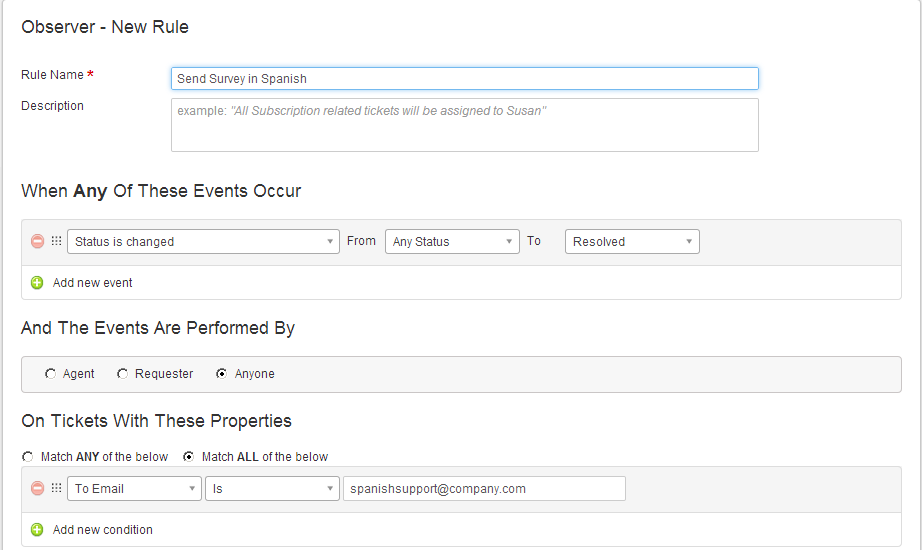
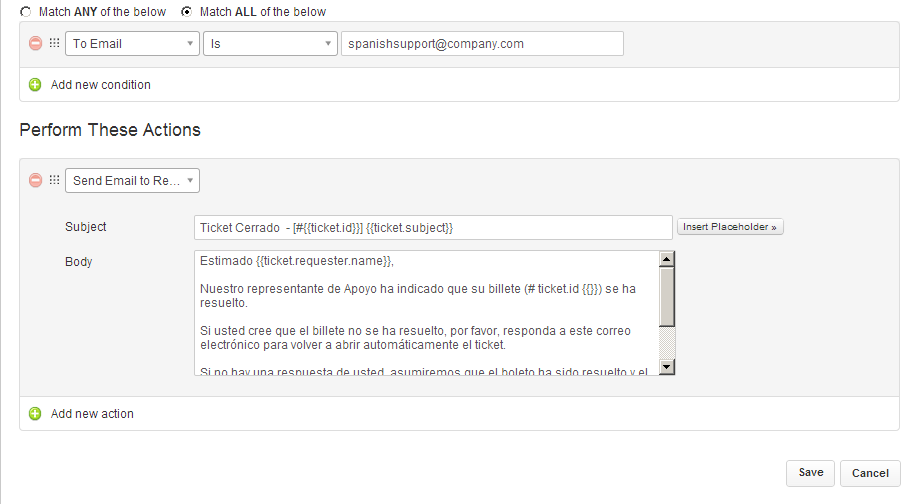
You may make use of Observer feature to trigger out Multi-language survey options. 

You could create specific custom fields or user conditions based on Email etc. Like in screenshot below.


Similarly based on other To EMail , you may create/send Surveys in different languages.


regards
Vijay


  • Community Debut
  • April 29, 2014

This still doesn't explain how to get the survey into the email?


  • Community Debut
  • April 30, 2014

I dont think this would work. As the NoReply above hints - What are the placeholders for the 3 rating options? (awesome, just ok, not good)


  • Contributor
  • May 6, 2014

The placeholder for the rating options is {{ticket.satisfaction_survey}}. Just add it to the email in the rule that is created within observer. 


  • Community Debut
  • June 1, 2014

Thanks for the placeholder Mikael. This however does not address the problem of survey being not localized (i.e. base language only) as there is bno interface in FD admin to localize the 3 voting options (awesome, just ok, not good).


This feature was raised 4 years ago, and it stil is not possible to setup multilingual satisfaction surveys, not very good for international companies, like ours, and like FreshDesk... when is this planned for?


  • Community Debut
  • October 25, 2017
Hello, is this possible today?

Can't figure out how to set up bilingual survey... Is it even supported? I can't even have 2 survey active at the same time when I select 'Allow agents to add survey links to specific emails' on both survey.


  • Community Debut
  • November 8, 2017

As far as I can tell it's not supported and there are no workarounds. :-/ 


  • Community Debut
  • November 8, 2017

As far as I can tell it's not supported and there are no workarounds. 


  • Community Debut
  • January 14, 2019

Wasn't this developed yet? It's still a big issue for us :(


  • Community Debut
  • April 16, 2019

I am also interested. Is it available? 


mrenaud
Skilled Expert
Forum|alt.badge.img+6
  • Skilled Expert
  • April 17, 2019

I also think that this is taking way too long (6 years). Can we get at least an idea if this is something we can expect?


Forum|alt.badge.img+7

Fully agree. There are gaps everywhere for a real multi-lingual support site. The KB and reply templates work fine, but those are the only things that has really been addressed.


  • Community Debut
  • April 18, 2019

Waiting for years. Have to say, if you really need multi-lingual support Freshdesk is not the product for you.


  • Contributor
  • April 25, 2019

Really shocked surveys are not multilingual yet.

This is a must have.


  • Apprentice
  • May 5, 2019

I agree with Nicolas Mollet, This is must have feature.


Hi all,


We are really sorry to keep you waiting. Freshdesk now supports multilingual customer satisfaction surveys, find more details on this help article - https://support.freshdesk.com/support/solutions/articles/50000000119-setting-up-multilingual-csat-surveys


Does the multilingual customer satisfaction survey also work when I create an automation rule with placeholder {{ticket.satisfaction_survey}} ?


Or would this placeholder only show the default language, in our case English?


Hey David,


Yes! The survey would work even while sending it via Automations using the placeholder. However, make sure the CSAT is turned on and the translation is provided in the respective contact's language.


Hope this helps!


Cheers!