Closed for Voting

Name and Email From Name Separate

Related products:Freshdesk
  • April 28, 2011
  • 3 replies
  • 18 views

So my logo is just fancy text, so I don’t need my text logo followed by the text I put in the name field in the branding part of Admin. However if I remove that I see that the emails sent out are without a From name.

3 replies

Hi Chris,

Please refer this solution article for modifying this. http://support.freshdesk.com/solution/categorie…

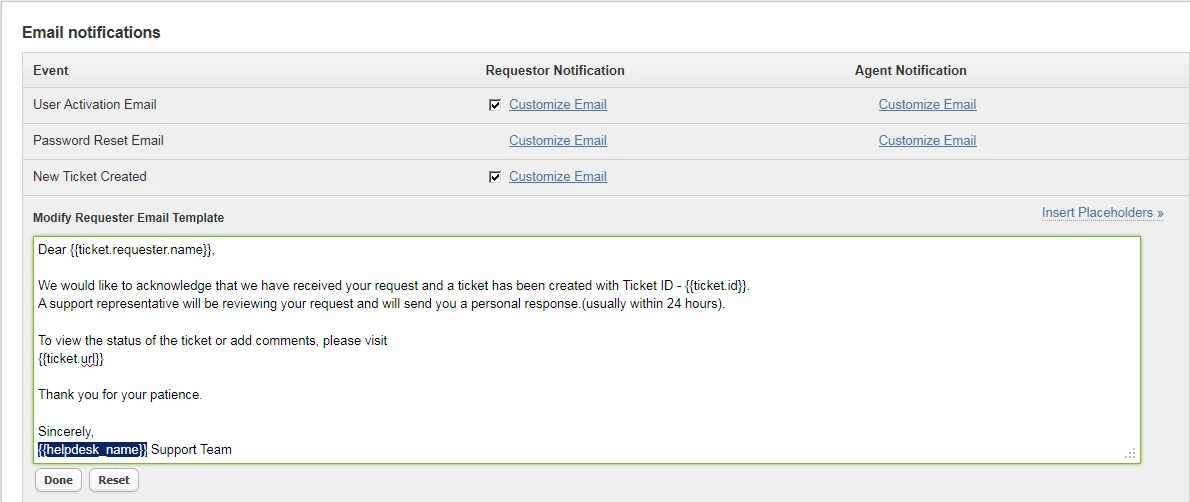
After you make the changes, go to Admin → Email Notifications and you can Edit the notifications and include your Helpdesk Name. Please check the attached screenshots. In this section, you may remove the Tag – {{helpdesk_name}} and give “CPTech Consulting” or any other name, so all emails will have from name as “CP Tech Consulting Support”.

Hope this helps.

Regards
Vijay

emailnotify_10033.png

  • Author
  • Contributor
  • April 29, 2011

for some reason my reply won’t go through so please see the following link.

http://pastebin.com/d06eqhKd


  • Contributor
  • May 2, 2011

Hi Chris,

Can you send us a screenshot of the problem.

There are basically three separate things here.

1. When you are looking at the Email list view, the email ID will always have the text in front of the @symbol. In your case it should be “help”

2. The Email subject will usually have the Helpdesk name followed by some text – for example –
CP Tech Consulting User Activation.
If you have not specified any Helpdesk name, the subject will simply be – User Activation.

3. Inside the Email body – you may see something like this at the end -

“Regards”
CP Tech Consulting

This is customizable in the Email Notifications section.

Please let us know which one of the three you are referring to. A screenshot will help.

BTW – The forum post error has been fixed and will be pushed to the production environment tomorrow.

Regards
Girish