Closed for Voting

Notifications Activity History

Related products:Freshdesk
  • November 1, 2015
  • 5 replies
  • 47 views

Excuse me for writing this in an agile/scrum user story format. :) Really like Freshdesk so far and felt a notifications history would make it better. One benefit would be during setup. Being able to see notifications sent would make it easier to determine if notification and rule settings are properly configured and working as expected.


User Story 1

As an agent role (agent, supervisor, admin, or account admin)

I would like a notification history on a ticket

So that I can see when a notification was successfully sent and to whom.


Acceptance Criteria 1.1

When I view a ticket and show activities, I will see successfully sent notifications including the time when they were sent and the notification name.

Example:

HelpDesk sent a notification 2 days ago (Thu, Oct at 12:09 PM)

Sent notification Agent Solves the Ticket


Acceptance Criteria 1.2

When notification history is visible and I click on a notification activity, it will expand to show more details including the individuals notified and a copy of the message body.


Example:

HelpDesk sent a notification 2 days ago (Thu, Oct at 2:36 PM)

Sent notification Ticket Assigned to Agent

Notified to : agent@helpdesk.com


Hello Mr/Mrs Agent Name,

A new ticket has been assigned to you.


Acceptance Criteria 1.3
When notifications have been sent related to a ticket and a requester views the ticket, they will be unable to see notifications history.


Acceptance Criteria 1.4

When a rule is configured (such as Observer) to send a notification and the email successfully sends after the rule is triggered, the notification will be added to the notification history for the related ticket.


User Story 2

As an admin or account admin

I would like a settings option to turn on/off notifications history for a requester

So that I can allow requesters to see the history of notifications sent only to them.


5 replies

Hi Steven,


Firstly, thanks for the lucid explanation of your requirements - really helps!


Now coming to your requirements, we already have plans for showing activities when automations execute on tickets, and for showing delivery status of sent mails from Freshdesk. Considering this is still in planning stages, I will not be able to elaborate further but will ensure that your requirements are taken into account.


Also, can you elaborate on your user story 2? Considering we currently do not show activities on the customer portal (which is where a customer would be able to see his tickets) I am not sure this is applicable for us.


Thanks for your suggestions and have a great day ahead!


  • Author
  • Apprentice
  • November 14, 2015
Hi Arvind,

Thanks for taking the suggestions into account!

Don't worry about user story 2.  Given Freshdesk currently doesn't show activities on the customer portal, it would probably be better to list it as a separate feature request.  I'll give it some thought and perhaps do another user story with examples at a later time.

Hope you have a great day too!

aravind.sundararajan
Skilled Expert
Forum|alt.badge.img+12

Hello,


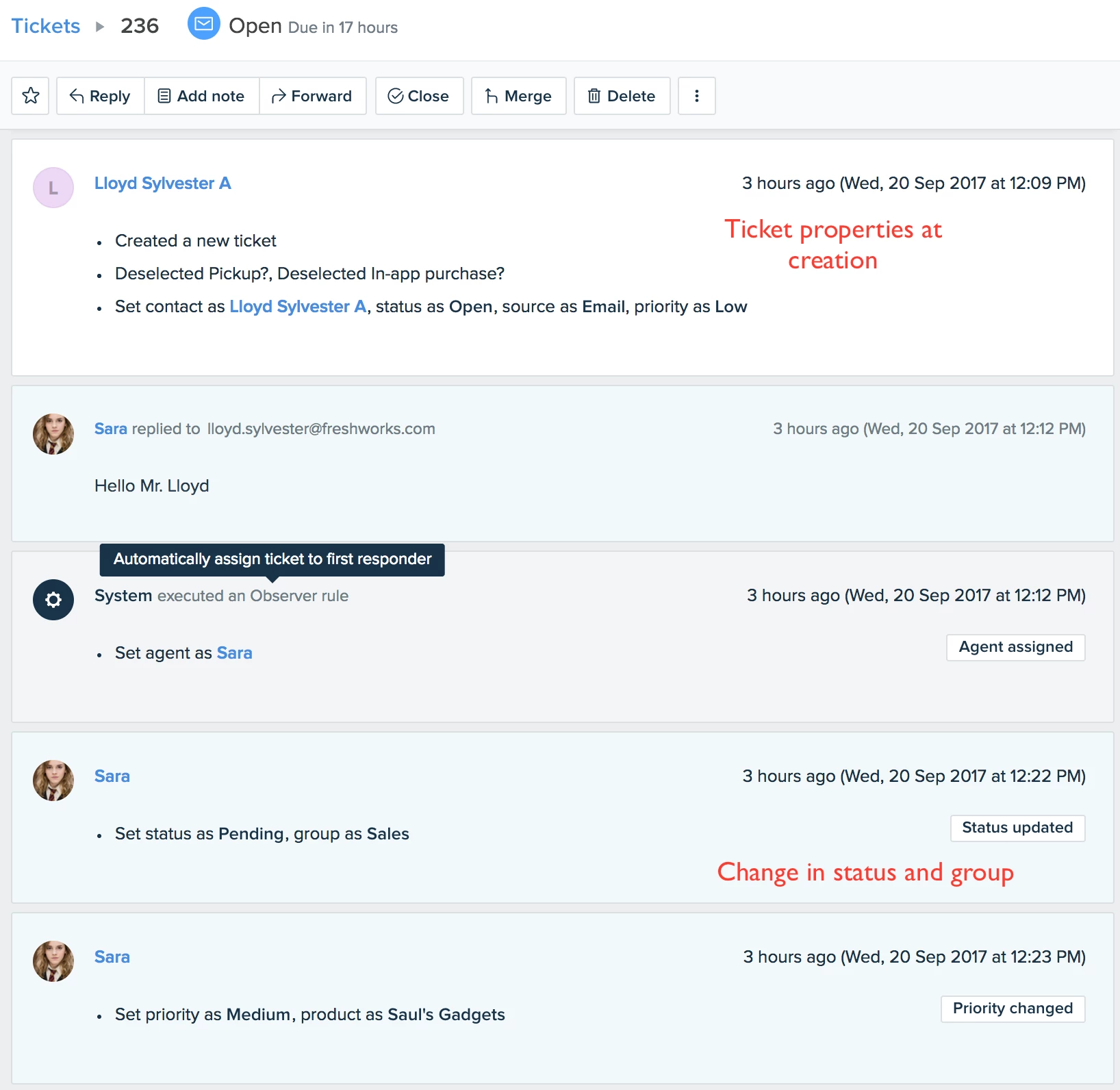
You can now see all the ticket related events in the Activities section. This includes replies, actions performed by automations and a lot more. 


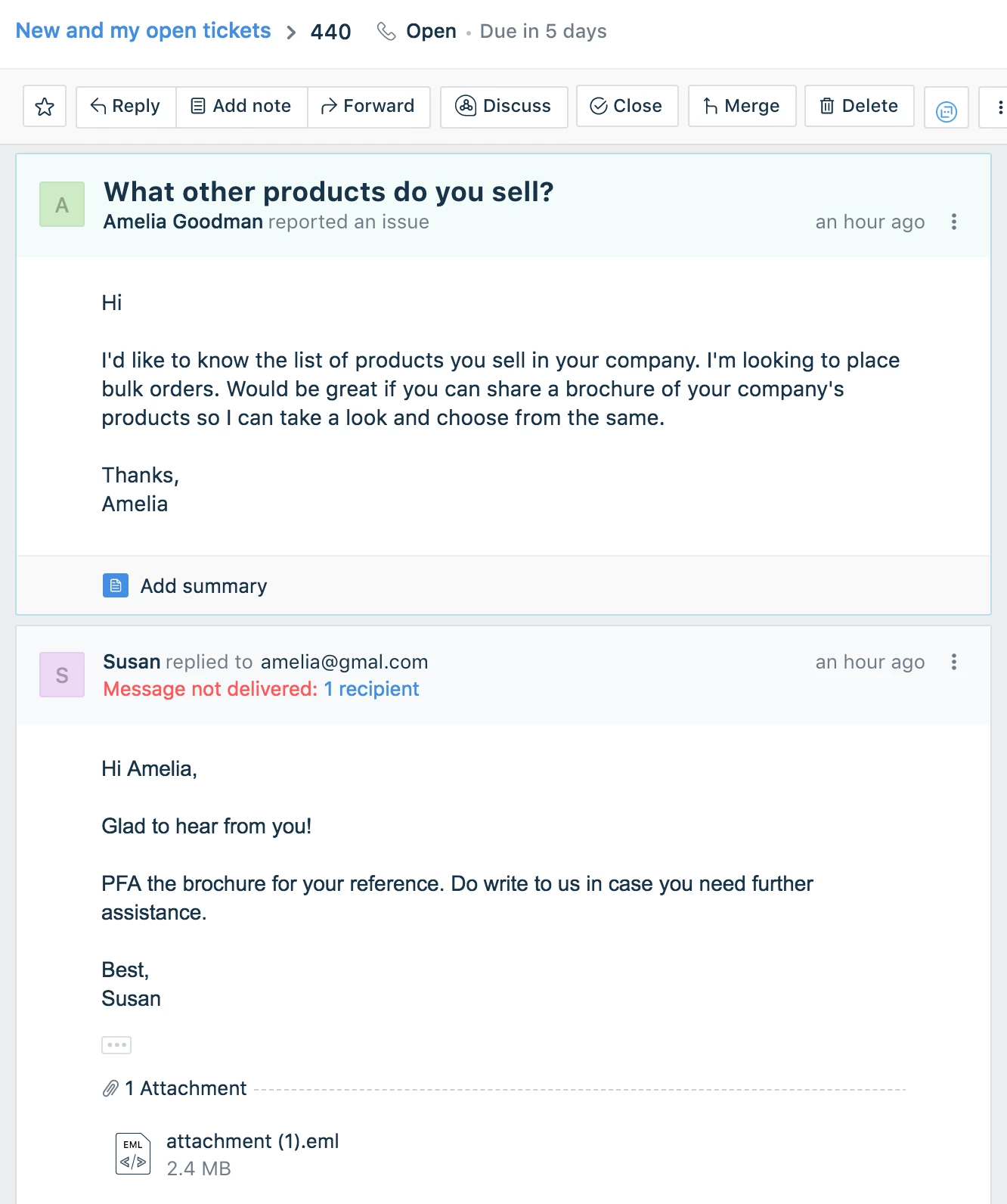
We've also included the email delivery failure notification so that in case of delivery failures, you'd be able to spot immediately and send out the response as quick as possible.


You can read more about these features in the links provided below:


1. Activities in Freshdesk

2. Email delivery failure notifications


Cheers!


  • Community Debut
  • April 8, 2020

The actions performed by automations are shown in the activity pane, not in the main ticket's pane.


So there are some emails that are sent to the customer through automations, but are not visible in the ticket (or when you export the ticket as PDF).


This is actual communication that is not visible.


It would be great if one could see those emails while reading the ticket history.


suprabha.somanathan
Community Debut

@Peter


Sounds like a fair ask!

We'll pass this on to our management team if this is something that we can come up with in the near future.


For now, you could use the Data export option inside Analytics to have all of these ticket activities exported and the same can be used to build a

custom report for easier access.Feel free to reach out to us at support@freshdesk.com for any further assistance on setting this up.


Cheers!