Closed for Voting

Observer action: Add note to ticket

Related products:Freshdesk
  • April 6, 2015
  • 12 replies
  • 52 views

I'd like to be able to add a note to the ticket via an Observer rule. 


One example I have in mind:

A customer creates a ticket with "Urgent" priority.  After discussion, the customer or agent changes priority to "Low".  The Observer rule would automatically detect the change and add a note (option of public or private) indicating the previous priority with the name of the person who set it (if it was the first time it was changed, this would be the ticket creator), as well as the new priority and the name of the person who changed it.  Adding detail could be an option, as well, to indicate why the priority was changed.

12 replies

Aaron,


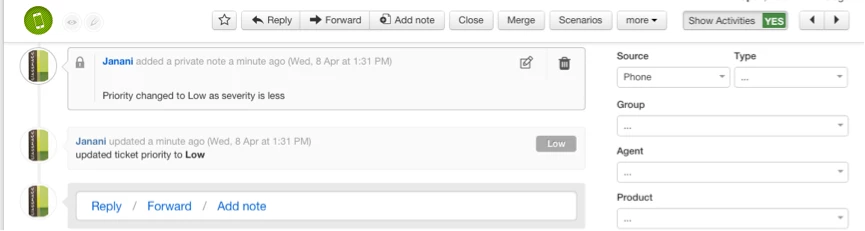
Making a note of priority change is certainly important. In case your agents manually update the priority field or execute a scenario to modify it, a log of the activity will be automatically recorded in the corresponding ticket. This update can be found from "Show Activities" button on the top right of ticket page:


Agents could optionally add a note as to why they changed the priority.  Let me know if this helps.


  • Author
  • Contributor
  • April 7, 2015

Thank you.  It wasn't very clear that the "Show Activities" toggle revealed this kind of information.  It's a step in the right direction, but doesn't completely resolve the issue for us.  We want to be able to open the ticket and at once see the complete history.  Toggling "Show Activities" on will reveal the priority and status changes, but hides messages.  Also, it can't be locked in the "Yes" position, meaning I have to assume every ticket has been adjusted, and I have to toggle it every time I check a ticket, because I won't know that anything was changed.


Aaron,


I understand your concern. You could create an observer rule to add a tag whenever priority is changed. You could then filter out these tickets from tickets tab and see the activities for each of them. Also - when you click on the individual activity which reads "<Name> replied" or "<Name> added a public note" it would automatically expand and show you the contents. 

In short you can find

1) tickets where priority was changed

2) who changed it

3) why it was changed - by clicking on the activity (just above priority change) for the private note where agent has logged the reason for priority change.


I've attached a screenshot for your reference. Do check and get back to us if you need further info, Aaron. 


showactivities_18407.png

  • Author
  • Contributor
  • April 8, 2015

I appreciate the suggestion.  I still hope that the options I mentioned can be implemented in the future, as this is still not an ideal solution.  Again, I'll have to manually switch views throughout the day to get an idea of what's been changed, and I prefer to leave my window open to the list of my, new, and unassigned tickets.


Changes to priority and status could also be detailed in the Dashboard view, as a step forward.


  • Community Debut
  • April 29, 2015

I believe you could use the webhook function inside the Observer actions to call the Freshdesk API and create a note inse the ticket being watched.


  • Author
  • Contributor
  • May 4, 2015

Thanks, Jean-Baptiste.  I'll look into that.


  • Contributor
  • May 21, 2015

This is thread ties right into what I am trying to do on our end.  PUT the latest private note into a customer field called "Resolution Summary".  I have worked with two different reps that have provided me peaces of information that does not work.


The following is the advance code that I am using that does not work; however, the tag is working, so that tells me that there is either something wrong with the callback URL or the PUT code itself;


{"helpdesk_ticket": {"custom_field": {"ticket_summary_181239": "{{ticket.latest_private_comment}}" }}}


Callback URL:  https://wpdmatrixsolutions.freshdesk.com/helpdesk/tickets/{{ticket.id}}


To this point, no help agent has mention  if the above requires authentication or not.  Need some guidance here, and thank you in advance.


Forum|alt.badge.img+1
  • Apprentice
  • December 11, 2015

 I would also like this functionality to trigger private note from an observer rule.  Did anyone manage to get this working or can a freshdesk rep. share the  recipe for doing it?


Cheers!


aravind.sundararajan
Skilled Expert
Forum|alt.badge.img+12

Folks,


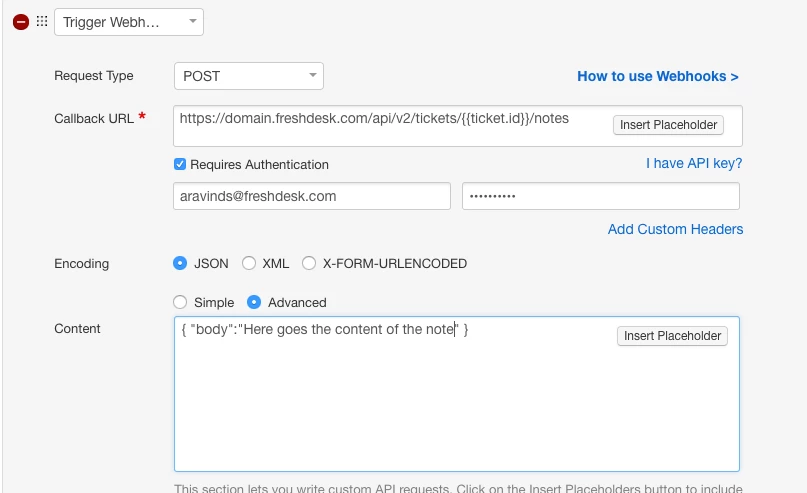
Here's the setup that you can emulate to add a private note using an Observer rule. 


Action : Trigger Webhook


Request type : POST


Callback URL : yourcompany.freshdesk.com/api/v2/tickets/{{ticket.id}}/notes


Encoding : JSON ( advanced )


Content : { "body":"Here goes the content of the note" }


image


Cheers!


How do I pull data from Fedex.com from a tracking number?  Is it a GET?  I need to send the data to the website and pull the data from the tracking number.  Is this possible?


aravind.sundararajan
Skilled Expert
Forum|alt.badge.img+12

Hello Travis,


There are couple of ways through which this can be achieved. 


1. Use the observer rule to send the ticket data {{ticket.id}} to fedex system and then trigger an api call back to Freshdesk with the required data to update the ticket using Update a ticket API


2. Create a custom app to send the data to fedex system and simultaneously fetch the required data and display it on the ticket page 


Since Fedex supports REST API, the custom app solution should be feasible. In case if you're wondering how to go about this, please let us know. We have trusted app partners with expertise in creating apps for Freshdesk as a professional service.


Cheers!


geebranz
  • March 9, 2021

Thanks for the help fixing this issue, admin!


spokane real estate market