New Idea

Pre-select contacts based on company

Related products:Freshdesk
  • June 22, 2023
  • 8 replies
  • 98 views

Forum|alt.badge.img+1

When we’re sending a new email to a company, we always need to separately go through the contacts tab first and find which contacts are associated with said company before sending the email, this is a error prone activity as we keep on expanding and several companies start to have contacts with similar / equal names, which makes it easier for a mistake to happen and send an email to the wrong contact/company.
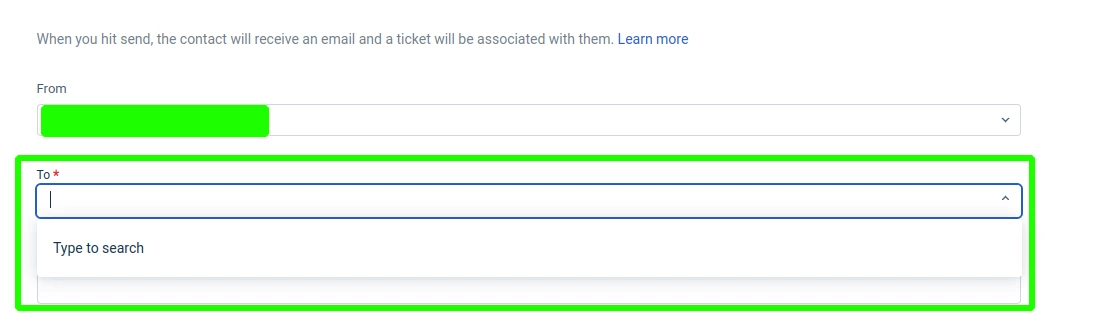


Our idea would be for us to be able to send emails to a company instead of individual contacts, the contacts associated with the company would be defined by ourselves in the respective company page within the companies tab.


Currently we would do this:

From - us@us.com

To - contact1@company1.com, contact2@company1.com, contact3@company1.com 


Our suggestion would be this:

From - us@us.com

To - Company1 (selecting the company will automatically fill in the contacts)

8 replies

If you're looking to pre-select contacts based on the company they work for, you can follow these general steps:

  1. Gather contact information: Collect a list of contacts along with their respective companies. This information can be obtained from various sources such as your address book, CRM system, email contacts, or other databases.

  2. Identify the target company: Determine the specific company you want to focus on.

  3. Filter contacts: Use the available tools or software to filter your contacts based on the target company. You can manually search and select contacts associated with that company, or use search and filter functions within your contact management system or email client to streamline the process.

  4. Create a contact list: Once you have filtered the contacts, create a new contact list or group specifically for the selected company. This will help you organize and manage the contacts more efficiently.

  5. Review and verify: Take a moment to review the selected contacts and ensure they are indeed associated with the target company. Double-check for accuracy and make any necessary adjustments.

By following these steps, you can pre-select contacts based on the company they work for, allowing you to focus on relevant individuals when needed. The specific process may vary depending on the tools or systems you are using to manage your contacts.


Forum|alt.badge.img+1
  • Author
  • Apprentice
  • June 22, 2023

If you're looking to pre-select contacts based on the company they work for, you can follow these general steps:

  1. Gather contact information: Collect a list of contacts along with their respective companies. This information can be obtained from various sources such as your address book, CRM system, email contacts, or other databases.

  2. Identify the target company: Determine the specific company you want to focus on.

  3. Filter contacts: Use the available tools or software to filter your contacts based on the target company. You can manually search and select contacts associated with that company, or use search and filter functions within your contact management system or email client to streamline the process.

  4. Create a contact list: Once you have filtered the contacts, create a new contact list or group specifically for the selected company. This will help you organize and manage the contacts more efficiently.

  5. Review and verify: Take a moment to review the selected contacts and ensure they are indeed associated with the target company. Double-check for accuracy and make any necessary adjustments.

By following these steps, you can pre-select contacts based on the company they work for, allowing you to focus on relevant individuals when needed. The specific process may vary depending on the tools or systems you are using to manage your contacts.


I believe that this doesn’t tackle my request, we have the right contacts on our side, we’re just looking to simplify the process to reach out to them (e.g., I know I want to reach out to Company1, but now I need to look for the contacts associated with that company instead of typing Company1 in the “To” field).

Instead of manually looking for that information every time we create a new email (which happens a number of times on a daily basis), we want to make it more straightforward.


Forum|alt.badge.img+1
  • Contributor
  • June 22, 2023

I think this would be very beneficial when you need to raise a ticket on behalf of a company. currently you can not search it, instead you have to remember the contact that belongs to that company or open another tab and search in a separate window.

I believe a simple way would be when creating a ticket to have the option to search by company or by contact.


Forum|alt.badge.img+1
  • Contributor
  • August 3, 2023

I believe a implementation for this could be as simple as having a dropdown in ´New email´and ´New ticket´ where you select which company and then it displays the correct contacts within that company


Forum|alt.badge.img+1
  • Contributor
  • August 3, 2023

For example our clients have multiple stores, each stores we categorized it as a company in Freshdesk

Acme - United Kingdom
Acme - Spain
Acme - Italy
Acme - Germany

  • The challenge is that all the contacts have same domain email address acme.com
  • When sending an email or creating a ticket on their behalf, it is impossible to know what person belongs to each company.
  • Manually search on another tab the right contact on that company and then search for their email

SOHO
Community Debut
  • Community Debut
  • August 3, 2023

I believe a implementation for this could be as simple as having a dropdown in ´New email´and ´New ticket´ where you select which company and then it displays the correct contacts within that company

I fully Agree with ATIN. We really need an easy way to send email to the correct group at our clients. The current way is very time consuming and often we choose the wrong people at a client side because it is not clear based on their position. Means having several groups of contacts within one client side would also help to inform the correct contacts.

There are also a few contacts which are assigned to multible client sites which needs to be considered in grouping contacts.


  • Community Debut
  • August 3, 2023

Thats totally what we need here. Thanks for bringing that up!


I fully agree with he suggestions above. This would save us so much time when having to send out email to all of our clients as well as to the right people.