Closed for Voting

Prepopulate fields from Querystring

Related products:Freshdesk
  • February 18, 2015
  • 11 replies
  • 69 views

We would like to add support-links to our products, that prepopulates the different fields with information from the querystring.


I saw a solution stating that you can do this with the widgets, but I would like this feature for the regular portal aswell.


11 replies

Hey Chris,


Nice to see your post today !


This can be done via portal customization and I will convert this topic to a ticket so that I would be able to assist you better.


Regards,

Durga


  • Contributor
  • December 9, 2015

Any chance we can get the solution here.? This is something I am interested in as well. I found this thread via google.


  • Community Debut
  • September 7, 2017

I am very interested in this as well.  We need to be able to create a ticket from a contact, and I can't find any way to prefill the requesterid.

We don't want to use the Portal, this is for INTERNAL ticketing.


aravind.sundararajan
Skilled Expert
Forum|alt.badge.img+12

Hello,


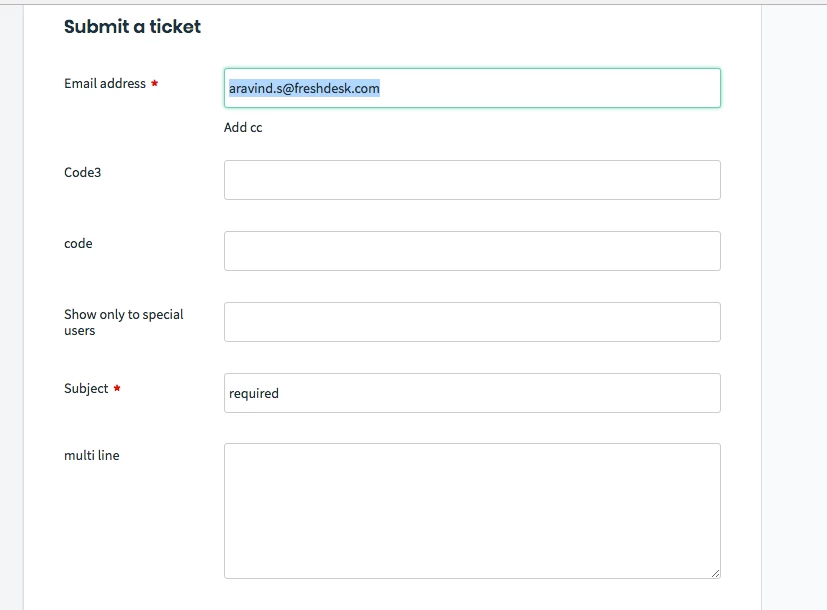
It is possible to pass values to the ticket form using the portal customisation feature available on the Estate plan. The below script demonstrates the code to preset the subject field value as "required". This is how it looks like on the new ticket form when the user navigates from a specific link. The link in this case has been constructed to set the type value in the url as "test". ie. https://mycompany.freshdesk.com/support/tickets/new?type=test


<script>

jQuery(document).ready(function(){

  function getParameterByName(name) { // default code to be added to the newticketpage
      name = name.replace(/[\[]/, "\\\[").replace(/[\]]/, "\\\]");
      var regex = new RegExp("[\\?&amp;amp;]" + name + "=([^&amp;amp;#]*)"),
          results = regex.exec(location.search);
      return results == null ? "" : decodeURIComponent(results[1].replace(/\+/g, " "));
    } 

  
  var type_form = getParameterByName('type');
 
                   if(type_form == "test") // custom value here is set as "test"
  {
    jQuery('#helpdesk_ticket_subject').val("required"); // pre-populating the subject value

                       
  }


});
</script>


Cheers!


  • Community Debut
  • September 17, 2018

Can you provide more details for this?  I attempted to add the script and was able to get the url to post the correct "type", but it seems to interfere with dynamic field population.  The dynamic fields do not load.


aravind.sundararajan
Skilled Expert
Forum|alt.badge.img+12

@Chase You can add a onchange() trigger to mimic the mouse click to select the type option. Please add this code to the existing script to get this working:


jQuery('#helpdesk_ticket_ticket_type').change();


Cheers!


  • Community Debut
  • September 21, 2018

This is still not working.  Can you include the entire script that should be used?  


aravind.sundararajan
Skilled Expert
Forum|alt.badge.img+12

Hello Chase,


Here's the complete script that can be used to auto-fill the type field and also mimic the click to display relevant dynamic sections.


<script>

jQuery(document).ready(function(){

  function getParameterByName(name) { // default code to be added to the newticketpage
      name = name.replace(/[\[]/, "\\\[").replace(/[\]]/, "\\\]");
      var regex = new RegExp("[\\?&amp;amp;]" + name + "=([^&amp;amp;#]*)"),
          results = regex.exec(location.search);
      return results == null ? "" : decodeURIComponent(results[1].replace(/\+/g, " "));
    } 

  
  var type_form = getParameterByName('type');
 
                   if(type_form == "test") // custom value here is set as "test"
  {
    jQuery('#helpdesk_ticket_ticket_type').val("Test");
    jQuery('#helpdesk_ticket_ticket_type').change(); // mimicking the type value change

                       
  }


});
</script>


  • Apprentice
  • January 15, 2020

Will I be able to use this code to prefill the username's first and last name? 


  • Community Debut
  • February 6, 2020

We have a similar question

Any updates on how to might be able to pre-populate a Service Request using URL parameter(s).

Thanks, Patrick


Hi Victoria & Patrick,


Yes, you can make use of this code to prefill any values present in your ticket form. 

Cheers!