Closed for Voting

Prevent Auto-Responder Wars

Related products:Freshdesk
  • February 16, 2012
  • 53 replies
  • 164 views

Show first post

53 replies

  • Community Debut
  • November 18, 2016

I am also having this problem. Making a Dispatch'r rule may work, but it is not ideal.  Has there been any success with this yet?


  • Community Debut
  • January 6, 2017

Any update on this yet?


  • Community Debut
  • April 20, 2017

We have this issue now. It occurs particularly when we pass on a request to another department using another ticket system (Both samanage and kayako). 

Kayako has ways to filter out mail from freshdesk or repetitive mail. 


Can freshdesk do this? 


The way most ticket systems do this is to have a signature in response mails and if they come back in a response from another system, no notifications are sent in return. 


Please fix. 


  • Contributor
  • June 9, 2017

We also just had this. I had to delete 100's of mails and thankfully I was there to turn off our auto-reply. Freshdesk please do something about this?!


  • Contributor
  • June 20, 2017

What's the status of this, Freshdesk?


  • Community Debut
  • July 12, 2017

I am having a problem with this as well.  In this case with the Microsoft Office365 automated support system.   I can't see a way to break the loop on this myself.  It looks as though I'm getting a new ticket created once every hour.  It's not impacting any of my customers at this time, but it is incredibly annoying.


  • Community Debut
  • August 8, 2017

FRESHDESK SUPPORT!!!  PAY ATTENTION!  This issue has been going for 5 YEARS!  Where is the fix?  For a customer service platform company, this is VERY bad customer service.  What the hell are you doing?


  • Community Debut
  • August 8, 2017

If I can add, Kayako (Another Issue Tracker) had this feature support already 7+ years ago. And Kayako was much cheaper then. Now they have been acquired by Atlassian. Please discuss if you are unsure how best to implement this and want input on how this can be designed to work well. 


  • Contributor
  • August 9, 2017

I'm pretty sure this has already been fixed years ago by Freshdesk, but every now & then an auto-reply is simply not recognized. We have used FD for years and with many thousands tickets, only had this problem once.


aravind.sundararajan
Skilled Expert
Forum|alt.badge.img+12

Hi,


First, my apologies for the lack of updates on this thread. Community forums have never been our forte but we're trying to actively engage and improve our presence here. 


To begin with, we've implemented suppression mechanisms for new ticket notifications wherein we would suppress the notification in case if the incoming email has the following tags in the original headers :


Auto-Submitted: Auto-
Precedence: auto_reply
Precedence: (bulk|junk)


The behaviour of the out of office emails differ with the clients ( Gmail triggers a new email as opposed to outlook web client which sends a response to the email retaining the references ) but the auto-responders will bear either of these tags and subsequently , the new ticket notifications would be suppressed. This should be the same case with majority of the ticketing systems ( emails generated as automatic notifications bear these tags ) .


In addition to this, you can also configure a dispatchr rule to automatically skip new ticket notifications for specific emails. You can make use of the condition Subject or Description contains and add several keywords ( Out of office, OOO , etc ) .


In case if you're facing auto-responder spams or looping of emails, please drop us a note here . We would like to hear from you and connect individually to see how we can solve the issue.


Cheers!


  • Contributor
  • September 19, 2017

Hi,


When were these checks added so I can check we haven't seen the issue since??


And they stop the new ticket notification or a new ticket in the first place?


Thanks


Dan


aravind.sundararajan
Skilled Expert
Forum|alt.badge.img+12

Hello Dan,


These checks have been there for more than 3 years now . If the new incoming email has any of these tags, freshdesk would stop sending the new ticket notifications , thus preventing the mass creation of tickets .


Cheers!


  • Community Debut
  • September 25, 2017

We are having this issue as well with our website host. The started using Salesforce and now we are having hundreds of tickets created when they send anything to us. I tried using the Dispatchr to stop it but it didn't work. I add all of the addresses that they send from but there is no option to select that stops an auto reply. Any help is appreciated. 


aravind.sundararajan
Skilled Expert
Forum|alt.badge.img+12

@Jason: I've emailed you separately to keep track of this issue. I would like to deep dive into this case and see how well we can handle it in Freshdesk.


Cheers!


  • Community Debut
  • September 25, 2017

Thank you Aravind. Email received. 


aravind.sundararajan
Skilled Expert
Forum|alt.badge.img+12

Thanks,Jason. I've emailed you back with the reason for the spam emails in the helpdesk.


Brief for other users : 


The reason why those emails were sent new ticket notifications is because they didn't have a proper tag in the email header indicating that it is a system generated email. Because of this, Freshdesk considered it to be legitimate sender and started triggering the new ticket notifications for every incoming email.


How to avoid this ? In General, helpdesk systems follow the email standards to set the tags to indicate an auto-response . In specific cases like this where the standards aren't followed, we can use the Dispatchr rule to skip new ticket notifications for specific contacts/ emails with specific keywords


Cheers!


  • Contributor
  • December 29, 2017

As a fall back to the Dispatch'r I rule with keywords, can we somehow make a rule so that if 3 tickets get created with exactly the same Subject and body i the email within 30 seconds to stop responding or something?


  • Community Debut
  • April 6, 2018
Issue still happening. Still cleaning up 1000+ tickets that populated this morning due to auto-responder from a client's help desk. We sent them a notice about a report error and their help desk sent a reply, our FD then created a new ticket and sent a reply, their help desk then sent back the same exact message, which created a new ticket in FD and thus the vicious cycle continued until I blocked the client's contact. Simple pattern matching on new tickets should work to not keep creating tickets from repeated identical emails. If [incoming message] = [previous message] and time < 1 minute, don't create ticket or add incoming as message on original ticket to contain the problem.


aravind.sundararajan
Skilled Expert
Forum|alt.badge.img+12

Hello Colin & Guyhanes,


Freshdesk doesn't send email notifications for tickets that are deleted or sent by a deleted contact. Perhaps, we can use this behaviour to create an app that would automatically delete tickets if the recently created ticket has the same subject.


You can create a serverless app that would run on the background to perform the ticket deletion. Here's how you can set this up:


1. Create a serverless app to listen for ticket creation events - Refer documentation here


2. The app would obtain the ticket requester information and use List all tickets API to fetch the recently created tickets of the contact


3. You can include a condition to check if the ticket subject is identical and then invoke Delete a ticket api if the condition is true


This way, the automated notifications from the 3rd party can be identified and the ticket carrying the automated message would be deleted, thus preventing further message loops.


Cheers!


  • Community Debut
  • July 25, 2018

We are experiencing the same issue. Please contact me!


  • Community Debut
  • September 12, 2018

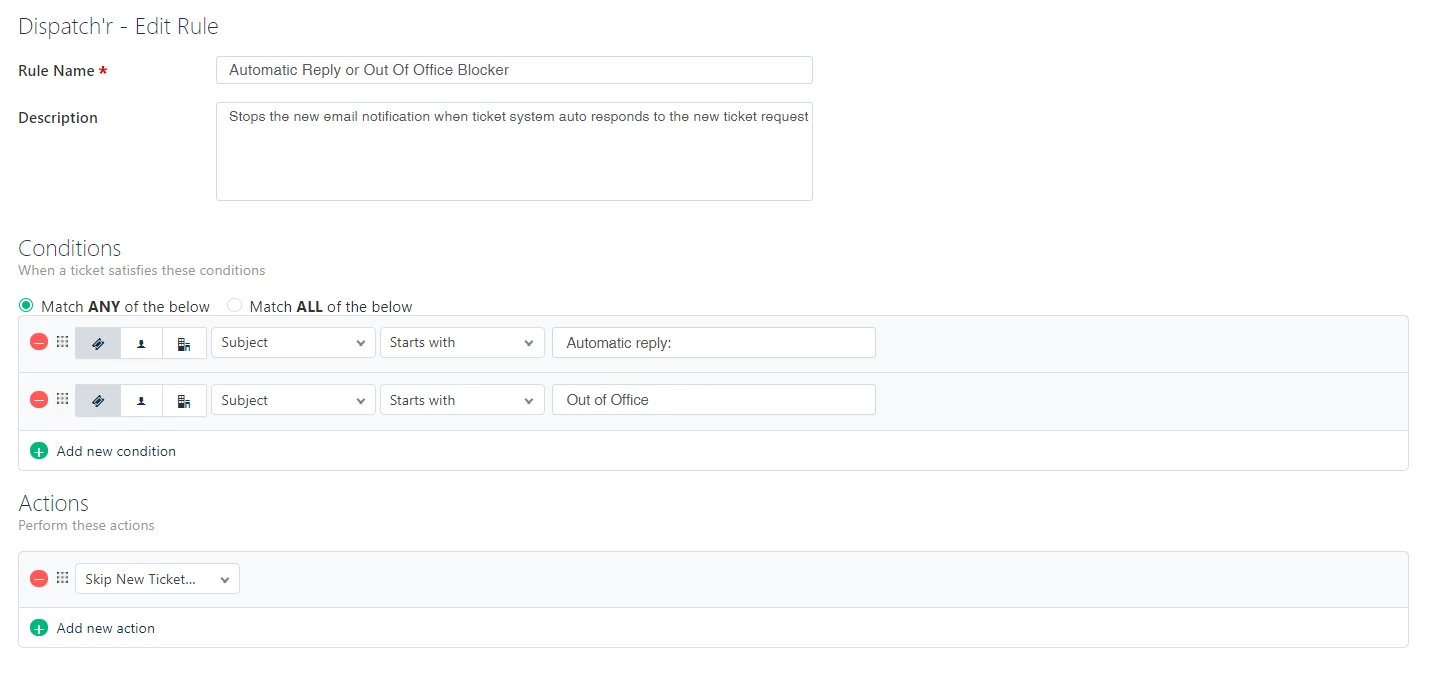
I you setup a dispatch'r rule like below would that not stop this?


image


  • Community Debut
  • September 13, 2018

New user here.  I've seen several similar posts.  Some say the action should be "Skip New Ticket Email Notifications"  others say to use "Delete The Ticket".  Can someone give me a use case of why you would want to use one vs. the other?


  • Community Debut
  • September 14, 2018

Skip new ticket would still give you a ticket with the out of office message so you know vs deleting it would go to deleted and not obvious.


I found the better way for us was to put a filter on our email box for our tickets and forward to a non ticket email group that you are a member of and then delete the email from the inbox (as part of the filter). That way it never get's into the ticket system and saves on another issue that if the ticket requester has out of office on and you reply to the ticket you get the out of office message in the ticket but all your cc users are now dropped from any replies (Until you or the requester re add them)


  • Community Debut
  • September 13, 2019

I have this problem today. How to I fix? 

I had to disable my autoresponder!


Same here. About 2000 mails. Freshdesk, what do we do?