Closed for Voting

Printing Solutions

Related products:Freshdesk
  • March 28, 2014
  • 13 replies
  • 50 views

Hi Guys,

Apologies if this has already been logged but I couldn't find it.


Would it be possible to add printing to the solutions page? A "download as pdf" link would be great as well.


I just find that quite often I need a solution document when I'm away from the computer or network and printing is a pain as you have to select the solution text or it will add a lot of garbage to the top of the printout which is all the header information.


Cheers,


Pete

13 replies

  • Community Debut
  • June 11, 2014

Pete I am after the same sort of thing. A decent print stylesheet would do (then we can print to a pdf printer)

Freshdesk:


Can you at least let us add print media queries within the stylesheet (for those of us on Estate plans).

Currently the customer portal inserts html like this:

<link href="/support/theme.css?v=1402489435" media="screen" rel="stylesheet" type="text/css">

If you remove the media="screen" bit then it will use our style sheet for printing and will allow me to add media specific queries such as:

@media print

{

.header-menu, .header-menu *

{

display: none !important;

}

}


Currently we cannot do this as when printing it does not use our stylesheet. This would also allow us to apply our own custom styles when printing, currently these are missing.


Regards

Craig


  • Community Debut
  • June 11, 2014

For anybody lurking here I have found a partial solution/hack.


Place this snippet of code into your page_layout:

<script type="text/javascript">
  jQuery(document).ready(function(){
    jQuery('head link[rel=stylesheet]').removeAttr('media');
  })
</script>

This will remove the media attribute from all the link tags. Now your own custom stylesheet will be used for both screen & print.


If you are using the Freshdesk theme then this will do a good job of removing most stuff you wont want printed:


@media print
{    
    .header-menu, #sticky_head, .breadcrumbs, .sidebar, .article-vote, .footer-area, #fc_chat_layout, #vote-feedback-container
    {
        display: none !important;
    }
}

Of course you will need to modify this to get the result you want and depending upon the theme you are using and/or how much you have modified.


This works in chrome and Firefox. But does not work in IE, IE has already read the stylesheet before Jquery has a chance to remove the attribute.


So still await a permanent solution from Freshdesk.


sajesh.krishnadas
Contributor
Forum|alt.badge.img+6

Now we have the option to export/print Knowledge Base articles as PDF with 'Print this Article' option. 


Regards,

Sajesh


  • Community Debut
  • November 7, 2014

Thanks Sajesh,


How do I add this function to my theme? I cannot find any documentation or a theme with this function.


Regards

Craig


  • Author
  • Apprentice
  • November 8, 2014

Hi Sajesh,


I actually stumbled onto this about a day or two before your post! Fantastic to see :)


Regards,


Pete


sajesh.krishnadas
Contributor
Forum|alt.badge.img+6

Craig,

I think you would have customized your portal because of which the function isn't available by default. You can add the below code to get it working:


1. Go to Admin -> Helpdesk Rebranding (under General Settings)

2. Click on 'Customize portal' at the bottom

3. Click 'Portal pages' under the 'Layout & pages' tab and select 'Article view' page

4. Add the below code <a> tag inside the <h2> tag as show below:


<h2 class="heading">{{ article.title | h}}<a href="javascript:print();" class="icon-print solution-print-icon" title="{% translate portal.print_title %}"></a>

 </h2>


Kindly confirm whether it works. Thanks. 


Pete,

Thanks for the smiles :)


  • Community Debut
  • August 18, 2015

Sajesh,


We have some users that see the print button and others that do not.  Could you help us determine why that would be?  I tried to follow the instructions you provided but our account does not seem to have that layout option.  


-James


sajesh.krishnadas
Contributor
Forum|alt.badge.img+6

James,


Kindly excuse the delayed response. Regarding the print button visible to only few users, it is not supposed to be the actual behaviour. We looked into your account, it seems to be working fine as we could see the print button in your portal. Can you kindly confirm whether you are referring to agents as other users?


  • Community Debut
  • August 27, 2015

Yes-- I am referring to agents.  Some agents do not see the Print option.


sajesh.krishnadas
Contributor
Forum|alt.badge.img+6

James, please note that the print button option will not be available in the agent-side helpdesk, it will be available only in the customer portal side. When we looked in your customer portal, the print option was available. 


  • Community Debut
  • August 27, 2015

I see it in my agent side portal (perhaps because I am admin?) but other do not.


sajesh.krishnadas
Contributor
Forum|alt.badge.img+6

James, that is not the usual behaviour. It would be really great if you can raise a support ticket so we can look into it further and assist you. Thanks!


  • Community Debut
  • October 5, 2020

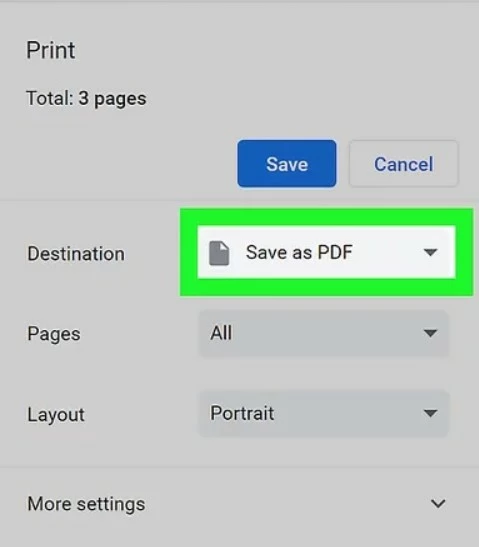
Guys, This option isn't needed to save any web page in PDF format. Most of the browsers now a days having option if you don't have printer you can easily save them to pdf format by pressing Ctrl+P button. 


image