


When sending a mail (either via the default e-mail notifications or via a node in a workflow) and using Placeholders in those mails, the text font is very weird for the text provided by the placeholders (it least if you use Outlook as mail client).
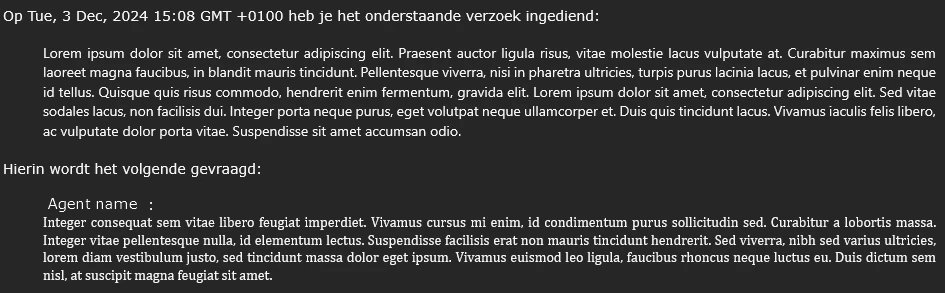
The first indented text is the ticket description and the second indented text is the latest public comment.
Nowhere in FreshService is a specific font set, even under the E-mailnotifications it says “Default font”, so why does each text area have their own font?
In an attempt to have all text in a mail set to a specific font I've tried:
- Setting the font in E-mailnotification in the admin panel
- Edited the mail in the HTML editor and set the code below in each <p>, <div> and <span> tag
style="font-family: Verdana;"
But still it comes out as pictured above. I'm no perfectionist and if the font it would come out as in the mail would seem similar to Verdana I would be fine with it, but this just looks absolutely atrocious.
I've already raised a support ticket with FreshWorks for this and I got this as a reply:
Thank you for reaching out regarding the font family issue in your HTML email sent through the workflow.
Our developers have confirmed that the description field in Freshservice uses a rich text editor, which comes with its own HTML properties and inline styles.
Unfortunately, this means that it is not possible to impose a specific font family (like Verdana) for the description placeholder content. The rich text editor applies its own inline styles, which can be seen in the ticket details page as well.
Sorry for not being much of a help here.
I understand the reply, but I just can’t leave it at this.
I have three possible solutions (of which the last is least favourable):
-
When sending an e-mail from a FreshWorks Product using Placeholders, allow the font in the placeholder to be ignored and use the font defined in the e-maileditor. Font colour, bold, underline, italic and such should remain.
-
Allow admins to disable different fonts in text area in their forms. Again, font colour, bold, italic and such should still be available.
-
Allow admins to disable rich text formatting entirely. This is least favourable, but there will at least be uniformity in communication.
