Closed for Voting

Reply email options

Related products:Freshdesk
  • August 7, 2011
  • 6 replies
  • 57 views

It would be nice to have a way of having a personalized response email from each agent. So if someone sends to support@acme.freshdesk.com I can reply as john@acme.freshdesk.com. Maybe even a way of having it for your own domain eg sent to support@acme.com and reply from John@acme.com - where I would set up John@acme.com to forward to support@acme.freshdesk or john@acme.freshdesk.com Thanks

6 replies

  • Contributor
  • April 22, 2012
If you keep the email address the same (ie support@acme.freshdesk.com) but add the agents name then it will look like it came from the Agent in there outlook or gmail or hotmail account but when they hit reply it will go back to the support desk not the personal inbox of the Agent.
You don't want to have agents receiving company support requests in the personal inboxes, it becomes a support nightmare when people leave or are on leave.


  • Apprentice
  • May 10, 2012
You could create a rule that forwards incoming emails sent to john@acme.com to john's group or his own individual assigned tickets... but I do agree this becomes a nightmare should an agent be absent - or where you get those irritating customers.

  • Contributor
  • August 13, 2012
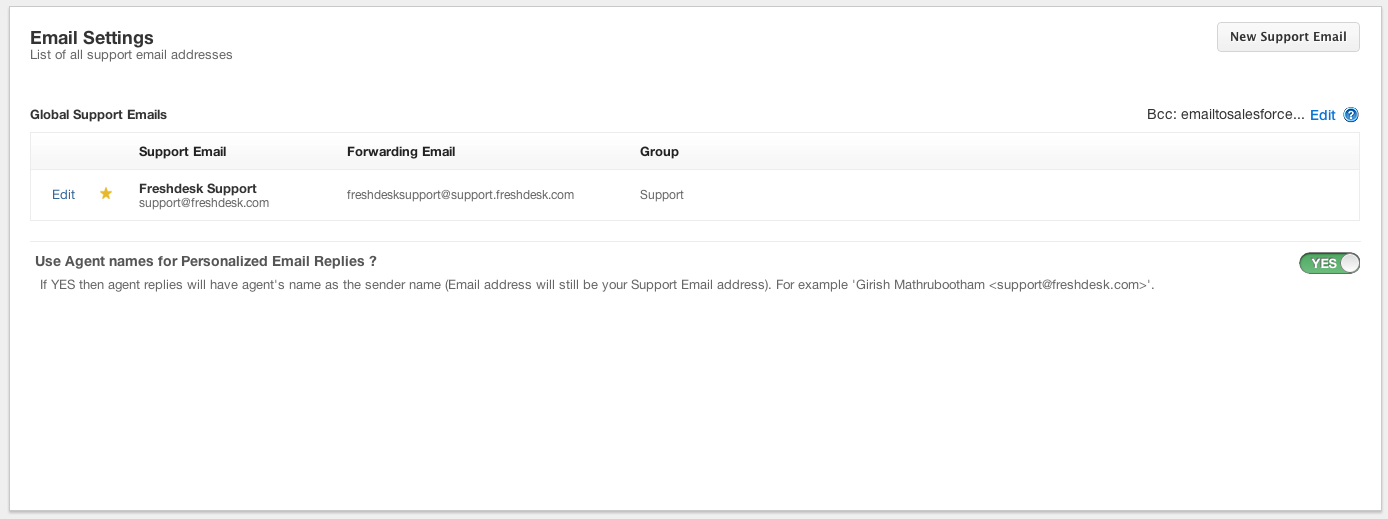
This feature has been released on Saturday. You now have the option to configure outgoing agent replies with the agent name. The email address (and Reply-To address) will still be your support email address. You can customize this under Admin -> Email Settings. Please see screenshot below
Screen Shot 2012-08-13 at 9.26.14 PM.png

  • Community Debut
  • October 5, 2016

It would be nice to have an option for agent/admin to either reply as a general person (support@FreshDesk.com) OR personally (JohnDoe@FreshDesk.com). It seems like there is an all or nothing feature. As an admin with many other roles in my organization, I don't always want to use my name because then the support requesters start emailing me directly!


  • Community Debut
  • June 9, 2020

Is it possible to have this same functionality in the automations? We have multiple portals and each portal has a different email address to send to for ticket creation. Because of the multiple portals, we cannot use the default email notification for "New ticket created". We have to create rules in automations with the customized messages for each portal. In the action section of the rule, "Send email to requester", it does not allow us to change the "Reply-to address". Can this be added? I will submit a ticket to see if there is a workaround available.


geebranz
  • March 9, 2021

It’s actually working just fine


couples counseling pensaolca fl