Closed for Voting

Reply/ Forward but do not include correspondance.

Related products:Freshdesk
  • February 24, 2016
  • 3 replies
  • 36 views

 It would be nice to have a  converse button ,


Dependant on the final arrival of parent and child  this might solve my problem


What I would like is a reply button that did not include the content of the orginal mail  and subsequent conversations as we might have happened.

Sometimes we have gone off topic and I do  not need to send the earlier conversations, particularly where the users have included multiple screen shoots.  I have to click reply to the mail then delete out all the old text.

Basically I  the ticket to hold the new correspondence  but the email out not to include the original conversations.



3 replies

aravind.sundararajan
Skilled Expert
Forum|alt.badge.img+12

Hello,


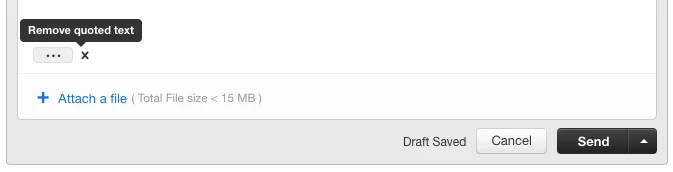
You can remove the clutter and send a clean reply to your customers by simply removing the quoted text. 


You simply need to hover on top of the quoted text icon and click on the 'x' or 'Remove quoted text' option (as shown below).


image


Cheers!


  • Community Debut
  • March 29, 2019

Is there any way to automatically "remove quoted text", rather than having to click the x on *every single response*?


hemanth.ramya
Community Manager
Forum|alt.badge.img+9
  • Community Manager
  • April 15, 2020

Hi Vlad,


Have you tried making use of the Freshworks Marketplace app: Remove Quoted text for this? By using this app, the quoted text in the reply of an agent would be automatically removed so that you don't have to worry about it every single time. 


Check out this link for detailed insights on the app:

https://www.freshworks.com/apps/freshdesk/remove_quoted_text 


Simple integration with Freshdesk, navigate to Admin -> Apps -> Get more Apps -> Remove Quoted text -> Install.


Hope this helps. Cheers!