Closed for Voting

Reporting for All Customers

Related products:Freshdesk
  • February 14, 2015
  • 3 replies
  • 18 views

 I was shocked when I discovered this.


I can't run a report for all of my customers at once!


Reports are only available for one company at a time?!?


-----

Here is my situation:

-----

We are a school district, and we have four school buildings.

I am using the "Company" field to assign "Customers" (teachers) to their buildings.


Because I can only run one "company" at a time, I can't perform any analysis on the entire school district?!?


PS Don't tell me to export all of my tickets and create pivot tables in Excel

3 replies

  • Contributor
  • July 16, 2015

This could explain why my reporting seems so off... Is this true?!?!  If so this needs to be addressed. 


  • Contributor
  • December 26, 2018

I'd like to +1 this need.  We are migrating from Kayako to FreshDesk and Kayako offeres extensive, SQL-based reporting.  We know that reporting was a weak spot for FreshDesk, but I would expect that you would allow a FreshDesk customer to report on any data in FreshDesk.  Since Companies and Contacts are separate, it's foreseeable that your customers will want/need to report on Companies and Contacts.  We can't.


I tried the scheduling approach, selecting only Company fields and found that at least one ticket field.  I would accept exporting company data to Excel, if this was an option.


suprabha.somanathan
Community Debut

Hey Folks!


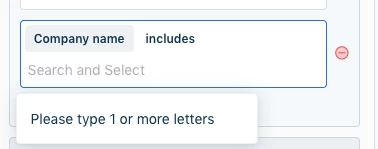
There sure is an option with us to include as many company names as you desire in the filters of a widget on a report in the new Analytics module of Freshdesk.

Depicted in the screenshot below - 


image


Hope this helps!