Closed for Voting

Reports - Filter by Team/Group?

Related products:Freshdesk
  • July 26, 2016
  • 14 replies
  • 36 views

We use Freshdesk to track helpdesk tickets as well as higher-tier technical issues.  The latter severely skews things like first call resolution.  I would like to be able to filter by group so that I could only show helpdesk tickets.

14 replies

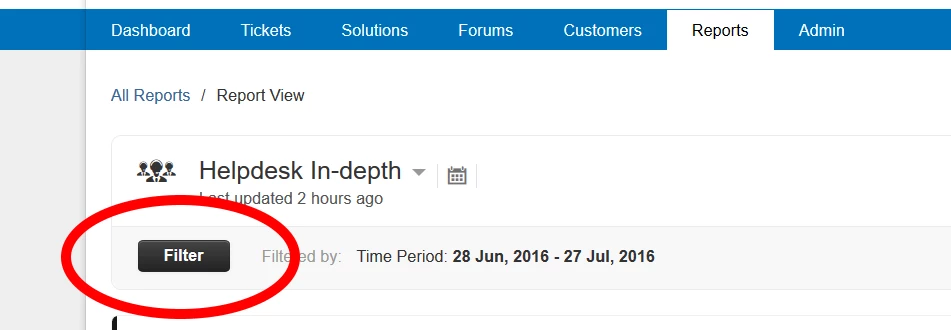
The reporting features depend on the Plan. Our test account ( free Sprout plan ) has absolutely minimal reporting but our regular account ( Estate plan ) has detailed reporting and many useful features, including filters. Two of the nicest features are the Helpdesk In-depth report and the ability to save your customized reports, which, according to https://freshdesk.com/helpdesk-features, are available from the Blossom plan and up.


  • Author
  • Contributor
  • July 27, 2016

Thanos, thanks for the response.  The "Helpdesk In-Depth" report is the one I am talking about, sorry I didn't mention it.  The problem is, we use Freshdesk for more than "helpdesk" tracking so as I said, stats like first call resolution are distorted.  If the "Helpdesk In-Depth" report could truly reflect only our helpdesk somehow (ie, Group Filter), that would be great.


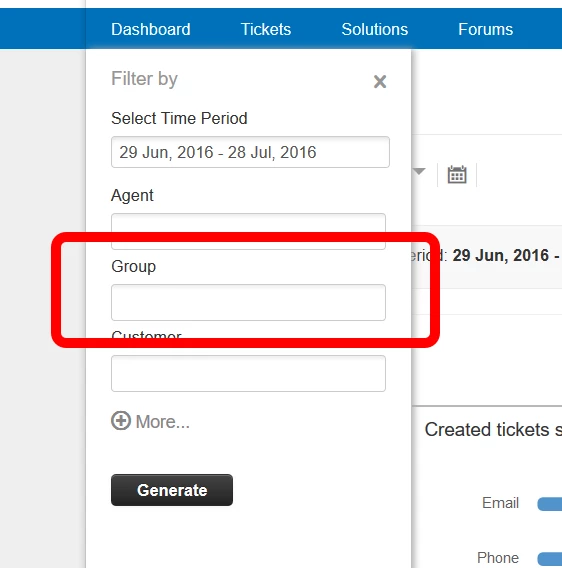
Hi scott. The "Helpdesk In-Depth" report has various filtering criteria, including by Group(s) and you can save your own custom reports. Also, from the Blossom plan and up you can schedule daily/weekly/monthly delivery of reports via email.


  • Author
  • Contributor
  • July 28, 2016

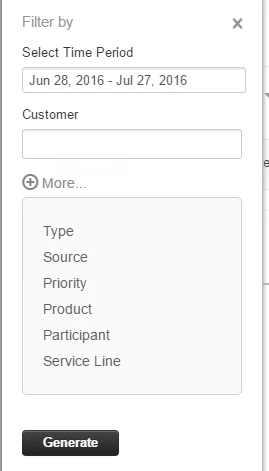
Group is not one of the options (for me).


  • Author
  • Contributor
  • July 28, 2016

There is no group option... screenshot pending moderation (sigh)


Just to make sure, you don't have the option to filter by Group(s) as in the image bellow ? ( not even under 'More...' ? )


  • Community Debut
  • July 28, 2016

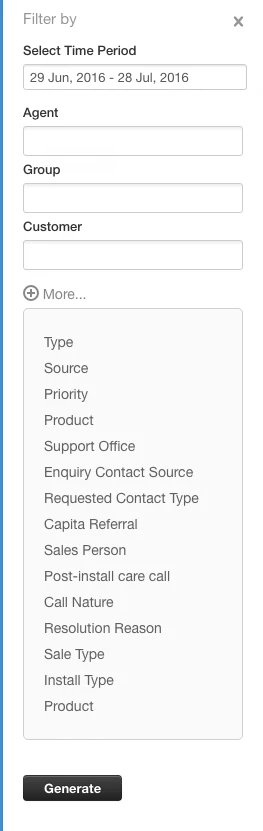
There is a group option in my filters for Helpdesk In-Depth reports and a "More" option which expands to provide more filters.  It must depend on which plan you are on, I'm on estate - which one are you running?


Scott, I believe there is one solution but it is convoluted:

1) Create a Dropdown custom ticket field ( say _Group ) with the names of your Groups as its list of Dropdown Items

2) Create as many Dispatch'r rules as you have Groups:

[ Match ALL of the below ]
[ Group ] [ Is ] [ GroupName ]
Actions
[ Set _Group as ] [ GroupName ]


Note: since only the first matching Dispatch'r rule is executed, you may have to adapt in case you already have Dispatch'r rules that set the Group ( i.e. don't create the above rule - just add the action to the existing rule )

3) Create one Observer rule for the 'None' Group and as many Observer rules as you have Groups:

When Any of these events occur
[ Group is updated ] From [ Any Group ] To [ GroupName ]
and the events are performed by [ Anyone ]
on tickets with these properties
Ticket Fileds [ Group ] [ Is ] [ GroupName ]
perform these actions
[ Set _Group as ] [ GroupName ]


Note: place these rules after any rules that change the Group

4) Create a Custom App to hide _Group from the ticket sidebar:


<script type="text/javascript">
  jQuery(document).on('sidebar_loaded', function() {
  jQuery('#helpdesk_ticket_custom_field_cf_group_859258').closest('.field').hide();
  });
</script>


What all this does is provide you with the _Group custom ticket field that mirrors the actual Group and should be available in your report filters.


  • Author
  • Contributor
  • July 29, 2016

  • Author
  • Contributor
  • July 29, 2016


  • Author
  • Contributor
  • July 29, 2016

Blossom.  Gif incoming (pending moderation)


Scott,


Group and Agent filters are not available in the Blossom plan as you would not have had Group at a glance and Agent at a glance in the older version of reports. Garden plan will allow you to:

1) filter reports by Group and Agent 

2) drill down to the list of tickets from any bar graph in Helpdesk in-depth (such as email tickets that violated resolution SLA, High priority tickets that violated first response SLA, Tickets that reopened >5 times, etc)

3) Schedule reports on daily/weekly/monthly basis to any 10 emails of your choice


Hope that clarifies things!


  • Author
  • Contributor
  • September 13, 2016

Thanks for the reply.  That's very disappointing. Unfortunately we are a non-profit with limited resources and upgrading is not an option.


  • Community Debut
  • October 5, 2017

I don't understand why the other available reports can be filtered by group, yet this is omitted from the In Depth Helpdesk report.


Why allow users on the Blossom plan to have groups if you block them from filtering by groups for reporting?


Seems illogical to me, and perhaps is a way to make your customers pay more for a very tiny feature request.