Implemented : Idea is live

Require resolutions tab to be filled out before ticket can be closed/resolved

Related products:Freshservice
  • January 29, 2024
  • 21 replies
  • 367 views

shant592
Skilled Expert
Forum|alt.badge.img+3

As part of the latest feature release, a resolutions tab was added.  However, there is no mechanism to force this box to be filled out before a ticket can be resolved or closed.  Please include this in closure rules or a business rule to be able to make this tab a required field before a closure can occur.  

April 10, 2024

Hello @Medic1334 ,

We have delivered the business rule actions to mandate resolution note field, along with other actions. You should check the actions under business rules which should have the resolution note available to act upon. 
Here’s the solution article with more details on it:
https://support.freshservice.com/en/support/solutions/articles/50000009490-resolution-note-generator?_gl=1*1q1qigy*_gcl_au*MzU2MjMyMjk1LjE3MTAzMTA3NDk.#:~:text=Hiding/Mandating/Disabling%20resolution%20note%20field%3A%C2%A0

21 replies

Forum|alt.badge.img

Hi, thanks for your feedback. This is already work in progress and will be launched in early Q2 2024.


Forum|alt.badge.img+1
  • Apprentice
  • January 30, 2024

Please can the Resolution Notes:

  • Be made searchable and filterable from the search bar. *
  • Be threaded, like normal ticket conversations so that it looks like a thread of Private Notes with the submitting agent’s name at the top. **
  • Be trackable in the Activities tab.

*We find that little bits of tacit knowledge end up in resolution notes and these have proved extremely valuable over time.

**We sometimes believe a ticket to be resolved and so submit resolution notes. The requester later responds to say that the issue is still not resolved. Threaded ‘replies’ will help to keep track of which agent has done what on a ticket, rather than replacing resolution notes which possibly contain important or relevant information.


afautley
Top Contributor ⭐
Forum|alt.badge.img+11
  • Top Contributor ⭐
  • January 31, 2024

I Agree i believe this is something completely underestimated by Freshworks, please implement asap


Forum|alt.badge.img+7
  • Top Contributor ⭐
  • January 31, 2024

And add the info to the activity’s of the ticket, if you update with a resolution, it should be logged in there also, at the moment it is not


Medic1334
Top Contributor ⭐
Forum|alt.badge.img+9
  • Top Contributor ⭐
  • February 7, 2024

The release of this was pretty terrible and not thought through.  In addition to not being able to require contents:

  • There’s no ability to use the automator to query/manipulate these fields unless you do an API call
    • The automator getting “access” to this would allow for a logic to check the contents for length as well to ensure resolution information is applicable (if contents is not >10 characters, reopen and notify agent).
  • There are no placeholders listed to be able to insert the contents into interactions
  • There is no ability to interact with this via the API
    • On release the field did not appear in API returns for tickets, but it since has been added.
  • Doesnt exist in business rules as a criteria
  • Doesnt exist in Field manager

Huge potential that should have been delayed a month to allow for at least some of the above functionality to come with it, but FS is obviously trying to drive the AI hype by releasing this when their FreddyAI stuff went off beta. Disheartening strategic choices.


Magnus Reinel
Top Contributor ⭐
Forum|alt.badge.img+4
  • Top Contributor ⭐
  • February 8, 2024

The release of this was pretty terrible and not thought through.  In addition to not being able to require contents:

  • There’s no ability to use the automator to query/manipulate these fields unless you do an API call
    • The automator getting “access” to this would allow for a logic to check the contents for length as well to ensure resolution information is applicable (if contents is not >10 characters, reopen and notify agent).
  • There are no placeholders listed to be able to insert the contents into interactions
  • There is no ability to interact with this via the API
    • On release the field did not appear in API returns for tickets, but it since has been added.
  • Doesnt exist in business rules as a criteria
  • Doesnt exist in Field manager

Huge potential that should have been delayed a month to allow for at least some of the above functionality to come with it, but FS is obviously trying to drive the AI hype by releasing this when their FreddyAI stuff went off beta. Disheartening strategic choices.

I agree. I think this is general fault - i.e. not being able to use workflows, business, and even reporting/exporting on a lot of basic functionality.

It’s great that new functionality is introduced, but it needs to be more thoroughly thought through. Otherwise there’s just gonna be a lot of missed opportunities and blowback from customers.

It’s good if they’re trying to adapt to a MVP-release schedule, like throw something out and then add-on things as they get feedback - if so, the fixes, and the updates needs to be much quicker!


Medic1334
Top Contributor ⭐
Forum|alt.badge.img+9
  • Top Contributor ⭐
  • February 8, 2024

The release of this was pretty terrible and not thought through.  In addition to not being able to require contents:

  • There’s no ability to use the automator to query/manipulate these fields unless you do an API call
    • The automator getting “access” to this would allow for a logic to check the contents for length as well to ensure resolution information is applicable (if contents is not >10 characters, reopen and notify agent).
  • There are no placeholders listed to be able to insert the contents into interactions
  • There is no ability to interact with this via the API
    • On release the field did not appear in API returns for tickets, but it since has been added.
  • Doesnt exist in business rules as a criteria
  • Doesnt exist in Field manager

Huge potential that should have been delayed a month to allow for at least some of the above functionality to come with it, but FS is obviously trying to drive the AI hype by releasing this when their FreddyAI stuff went off beta. Disheartening strategic choices.

I agree. I think this is general fault - i.e. not being able to use workflows, business, and even reporting/exporting on a lot of basic functionality.

It’s great that new functionality is introduced, but it needs to be more thoroughly thought through. Otherwise there’s just gonna be a lot of missed opportunities and blowback from customers.

It’s good if they’re trying to adapt to a MVP-release schedule, like throw something out and then add-on things as they get feedback - if so, the fixes, and the updates needs to be much quicker!

MVP works for internal type stuff for sure but when you have external clients/customers you should be relying on your internal sources to provide a better product prior to release to your external sources. Surely someone on the inside had a chance to think about some of these items.  Some roadmapping/clarity ahead of time would have been great and they are (kind of) doing this with their monthly roadmap presentations.


Forum|alt.badge.img+2
  • Contributor
  • February 8, 2024

These are all great! I’d like to add that we need the Resolution tab added to the mobile app.  I was checking tickets this morning via the mobile app before logging into my computer, and realized I couldn’t see the Resolutions.  So this needs to be added ASAP to the mobile app.

Thanks!


desktopsupprt1
Skilled Expert
Forum|alt.badge.img+4

The release of this was pretty terrible and not thought through.  In addition to not being able to require contents:


So can we DISABLE the Resolution Tab until such time that it can be made required to close the ticket?

We already have a required “resolution” field in the ticket Properties and the new tab is confusing for our new agents.

Why in the world would this be released in this half-baked state?


alyssia.correa
Forum|alt.badge.img+8
New IdeaIn progress : Included in Product Roadmap

Medic1334
Top Contributor ⭐
Forum|alt.badge.img+9
  • Top Contributor ⭐
  • March 12, 2024

The release of this was pretty terrible and not thought through.  In addition to not being able to require contents:


So can we DISABLE the Resolution Tab until such time that it can be made required to close the ticket?

We already have a required “resolution” field in the ticket Properties and the new tab is confusing for our new agents.

Why in the world would this be released in this half-baked state?


Sorry for the delay I missed your reply. I’m not part of the staff but looks like @alyssia.correa changed the status in in roadmap and @Sampath Jagannathan relayed that it’s slated for Q2 which we are almost to the opening of.  There is no way to hide it, but you can require length/as a whole where an automator will return the status to the desired if the length is not at least X. Check out the configuration here: 


Forum|alt.badge.img

Thanks for the feedback everyone. We are targeting to launch the updates in April 2024.


Forum|alt.badge.img

Medic1334
Top Contributor ⭐
Forum|alt.badge.img+9
  • Top Contributor ⭐
  • March 14, 2024

Thanks for the update @Sampath Jagannathan. Any knowledge around the possibility of requiring a min/max length?  I suggested a business rule possibility for this at the link below. We can do this with automator and logic expressions but it would be better to be able to provide a popup before the update is passed into FS instead of having to revert the ticket after a change is made :)


alyssia.correa
Forum|alt.badge.img+8
In progress : Included in Product RoadmapImplemented : Idea is live

Medic1334
Top Contributor ⭐
Forum|alt.badge.img+9
  • Top Contributor ⭐
  • April 8, 2024

@alyssia.correa I see this marked as Live but that’s not the case on our tenant. Is this something that will be rolled out progressively this week? 


Medic1334
Top Contributor ⭐
Forum|alt.badge.img+9
  • Top Contributor ⭐
  • April 8, 2024

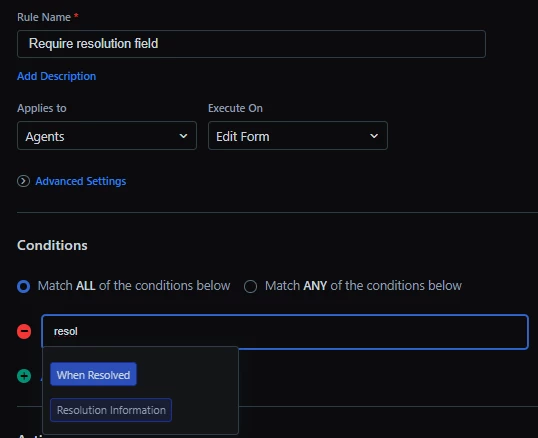
(The fields in the dropdown are custom fields we had before this field rolled out)


aseemaishwarya
Community Manager
Forum|alt.badge.img+1

Hello @Medic1334 ,

We have delivered the business rule actions to mandate resolution note field, along with other actions. You should check the actions under business rules which should have the resolution note available to act upon. 
Here’s the solution article with more details on it:
https://support.freshservice.com/en/support/solutions/articles/50000009490-resolution-note-generator?_gl=1*1q1qigy*_gcl_au*MzU2MjMyMjk1LjE3MTAzMTA3NDk.#:~:text=Hiding/Mandating/Disabling%20resolution%20note%20field%3A%C2%A0


Medic1334
Top Contributor ⭐
Forum|alt.badge.img+9
  • Top Contributor ⭐
  • April 10, 2024

I see now that we can mandate the field as an action; I was looking to use it as a condition and then display a message but after testing functionality as is this works. Thanks!


eeha0120
Top Contributor ⭐
Forum|alt.badge.img+12
  • Top Contributor ⭐
  • May 8, 2024

 Hello @Medic1334 ,

We have delivered the business rule actions to mandate resolution note field, along with other actions. You should check the actions under business rules which should have the resolution note available to act upon. 
Here’s the solution article with more details on it:
https://support.freshservice.com/en/support/solutions/articles/50000009490-resolution-note-generator?_gl=1*1q1qigy*_gcl_au*MzU2MjMyMjk1LjE3MTAzMTA3NDk.#:~:text=Hiding/Mandating/Disabling%20resolution%20note%20field%3A%C2%A0

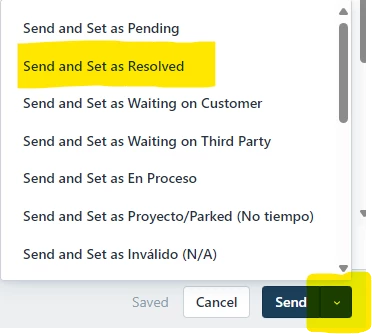
As far as I know, there are 3 ways in UX to Resolve a ticket:

  1. Setting Status as Resolved - Update ticket properties.
  2. Using App QuickResolver.
  3. Replying to requester and choosing Send and Resolve.

For 1 and 2, Business Rule works as expected.

But for case 3, Business Rule does not trigger at all. You can indeed send a reply and choose the option to Resolve the case, and then the reply is sent and the ticket is indeed Resolved without asking for the Resolution Note.

The option I'm referring to is this:

Is there anything I may have missed?


Regards,


Medic1334
Top Contributor ⭐
Forum|alt.badge.img+9
  • Top Contributor ⭐
  • May 8, 2024

But for case 3, Business Rule does not trigger at all. You can indeed send a reply and choose the option to Resolve the case, and then the reply is sent and the ticket is indeed Resolved without asking for the Resolution Note.

The option I'm referring to is this:

Is there anything I may have missed?

Regards,

Make sure your business rule is toggled on to run system wide.

I have a supplemental way to stop this as well I will PM you so as not to distract from the topic at hand on this thread that should help.