

New Idea

Require Service Item Fulfillment Prior to Ticket Closure

Related products:Freshservice
  • July 2, 2024
  • 8 replies
  • 151 views

volcanicdove
Skilled Expert
Forum|alt.badge.img+5

Hello,


Currently there is no native functionality to require that a Service Item included on a ticket be set to the “Fulfilled” status prior to closing the ticket. Having this available would be helpful for ensuring Agents are properly performing asset fulfillment, and without this feature it is difficult to accurately track inventory. Ideally, it should work similarly to how you can mandate a particular field be filled out prior to changing a property on a ticket using Business Rules.


Thanks

8 replies

Forum|alt.badge.img+5
  • Skilled Expert
  • February 20, 2025

100000000000% agree with this.

We only use Service Items within our Onboarding workspace, and sometimes there could be a lot of items included on an onboard ticket.  My analysts occasionally forget to "fulfill" the requests, which was driving me crazy!

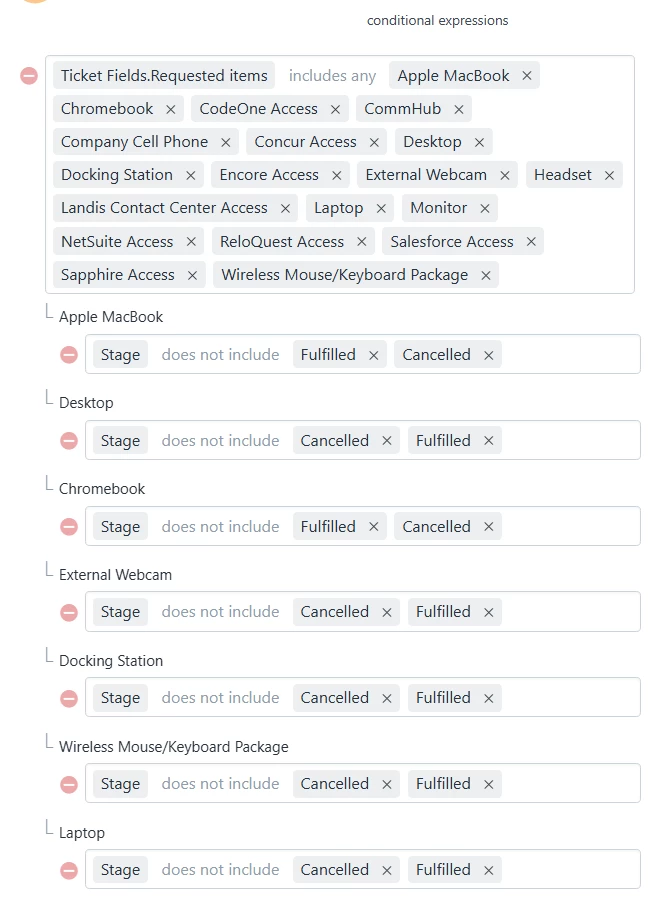
I created a workflow that runs when a ticket is resolved. It checks all included Service Items to ensure they are either in a Fulfilled or Canceled status. Setting this up was a bit tedious since I had to add each item individually.

Seems like a no brainer to me that it should be something that is built-in to the lifecycle of a ticket.


Forum|alt.badge.img+4
  • Skilled Expert
  • November 21, 2025

@lulrichs - any chance you could share how you created the workflow - I'm not seeing anything that allows checking the catalog item status in the Action setting.


Daniel Söderlund
Top Contributor ⭐
Forum|alt.badge.img+14

@lulrichs - any chance you could share how you created the workflow - I'm not seeing anything that allows checking the catalog item status in the Action setting.

You need to use API, 

https://api.freshservice.com/v2/#update_req_items_of_sr
Doing that for one item is easy, but if you have more then one you need to wait until looping :) 


Forum|alt.badge.img+4
  • Skilled Expert
  • November 21, 2025

@lulrichs - any chance you could share how you created the workflow - I'm not seeing anything that allows checking the catalog item status in the Action setting.

You need to use API, 

https://api.freshservice.com/v2/#update_req_items_of_sr
Doing that for one item is easy, but if you have more then one you need to wait until looping :) 

Is there a way to do it for any Catalog Item in one step?


Daniel Söderlund
Top Contributor ⭐
Forum|alt.badge.img+14

@lulrichs - any chance you could share how you created the workflow - I'm not seeing anything that allows checking the catalog item status in the Action setting.

You need to use API, 

https://api.freshservice.com/v2/#update_req_items_of_sr
Doing that for one item is easy, but if you have more then one you need to wait until looping :) 

Is there a way to do it for any Catalog Item in one step?

Not what I know of, you need first get the service items for the ticket. 
Then you need to update requested item using API. 


Forum|alt.badge.img+5
  • Skilled Expert
  • November 21, 2025

@lulrichs - any chance you could share how you created the workflow - I'm not seeing anything that allows checking the catalog item status in the Action setting.

You need to use API, 

https://api.freshservice.com/v2/#update_req_items_of_sr
Doing that for one item is easy, but if you have more then one you need to wait until looping :) 

Is there a way to do it for any Catalog Item in one step?


Hi Jennifer!

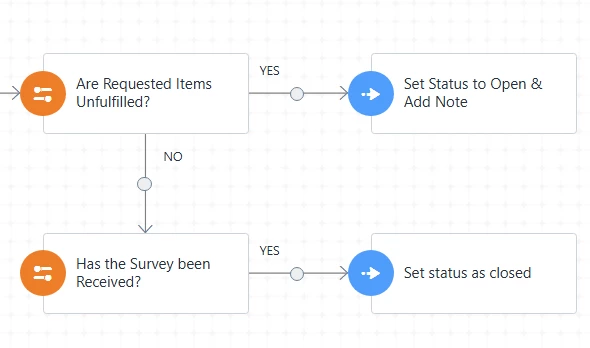
Here are the steps in my workflow:

Here is a screenshot from the Are Requested Items Unfulfilled? I created (I did this for all the different service items that could be added on an onboarding ticket):

It seems to work for us haha.


Forum|alt.badge.img+4
  • Skilled Expert
  • November 21, 2025

It seems like that is not an option in Freshservice - can anyone confirm??  This is a pain!


wicky5566
Community Debut
  • Community Debut
  • November 28, 2025

You’re right—having a native option to require a Service Item to be marked as “Fulfilled” before closing a ticket would be very useful for tracking inventory accurately. Implementing it similar to mandatory fields in Business Rules would ensure agents complete all necessary steps and reduce errors.

Until such a feature is added, some teams use workflow automation or scripts to enforce this requirement, though it’s not as seamless.

On a lighter note, if you’re looking for a break from workflow setup, attending an event like Morgan Wallen Clemson can be a great way to recharge!