Closed for Voting

Restricting access to certain Service Catalog categories

Related products:Freshservice
  • February 11, 2017
  • 2 replies
  • 55 views

In Solutions, each Solutions Folder can be edited to reflect which users can access the solution:

* All

* Logged in users
* Agents
* Companies


This level of access control does not exist in the Service Catalog. I would like to control which types of users see which types of service requests. For instance:
* All users should be able to make IT related requests

* Only Agents should make HR related service requests
* Only Department Finance may make Travel requests

Also, it is silly having all the default categories which cannot be deleted. Users will access the system and see functionality for booking airline tickets, when the scope of the service desk does not extend to that.


2 replies

Forum|alt.badge.img+11
  • Skilled Expert
  • May 18, 2022

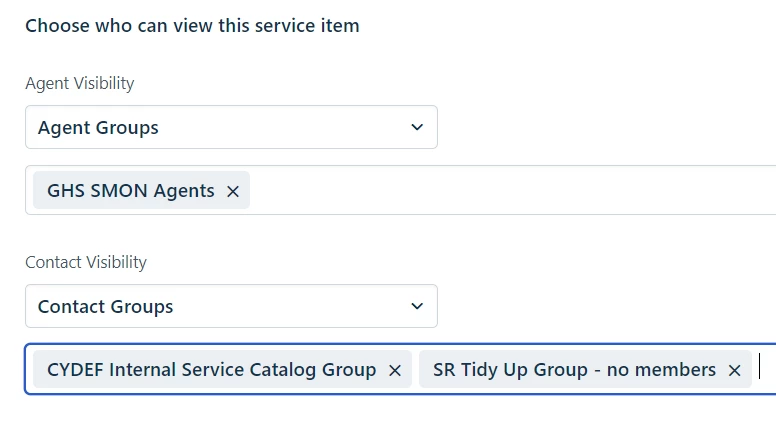
Hi @louis - at the very bottom of each SR (Service Request) you can set who can see it.

It’s not as convenient as managing things at the folder level but it can be done.

  1. If you don’t want to delete SRs like “Reserve airplane tickets” you could set it as Draft and it won’t be visible to Contacts
  2. I created a couple of Groups in FS specifically to manage access to these SRs -
    • We have some staff who are Contacts (as opposed to Agents) and they needed access to certain SRs so they are in the CYDEF Internal Service Catalog Group
    • Other SRs I don’t want anyone to see so I created essentially a “sinkhole” group and did not put any users in there


HTH

Bryn