Closed for Voting

richer text editor controls in solutions

Related products:Freshdesk
  • January 8, 2014
  • 4 replies
  • 33 views

Hello,

We are planning on moving our user documentation from Atlassian Confluence to Freshdesk. However, we find the Freshdesk text editor pretty primitive. It would be great if the text editor supports additions of macros so that we can do things like


- display code in a particular language

- display some important info in a frame. example: Note: do not change this setting.

- add a horizontal line


Thanks


Ali

4 replies

  • Contributor
  • January 8, 2014

Hi Ali


Your requirement to bring in CODE can be solved right now, if you're in the Estate plan, using Portal Customizations


An example here - https://support.freshdesk.com/categories/2/forums/7/topics/22032


https://support.freshdesk.com/categories/2/forums/6/topics/599


Same can be done for frames as well, you need the Javascript/Jquery to bring in these changes and show them in Solutions


We dont plan to bring these in the editor, since they are already supported in CSS/Portal Customizations feature


thanks

vijay


  • Author
  • Apprentice
  • January 8, 2014
Vijay,
What does lightbox have anything to do with me trying to add code snippet in my user guide?

 
Take a look at my freshdesk page

http://agiletestware.freshdesk.com/solution/articles/179537-testing


In confluence or any other decent text editor, I can surround my code with some macro so that it is displayed nicely

https://agiletestware.atlassian.net/wiki/display/DGF/testing-ignore


  • Contributor
  • January 9, 2014
Hi Ali Thanks for bringing this. We will look at the possibility of getting this done at the earliest. Regards Girish

Hi Ali. 


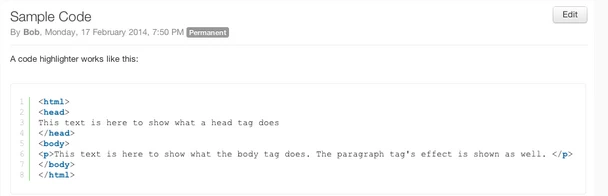
Just wanted a give you a quick update.The code highlighting feature in the solutions has been rolled out recently. 


Here is a screen shot for your reference 


Thank you