Closed for Voting

Russian SPAM influx

Related products:Freshdesk
  • April 15, 2019
  • 129 replies
  • 275 views

Just saw 3,000+ tickets come in via email -- all Russian SPAM.  We have correctly introduced DKIM, etc for our FreshDesk domain

129 replies

  • Community Debut
  • April 15, 2019

We experienced the same issue... Is there anything else we need to do ?


  • Author
  • Contributor
  • April 15, 2019

For these spam tickets that do not have any common phrases/words, one way to delete them(for now) is to set up Dispatch'r and Supervisor rules using Russian letters. I have listed the most common Russian letters that have proved effective in deletion until now. Make sure that they add all these letters. Even though some might look similar, they are distinct capital and small letters that make a huge difference.


You could set up a Dispatch'r rule to automatically mark such tickets as Spam using the following steps:

1)Go to Admin->Dispatch'r ->New Rule

2)Under Conditions, click on "Match ANY of the below" and select the condition as "Subject or Description Contains" and enter the different Russian letters as seen in the screenshot below.You could copy and paste some of these Russian letters- б, в, г, д, ж, з, к, л, м, н, п, т, ф, х, ц, ч, ш, щ я, ю, и, Б, Г, Д, Ж, П, Ф, И.


Also, this spamming issue is being looked upon by our email team. I'll keep you posted as soon as I get an update from them.


  • Author
  • Contributor
  • April 15, 2019

Support sent this to me -- by adding the Dispatch'r rule, you catch the SPAM on the inbound -- the Supervisor rule auto-cleaned our ticket inbox after 30 mins or so (then I disabled the Supervisor as it wasn't needed).


For these spam tickets that do not have any common phrases/words, one way to delete them(for now) is to set up Dispatch'r and Supervisor rules using Russian letters. I have listed the most common Russian letters that have proved effective in deletion until now. Make sure that they add all these letters. Even though some might look similar, they are distinct capital and small letters that make a huge difference.


You could set up a Dispatch'r rule to automatically mark such tickets as Spam using the following steps:

1)Go to Admin->Dispatch'r ->New Rule

2)Under Conditions, click on "Match ANY of the below" and select the condition as "Subject or Description Contains" and enter the different Russian letters as seen in the screenshot below.You could copy and paste some of these Russian letters- б, в, г, д, ж, з, к, л, м, н, п, т, ф, х, ц, ч, ш, щ я, ю, и, Б, Г, Д, Ж, П, Ф, И.


Also, this spamming issue is being looked upon by our email team. I'll keep you posted as soon as I get an update from them.


  • Contributor
  • April 16, 2019

We have the same issue. I created a dispatcher rule to intercept them and automatically mark them as spam, but it's still increasing our ticket number and they show up in the "Recent activities" in the dashboard. It's difficult to find our own agent activities inbetween all the Russian spam...


  • Contributor
  • April 17, 2019

We have just been hit. I'm going to have shut freshdesk down to stop it 8-(


  • Contributor
  • April 17, 2019

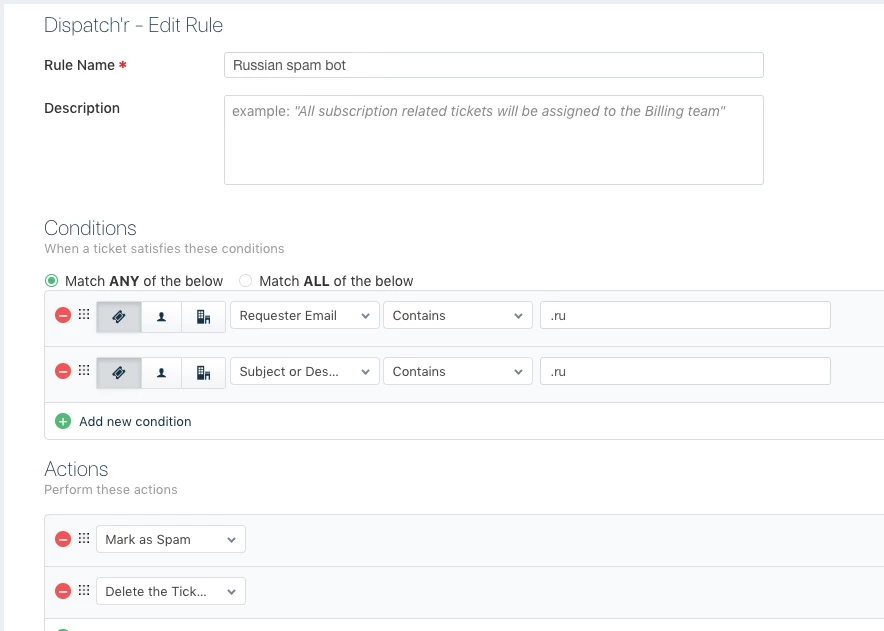
Just added a dispatcher rule to block anything with .ru in it. Seems to have done the trick.


  • Community Debut
  • April 17, 2019

Same problem - is there not a better way to filter spam?  Or only accept certain languages?


  • Community Debut
  • April 17, 2019

Update - for now I have implemented Paul's suggestion, but also added another 2 actionses - skip notification (for my sanity), and finally deleted the ticket - I'm not sure if I need this last action.


Forum|alt.badge.img+7

We have the same problem and added a dispatcher rule. It is also possible in the dispatcher rule to select language Russian. That works better for us, as not everything has .ru as sender. 


  • Community Debut
  • April 17, 2019

We have the exact same problem and implemented Paul's suggestion. The problem is we are giving a global service and legitimate .ru emails are going to be filtered as well. 
Is there any way to block by language and only allow english tickets?


  • Community Debut
  • April 17, 2019

Hi Mark, can you please describe how you set up the filter by language at dispatcher?


  • Community Debut
  • April 17, 2019

For those who are having the same issue here is the solution for now while Freshdesk take proactive measures:

You could set up a Dispatch'r rule to automatically mark such tickets as Spam using the following steps:
1)Go to Admin->Dispatch'r ->New Rule
​2)Under Conditions, click on "Match ANY of the below" and select the condition as "Subject or Description Contains" and enter the different Russian letters as seen in the screenshot below.You could copy and paste some of these Russian letters- б, в, г, д, ж, з, к, л, м, н, п, т, ф, х, ц, ч, ш, щ я, ю, и, Б, Г, Д, Ж, П, Ф, И.

Make sure that each letter is in a different condition.


  • Community Debut
  • April 17, 2019

My original dispatcher rule, blocking sender with .ru, does not work. The mails are coming from gmail - the .ru is in the subject. I can't block that and be sure I won't miss a legitimate ticket. Blocking Russian would work for me, if I can figure out how!

@Freshedesk - this seems to be a wider problem - is there something that you can do on your side to fix this?


  • Community Debut
  • April 17, 2019

I talked with the agent live and this is a topic they are aware and working to solve. Meanwhile here is the way to solve the russian language filter.

You could set up a Dispatch'r rule to automatically mark such tickets as Spam using the following steps:

1)Go to Admin->Dispatch'r ->New Rule

​2)Under Conditions, click on "Match ANY of the below" and select the condition as "Subject or Description Contains" and enter the different Russian letters as seen in the below. You could copy and paste some of these Russian letters-  

б, в, г, д, ж, з, к, л, м, н, п, т, ф, х, ц, ч, ш, щ я, ю, и, Б, Г, Д, Ж, П, Ф, И.
3) Make sure that each letter is in a different condition


  • Contributor
  • April 17, 2019

I used the .ru condition because the chances of someone using that domain extension in my tickets is extremely slender. I can't block Russian as our clients are international and that might bin a legitimate ticket. Using .ru in normal language for me is the best solution as it would be extremely rare for someone to use that in the body of a ticket and grammatically unlikely to because of the natural instinct to put a space after a full stop and a capital letter.


Screenshot to show how I did it:


image


Forum|alt.badge.img+7

Sorry for delay in replying. I am now not sure the language solution works. We have set up a multi-language helpdesk, and these spam contacts are correctly identified as Russian (based on the language). In the dispatch rule, under Contacts there is the option "Requester Language".  However, I am now trying to find out why it doesn't always work.


  • Contributor
  • April 17, 2019

I think my option is the best solution, for now, Mark as there is less risk to the usual customer enquiry?


  • Contributor
  • April 17, 2019

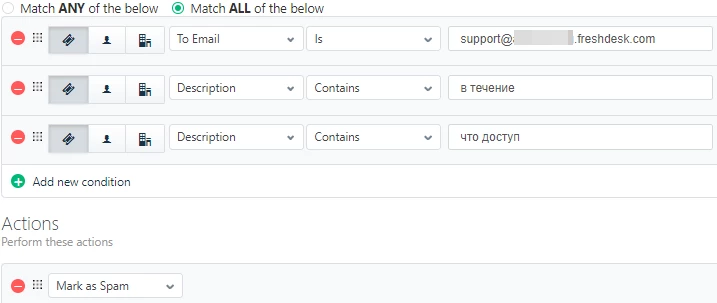
We could get legitimate emails from Russia, so I created a dispatcher rule that's a little different.


All spam emails were directed at a *@*.freshdesk.com email address, while we never use this (on purpose, only in the past because a FD bug), because we have a custom email address with our own domain.


So my dispatcher rule applies to emails that are addressed to the *@*.freshdesk.com email address and contain both of these word combinations: "в течение" and "что доступ", because I noticed that this occurred in all these emails.


The chance that the properties of a legitimate email would apply to all these three rules is pretty much zero.


  • Community Debut
  • April 17, 2019

I suggest to use the russian letter solution if you accept your tickets only in English as it does not block anything written with english alphabet.


  • Contributor
  • April 17, 2019

image


  • Contributor
  • April 17, 2019

The Russian language solution would not be an option if for example a bilingual Russian and English speaker writes an email in English but has a signature that contains any Russian characters.


Forum|alt.badge.img+7

I also added as action: Skip New Email Notification, but that does depend on your setup. 


  • Community Debut
  • April 17, 2019

I did the skip email notification as well but the only thing left is about freshdesk application notification. I'll check if I can solve that as well.


  • Contributor
  • April 17, 2019

By the way, blocking based on Cyrillic characters would not only block Russian, but many other languages, like Belarusian, Ukrainian, Bulgarian, Serbian, Macedonian, Bosnian, Croatian, Mongolian, Tajik, Kazakh, etc...


  • Community Debut
  • April 17, 2019

Paul raises some good points, I have implemented a combination of Paul and Mark's solutions.  These tickets are being deleted, but I am still getting APP alerts on my phone before that happens.  Anyone got some ideas there?