

Closed for Voting

Scenario that adds last private note?

Related products:Freshdesk
  • April 6, 2015
  • 3 replies
  • 37 views

Situation: We frequently have a ticket assigned to one agent, but would like to send a private note to that entire group (or more than one group).  Currently, you have to select all agents individually in the Private note.  If we had the groups listed and could select those, that would suffice.


The other solution would be to make the "Last Private Note" one of the Placeholder choices in the Scenario Automations.  I see "Last Public Note" is a choice, but not "Last Private Note."  Then, I could set up a scenario to send the last private note to the specified group.


Rick
3 replies

Hi Rick,


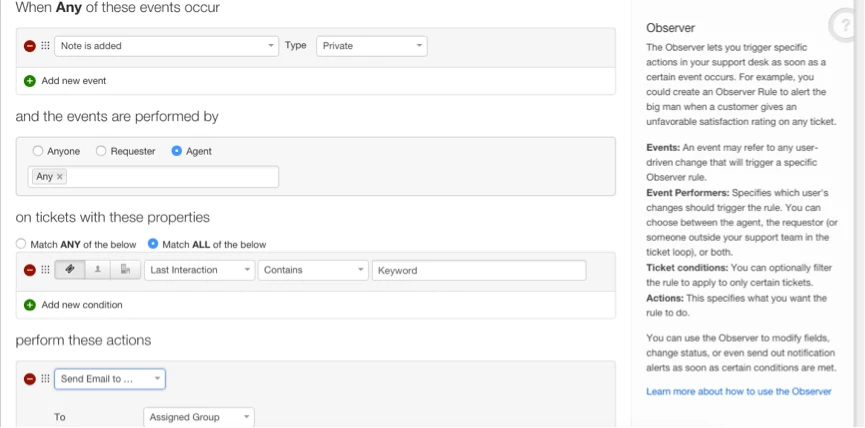
After adding a private note (either manually or from scenario), you could set up an observer rule to trigger email to Group(s) of your choice. The equivalent of "Last Private Note" would be - "{{comment.body}}"

Check this link for more info on hidden placeholders.


You would have to set up the below Observer Rule:

Event - Note is added ; Type is private

Performed by - Agent

Condition - Optional (you can leave it blank)

Action - Send Email to Group  - Assigned Group 


Subject - {{ticket.subject}}

Description - {{comment.body}}


If you would like to send email to another group, you could add another action - "Send Email to Group" with the same subject and description as mentioned above.


Let me know if this suits your use case, else we could figure out another alternative for you.


observer_18387.png

  • Author
  • Contributor
  • April 7, 2015
This is close, but it's sending emails to the group whenever any private note is added.  My desire is to tell the agent that only a specific action will trigger an email to be sent to the group with the last private note.

I'm wondering if the {{comment.body}} placeholder will work in a Scenario.

Rick


  • Author
  • Contributor
  • April 7, 2015
Adding {{comment.body}} to the Scenario I had created worked perfect.

Thanks!
Rick