Closed for Voting

Schedule and Draft Replies

Related products:Freshdesk
  • May 9, 2012
  • 37 replies
  • 95 views

Love Freshdesk, but one problem I run into often is the inability to save a draft reply to a ticket. Often I and my team will work at night to clean up tasks that we could not complete that day, but then if we write back to a client in the evening, they know we are working late and will likely reply, thus defeating the purpose of working late to clear out a backlog.

A solution would be to add the ability to save a reply as a draft, and/or the ability to schedule a reply. So if you are replying to a client, you could either save the draft to manually send it later (like in the morning during business hours) or to schedule it so it goes out automatically at the assigned time. This would really help make the system more useful for people who want to structure business hours.

37 replies

  • Community Debut
  • May 9, 2012
Why Not have both, drafts and scheduling! There are business cases for both and they are equally important.

Hi Allen & Hasso

We are already working on DRAFTs and will be available in a few weeks time :)

regards
Vijay

  • Contributor
  • May 30, 2012
I'll add my vote to both these. Scheduled replies is something we had in a old system years ago and I've had endless complaints since loosing that feature. Clients often seem to thing that if they receive a reply late at night that we provide 24 hour service, which is very much not the case :)

  • Contributor
  • July 3, 2012
Boy do I agree with the comment "if we send an email late at night, they think our normal business hours are late".  Our clients think we sleep here!

The ability to schedule a reply would be great!

  • Contributor
  • August 21, 2012
Draft replies has been completed and released last weekend. We will look at the possibility of adding scheduled replies.

  • Community Debut
  • February 14, 2014
We would love the ability to schedule replies also. This is great idea. +1


  • Contributor
  • March 20, 2014

I would love it if there was a draft feature on a "NEW" ticket as well.


  • Contributor
  • November 4, 2014

+1 for scheduled replies.


  • Community Debut
  • February 14, 2015

 Bump. We want this feature. This would be a big differentiator for your product.


  • Community Debut
  • April 21, 2016

+1 for scheduled replies. Do you have any information??


  • Community Debut
  • October 16, 2016

We so need this feature - any updates on this?  Thanks!


  • Contributor
  • November 21, 2016

Draft replies don't work sometimes. In our experience a sizable portion of drafts was not saved so we had to withdraw from using this feature.


Would be great (and much better than existing functionality!!!) to have a straightforward button "save draft".

Another great improvement would be to mark tickets with draft replies on the list (i.e. add some icon).


Scheduling ticket replies would be also a useful feature! +1 here!


  • Contributor
  • February 24, 2017
+1 for scheduled replies.


  • Contributor
  • March 21, 2017

Any word on Scheduled Replies?  So for example, I can compose replies at night and schedule them to send during normal business hours?


  • Community Debut
  • April 20, 2017

We need scheduled replies. Without it, Freshdesk is worthless to us.


Please look into adding scheduled replies. If not, why not?


  • Community Debut
  • April 20, 2017

Why aren't scheduled replies available yet?


  • Contributor
  • June 1, 2017

Dear Freshdesk,


Thank you for such a great ticket system!  I humbly request the following:


(1) An outright SAVE DRAFT button we can click to save at will to ensure draft saves (as the auto-draft feature is sometimey).

(2) Ability to schedule the reply to be sent a specific future date/time.


Pleeeeeease :)


Respectfully,

June Wilson


aravind.sundararajan
Skilled Expert
Forum|alt.badge.img+12

Hello,


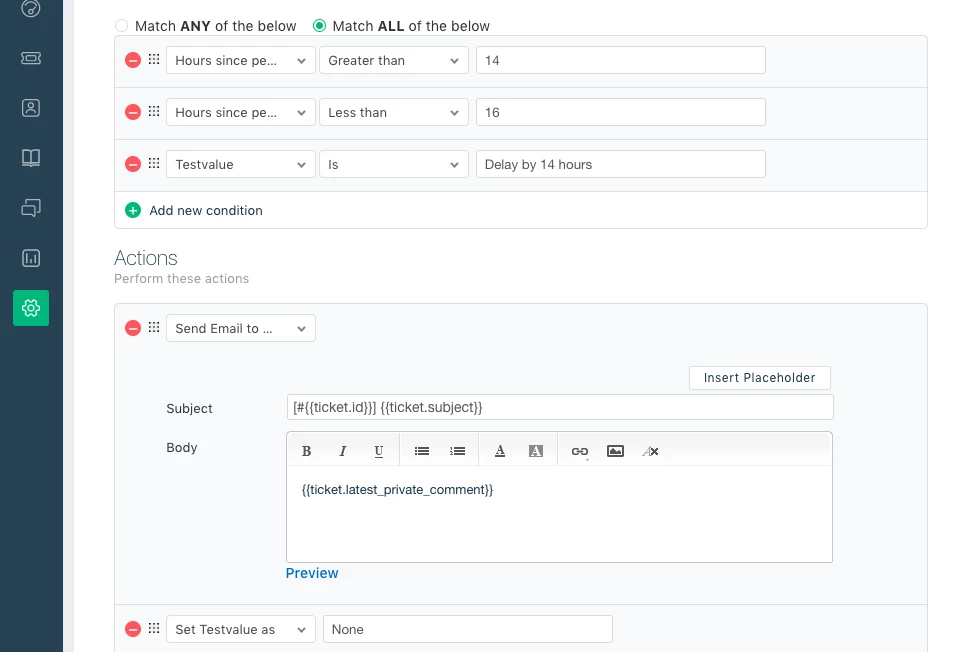
Having gone through the thread, the ability to schedule replies to be sent during business seems to be the key ask. We can achieve this with the current automation options available with a little bit of agent training. So, here's how I have setup replies to be sent during a later time using the automations:


The helpdesk operates from 9am to 5pm on all weekdays. My agents can work beyond 5pm or during weekends to clear backlogs but the responses need to be sent only during the operational hours. Let's discuss the admin configuration part first.


1. Create a custom dropdown field with different values that indicate the time delay - The time delay has to be calculated as the difference in time between the close of business hours for the day to the start of business hour for the next day. These could be your dropdown choices:


  • Delay by 14 hours (Use this for Mon-Thurs) 
  • Delay by  64 hours (Use this for Friday evening)
  • Delay by 48 hours (Use this on a Saturday morning)
  • Delay by 45 hours  (Use this on a Saturday afternoon) 
  • Delay by 42 hours (Use this on a Saturday evening)
  • Delay by 24 hours (Use this on a Sunday morning)
  • Delay by 21 hours (Use this on a Sunday afternoon)
  • Delay by 18 hours (Use this on a Sunday evening)


2. To trigger the time based supervisor, we'll consider the Hours since Pending condition in conjunction with the option chosen in the custom dropdown field. Here's a snapshot of the supervisor rule:


Similarly, you can create a supervisor rule for each delay condition. Note that you'll have to specify a close time for the rule since this automation runs once in every hour. So, it is advised to set the rule using Greater than x hours and Less than x hours conditions.


Agent workflow:


If the agent prefers to schedule the reply and send it during business hours, he can:


1. Draft the reply as a private note on the ticket

2. Choose the appropriate delay value in the custom dropdown field 

3. Set the status as "Pending" 


Hope this helps!


Cheers!


Hi Aravind,

Thanks for the workaround. Unfortunately, such solution looks too clunky and not really suitable for regular usage. Those are too many steps to schedule a reply and they require a specific workflow (for example, we don't use the "pending" status at all, and we won't use it in the future).


The expected work flow would have to be much simpler:

  1. Where now the interface has the "send", "send and set as XYZ" button, there should be a "send at date/time" field. The agent would then just have to enter a value, click on "send" and that would be it.
  2. An agent, or supervisor, should have the option to cancel the scheduled message, before it's sent.

The above is a lot simpler to use, and much less prone to errors than having to calculate the amount of hours, adding notes instead of replies, changing statuses and so on.


aravind.sundararajan
Skilled Expert
Forum|alt.badge.img+12

@Diego Thanks for breaking down the requirement. If I may ask a question, will an option to schedule replies to the start of the next business hour help? Certainly, it will be ideal to provide an option to choose date & time but to begin with, do you think this option would be a good start?


Cheers!


Forum|alt.badge.img+1
  • Contributor
  • May 24, 2018

+1 for scheduled emails.


I can see how a next business day might be handy for some.  But I have a situation where I need to send out an email on Saturday at 6pm, or around that time. So having the flexibility to choose any time would be preferred. Just have a calendar and time entry, then the email will send as soon as it can at that day and time.


  • Community Debut
  • May 28, 2018

Aravind, I agree with Dale sending a reply at a specific time is the best solution overall, however, if it were only a temporary fix to send it at the next business hour based on our times we selected as business hours, that would work for me - it's better than nothing really while it is being worked on to schedule it at a specific time.  


Forgive me for my ignorance but I have a really hard time understanding why it's such a difficult task to create when Freshdesk as so many beautifully enhanced options - when adding a time seems so basic and can be done even at email level already with so many applications from your email account.


  • Community Debut
  • August 20, 2018

I've just run into another use case for scheduled replies. 


We run a website that has subscriptions for products on it, I have a client that wants to get a shipment in 3 months, if they sign up for a subscription now it will trigger an immediate purchase and then another one in three months. Which creates a hassle for everyone in this situation. I'd like to compose a reminder for her in 3 months when she said she wanted it to go ahead and check out with the subscription. 


I'd also like to schedule follow ups to certain cases, like when they get the replacement product I sent them. 


With all that said here is a +1 for scheduled replies, and a new note to keep this thread alive. 


  • Contributor
  • October 25, 2018

@Aravind did anything happen since your suggestion? I'm currently evaluating a move from an email client workflow where the email client includes reply scheduling, to Freshdesk. I work outside my contacts' timezone and it would be inappropriate to send a reply in the middle of the night, but sometimes that's what time it is when I'm working. At the moment I'm struggling to even implement your workaround due to the absence of my custom field in Supervisor, but I'll keep trying. This feature or something like it would be extremely useful.


aravind.sundararajan
Skilled Expert
Forum|alt.badge.img+12

@Sam Unfortunately, nothing so far! I'm not really sure if we'll allow scheduling a reply right from the interface. Not ruling it out but definitely not in the scheme of things for now.


Meanwhile, I'll also look at other options like custom apps or APIs that can help in this case.


Cheers!