Closed for Voting

Search and report by tag

Related products:Freshdesk
  • March 5, 2013
  • 15 replies
  • 52 views

I tag tickets but i don't understand why this operation colud be useful.

I use tags in search box, i can't report by tag.

I can only use tag in ticket panel :-\

15 replies

  • Community Debut
  • October 28, 2014

I would really love to hear a response to this question. 


me too! How could I get a report of a Type of a ticket with such Tag??

Is the only thing left to be made I Suppose.

I will really appreciate it.

Thanks


aravind.sundararajan
Skilled Expert
Forum|alt.badge.img+12

Hi,


We've made a recent update ( ~4-5 months back ) that would allow you to utilise "tags" as one of the filters in the reports.


@Deborah : With this update, you'd be able to report on a specific type of ticket tagged with a particular keyword.


Cheers!


Hi,

the search functionality does not allow you to search quickly a ticket by tag (that is the main purpose of tags).

You have to search and then you can REFINE your initial search using tags, which is very different...

Can you please tell me if I am missing something?

regards

Giuseppe


  • Community Debut
  • July 17, 2019

Hey Aravind - or anyone else that can help - I need the ability to run a report on which tags are used most often to least often, not just as one of the filters. How does one do that in your platform?


Forum|alt.badge.img+7
  • Community Manager
  • July 18, 2019

@Giuseppe:

Could you please elaborate on your issue with tags? You can search for a tag, and the corresponding tickets which have the tag will show up as search results. If that is not the behavior observed in your account, please do let us know.


@Lynette

You can go to Admin > Tags, click on the number against any tag. You'll be taken to the ticket list page, where you can use the "Created at" filter to check the number of tickets with that tag, for a time range.

We're also rolling out enhanced analytics features - they're in beta now. We can enable it for your account. This will enable you to generate a report based on the top tags used in your tickets. Do you want us to enable the analytics beta for your account?


It looks like it works now, not sure what the issue was. I can search my tags from the general search now


  • Community Debut
  • July 18, 2019

Karthik - So what you're saying is I can look at how many times a single tag has been used in a month. That's not helpful for my situation.


I want to be able to run a report that shows in any given time period - let's say one month. For example, let's say I want to see which tags were used and how often in June 2019. In your scenario, I'd have to go one by one and see how many times each tag was used. I don't see a way to go to Reporting, and then create a report that shows for June 2019 a list of how often each tag is used - looking at that data one by one, by each tag, is inefficient and would take a lot of time.


Forum|alt.badge.img+7
  • Community Manager
  • July 25, 2019

@Lynette/strong>


I understand you want to create a report for a specific period of time to see which tags were used, and how often they were used, during that period. Please correct me if I'm wrong.


We’re working on an analytics feature that could achieve this. Once we enable the beta on your account, I can walk you through setting up a report that could help you. You could also try out its features and give us your feedback. Do you want us to enable the analytics beta feature for your account?


  • Community Debut
  • July 25, 2019

Hi Karthik,


Yes, that would be great! Thank you!


Forum|alt.badge.img+7
  • Community Manager
  • August 2, 2019

@Lynette We've enabled the analytics beta for your account. Please try using it and let us know what you think of it. You can also set up a tag report based on a certain time period.


  • Once you open the analytics page, you can click on "New Report" on the top-right.
  • You can name it and set the visibility settings as required.
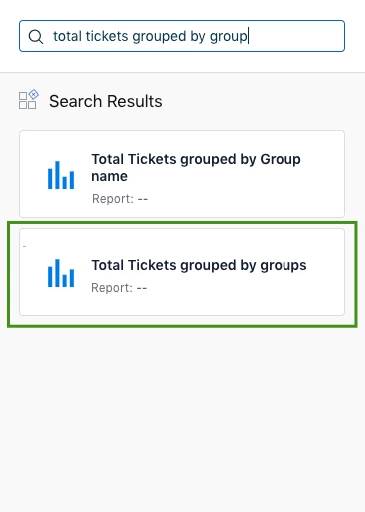
  • Search for “total tickets grouped by group” in the search menu on the right. Drag and drop the widget to create the report


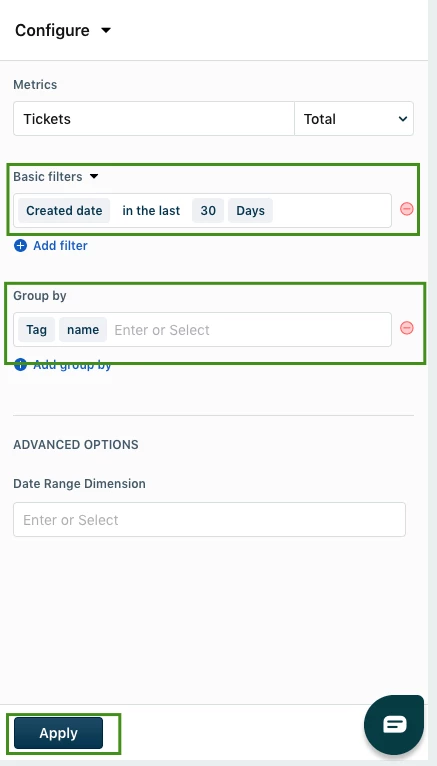
  • Click on it and you can configure the settings. You can set the basic filter to be “created in the last 30 days” to see the respective tickets and group it by the tag name to segregate the results by tags


  • Once this has been applied, you will see a visualization and tabular data on the left. You can modify the columns of the tabular data to show the data that is more important to you, such as ticket ID, resolved data, etc.


Please try this out and let us know whether you're able to get the desired results :)


  • Community Debut
  • August 2, 2019

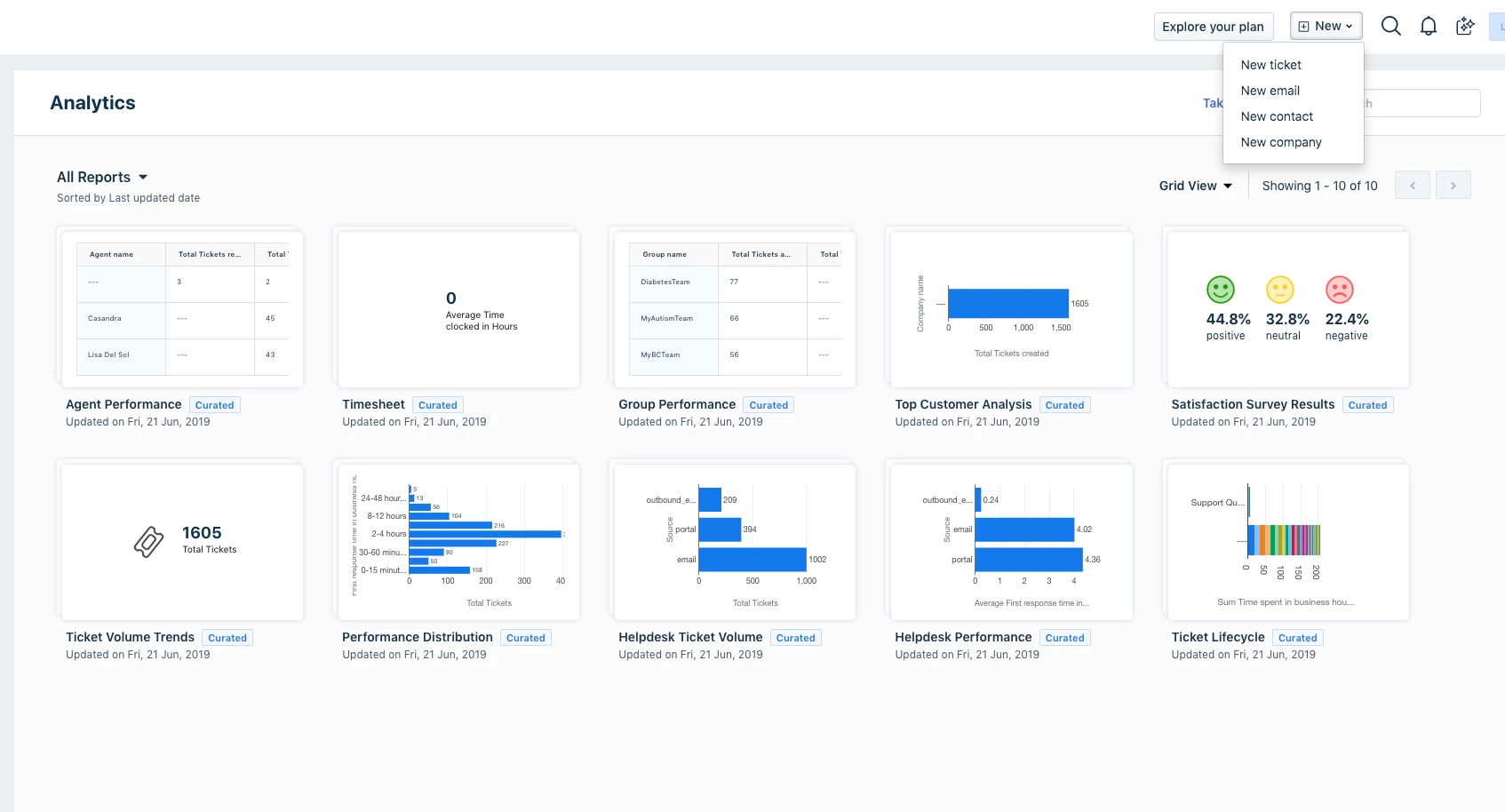
Thanks, Karthik, but I'm not seeing 'new report' in the upper right. I see the 'New' button but it does not have 'report' as an option. Can you please clarify?

image


Forum|alt.badge.img+7
  • Community Manager
  • August 6, 2019

Hello Lynette, 


Depending on which plan you are currently on, you might have to upgrade your account to make use of the additional features (such as custom reports) in analytics. We'll get in touch with you about this.


  • Community Debut
  • August 6, 2019

We have the 2nd highest paid plan, so not sure why this would be an 'elite' feature. I look forward to hearing from someone at Freshdesk to resolve this.


suprabha.somanathan
Community Debut

@Lynette


One of our support stars would be reaching out to you shortly explaining as to why is the option to create a new report not present on your helpdesk yet.


Cheers!