Closed for Voting

Sending Reply should change ticket to Waiting on Customer

Related products:Freshdesk
  • February 20, 2013
  • 21 replies
  • 58 views

The default behaviour when sending a reply should be for the ticket status to change from Open to Waiting on Customer (or this should at least be an option).  Every time when we reply we have to then manually change the status of a ticket.  


It would be better to default it to Waiting on Customer and manually change for any exceptions.

21 replies

  • Apprentice
  • February 20, 2013

Yes! This would make so much more sense than the current setup. We also have to manually change the status of every ticket to 'Waiting on Customer' after we reply. 


Should be, Send and Resolve or Send and Waiting on Customer. Could be very useful.


  • Apprentice
  • March 13, 2013

Yep that's another vote from me. Manually changing to 'waiting on customer' almost every time.


It should probably be a whole new button though 'Send and Waiting', 'Send and Resolve', 'Send'. Sometimes we send a response to say "We're looking into it" or something similar, so obviously we are not waiting on the customer.


Looks like they have implemented this now!


annapoorna.venketaraman
Skilled Expert
Forum|alt.badge.img+8

Hello!


The New Ticket View includes this option that allow you to send a reply and set the status with a single click. 


Please keep writing to our Forums. 


Thanks,

Anna


  • Apprentice
  • May 20, 2013

Hi Anna,


In the new ticket view, in a single click you can only "Send".

If you want to "Send and set as Pending", you have to click two times.


But for me, the problem is not about having to click two times. the problem is about forgeting to change the status to "Pending" after I send the message.


There sould be an option to change the default behavior of the send button to "Send and set to X".

(and then the "Send" option would be a secondary option in the dropdown menu).


Sorry my bad ensligh.

Thanks,

Atimoda


  • Community Debut
  • May 31, 2013

Hi,


I agree with you Atimoda - our default behaviour is to send and set to resolved most of the time.  If the default was a configurable option, that would make it much more useful for us!


Kind regards,

Charles


  • Contributor
  • July 18, 2014

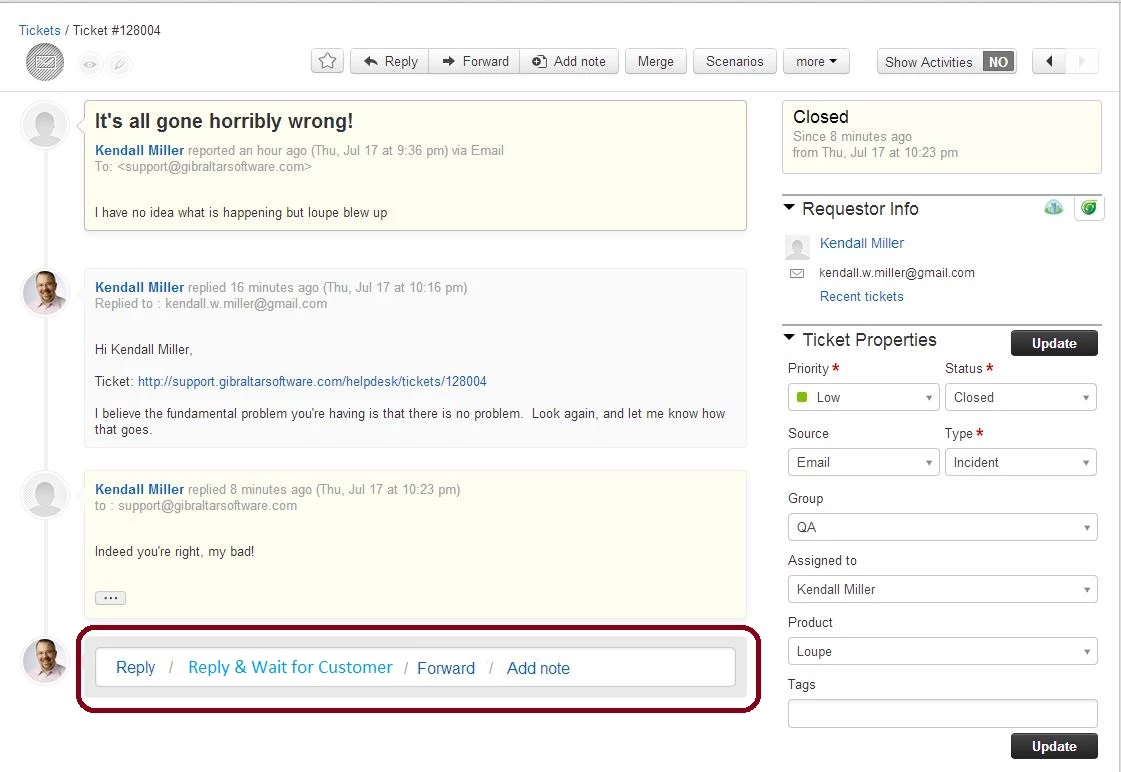
We're coming from using FogBugz and our main support system which had a Send & Close option we nearly always used on responding to a ticket.  Looking at Freshdesk, it should be Send & Wait for Response or something like that.  I'm not clear how this is implementable in the current version of the software.  It looks like we have to remember to change the status in the dropdown then click reply?  Or is it Reply, then change status and update? 

What I'd like is an option like this:


Hi Kendal,
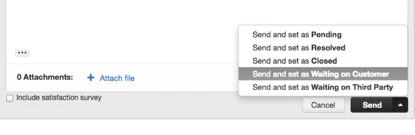
After typing the reply, you can click on the small arrow next to Send and select Send and set as Waiting on Customer.


Hi,


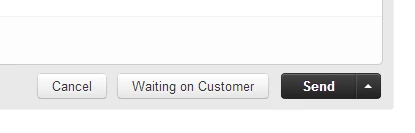
One suggestion is you can set up a Freshplug to create a button.
Go to Admin--> Integrations--> Freshplug to create one. Make sure that you select the option to have the Freshplug widget visible on the tickets page.

Send and Resolve Button


<div id="add_btn_send_resolve_in_reply"></div>

<script type="text/javascript">

    jQuery(document).ready(function() {

        if(jQuery('body').hasClass('ticket_details')) {

            var buttonLabel = 'Send and Resolve';

            //Adding the new button

            jQuery('#HelpdeskReply .btn-toolbar>span:last').before('<span class="btn-group"><button class="btn" rel="custom-reply-status" data-cnt-id="cnt-reply" data-status-val="4">' + buttonLabel + '</button></span>');

            //Moving the Save Draft to the left side.

            jQuery('#reply-draft').detach().appendTo('.post_in_forum');

            jQuery('#add_btn_send_resolve_in_reply').parent().parent().remove();

        }

    });

</script>


Send and Awaiting Customer Response Button


<div id="add_btn_send_resolve_in_reply"></div>

<script type="text/javascript">

    jQuery(document).ready(function() {

        if(jQuery('body').hasClass('ticket_details')) {

            var buttonLabel = 'Waiting on Customer';

            //Adding the new button

            jQuery('#HelpdeskReply .btn-toolbar>span:last').before('<span class="btn-group"><button class="btn" rel="custom-reply-status" data-cnt-id="cnt-reply" data-status-val="6">' + buttonLabel + '</button></span>');

            //Moving the Save Draft to the left side.

            jQuery('#reply-draft').detach().appendTo('.post_in_forum');

            jQuery('#add_btn_send_resolve_in_reply').parent().parent().remove();

        }

    });

</script>


  • Contributor
  • July 18, 2014

Ah thanks folks - you're right, it makes more sense to put it on the sending side not where I did it in my drawing.  I hadn't noticed the combo button feature, but I like the idea of a custom button for that since that makes it one click.  Thanks for the suggestions (I'll see if I can pull off that plugin!) but to FreshDesk staff - consider this a really useful refinement to work through since saving clicks in the critical path of working tickets gets to the heart of people loving the system.


  • Community Debut
  • September 7, 2014

We usually manually set to resolved after sending, so this is a 2 click process right now.


What I would prefer to see is a way to set my desired default option in settings, so that the "Send" button also applies that action


For example:

Dropdown Setting: Default Send Behavior = "Send and Resolve" or "Send and Waiting for Customer", etc


Then the SEND button now says "Send and 'Whatever Choice from above'"


Thoughts?


  • Community Debut
  • November 24, 2014

The FreshPlug workaround is great but seriously, it should be possible to choose a default for the send button.


  • Community Debut
  • February 18, 2016

Such a valid point, and thanks for the workaround from Arjun. While good to see the workaround, this should be a default feature option.


aravind.sundararajan
Skilled Expert
Forum|alt.badge.img+12

Hello,


The Send button , by default, only sends the reply and leaves the ticket status in its present state. The agents can make use of the tiny button to open up a dropdown with multiple status choices that can be set at the time of sending the email. This would involve two mouse clicks and having a button is much efficient than this one ( the freshplug proposed by Arjun ) . 


As we have deprecated freshplugs and support only approved custom apps , it would be easier to decide on the status that you would like to be set after every agent reply. You could then create an Observer rule as described below to set the status automatically without any manual intervention :


When any of these events occur : Reply is sent 


And the events are performed by : Agent - Any


Actions : Set status as "Customer Responded" or any status 


Cheers!


  • Contributor
  • April 26, 2018

Hi Aravind -- thanks for the workaround. Question: does this override the other things in the dropdown? 95% of cases we want to close after a response. But in the 5% where we might want to leave it open, and use the dropdown menu to select something other (like waiting on customer), will Observer then override that? 


aravind.sundararajan
Skilled Expert
Forum|alt.badge.img+12

@Chris: The Send and Set as <status> options are available by default. The agents can click on the tiny dropdown icon to choose the status value or just hit on Send button to leave the ticket on Open status.


Cheers!


  • Contributor
  • December 20, 2018

Hello,


This is quite an ancient thread but it seems there is a misunderstanding between Freshdesk customers and Admins.


  • The "tiny dropdown icon" next to the "Send" button is nice. But it is too cumbersome to have to remember and click twice on it for 80% of the responses we send.
  • The workaround involving an Observer rule is not that nice because for 20% of the responses we send, we'll have to set back the ticket status to what is was... Moreover, the Send dropdown is made useless with this Observer rule, which is a pity. 
  • And, please, think about your customers, this a really really basic feature, we dont want to look for a feature on the admin and on Google for hours, read forums and finally have to craft a dubious workaround to compensate such a basic feature missing...

The really simple, satisfying and asked solution to this issue would be to be able to configure the default "Send" button and have the other choices in that dropdown.

This is what every other help desks do and it is really frustating not to have it on Freshdesk, especially when it has been asked by multiple customers for 6 whole years with multiple explanations (and I even found some 8 year-old threads similar to this one).

I hope you will read this message and finally take it in consideration, for your users' sake.
Regards.


  • Community Debut
  • December 20, 2018

"The "tiny dropdown icon" next to the "Send" button is nice. But it is too cumbersome to have to remember and click twice on it for 80% of the responses we send."


"The really simple, satisfying and asked solution to this issue would be to be able to configure the default "Send" button and have the other choices in that dropdown."


Yes and more yes. It makes no sense that we even have to tell the devs this, do they not use it themselves?


Also this forum GUI sucks.


  • Community Debut
  • October 22, 2019

Please PLEASE make it possible that the Status of the ticket is changed corresponding to the use Canned Response.

My experience with a lot of different agents shows that most of them are forgetting constantly to choose the correct status. 

Example:
- Canned Response "Dear customer, please provide more information"
- Clicking on "Send" should then have automatically the Status "Pending / Waiting for customer"

I didn´t find any solution with Automations or Third Party App.


  • Community Debut
  • July 4, 2020

Zendesk has keyboard shortcuts to directly do a "Send and resolve".


I'm slightly dissapointed that freshdesk does not have this keyboard shortcut. 


Moreover, the keyboard shortcut "Ctl+Alt+Enter" simulates clicking the small arrow next to Send. However if I use arrow keys to select "Send and resolve" - pressing Enter does not work. It merely closes the pop-up next to Send. Highly frustrating. What is the point of having a shortcut if I can send the response.