

Under Review

Set Default Views for New Agents

Related products:Freshservice
  • Feb 20, 2025 8:50 AM UTC
  • 8 replies
  • 206 views

Forum|alt.badge.img+3
  • Active Contributor

Hi everyone,

I would like to suggest a feature that allows administrators to set default views and dashboards for new agents when they log in for the first time. Currently, each new agent has to go through an initial configuration to set up the correct views, which can be time-consuming and may lead to inconsistencies across the teams.

Proposed Enhancement:

  • Default Dashboard Configuration:
    Allow admins to pre-configure dashboards and views that automatically apply to new agents upon their first login. This ensures that everyone starts with a consistent setup tailored to our team's needs.

  • Customization Options:
    Provide options for different user roles or departments so that the default configurations are relevant to specific job functions.

Benefits:

  • Streamlined Onboarding:
    New agents can hit the ground running without the hassle of initial setup, reducing downtime and enhancing productivity from day one.

  • Consistent User Experience:
    A standardized setup across the team ensures that all agents have immediate access to the necessary tools and information.

  • Reduced Administrative Overhead:
    Less time spent on individual configuration means that administrators can focus on other important tasks.

I believe this enhancement would greatly improve the onboarding process and overall user experience for new agents. Thank you for considering this feature request!


 

8 replies

Daniel Söderlund
Top Contributor ⭐
Forum|alt.badge.img+14

ping ​@Medic1334 ​@zachary.king ​@Tabitha 


Medic1334
Top Contributor ⭐
Forum|alt.badge.img+9
  • Top Contributor ⭐
  • Feb 20, 2025 1:37 PM UTC

This would also be great for companies that have a high agent count across multiple business groups. It shows all tickets open right now, but if it were to show only tickets open in the users groups, etc it would be a lot more relevant and less “scary” to a person who doesnt know that logs in and see’s 10,000 unresolved incidents when 9,900 of them aren’t relevant to their role.


Forum|alt.badge.img+3
  • Author
  • Active Contributor
  • Feb 20, 2025 2:08 PM UTC

This would also be great for companies that have a high agent count across multiple business groups. It shows all tickets open right now, but if it were to show only tickets open in the users groups, etc it would be a lot more relevant and less “scary” to a person who doesnt know that logs in and see’s 10,000 unresolved incidents when 9,900 of them aren’t relevant to their role.

Exactly, and i think this would greatly improve the user experience.


Tabitha
Top Contributor ⭐
Forum|alt.badge.img+4
  • Top Contributor ⭐
  • Feb 20, 2025 3:36 PM UTC

This would also be great for companies that have a high agent count across multiple business groups. It shows all tickets open right now, but if it were to show only tickets open in the users groups, etc it would be a lot more relevant and less “scary” to a person who doesnt know that logs in and see’s 10,000 unresolved incidents when 9,900 of them aren’t relevant to their role.

Stop talking about my dashboard of unassigned and unresolved work 🤣😂 

I agree this would help us when setting up new workspaces. If we can assign a dashboard as part of the role assignment, we would all save time. 


Forum|alt.badge.img+2
  • Contributor
  • Jul 2, 2026 12:05 PM UTC

any update on this?


OG Bobby Johnson
Skilled Expert
Forum|alt.badge.img+5

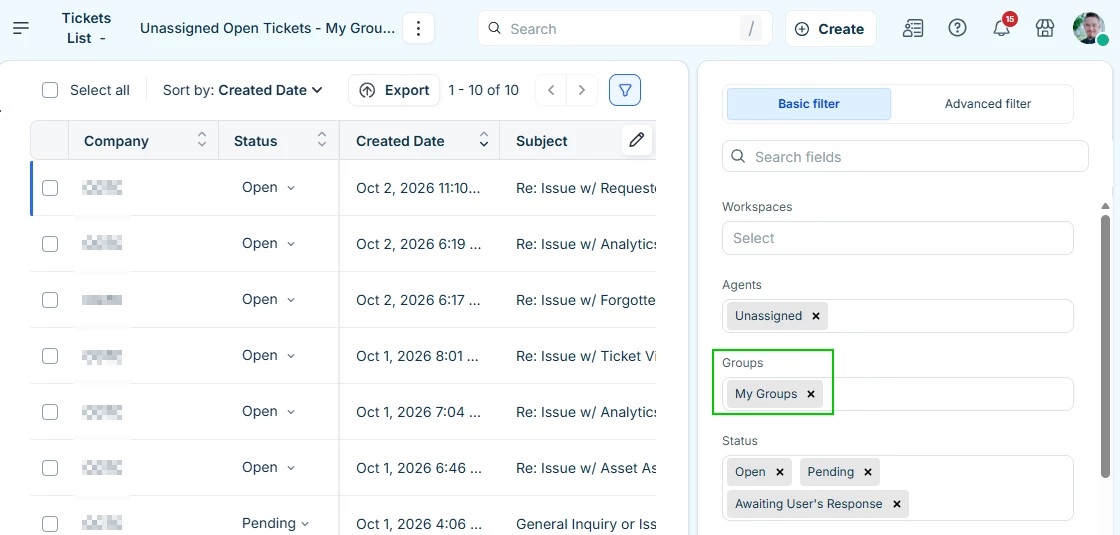
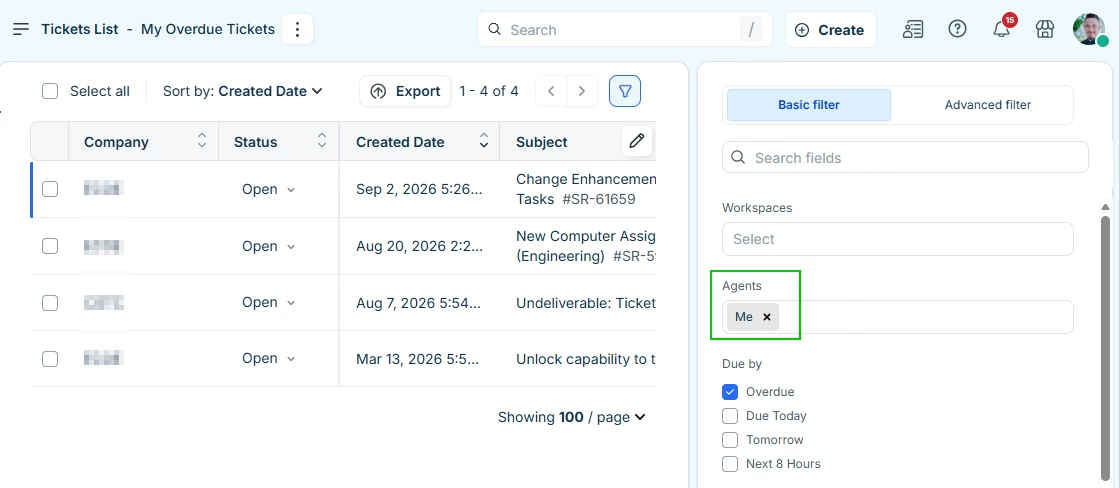
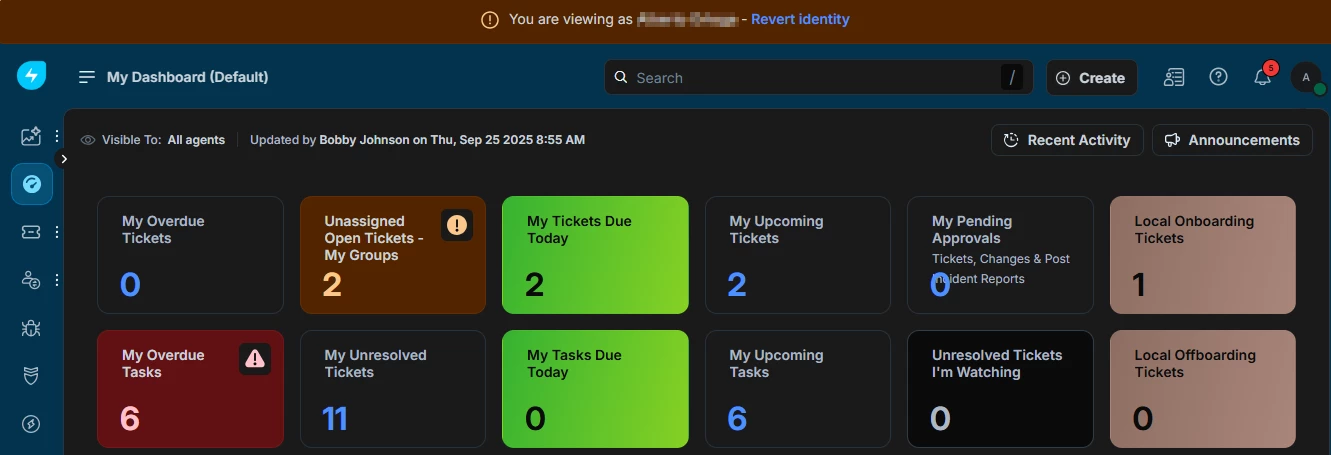
I usually create a new “default” dashboard that is generic using ticket list view filters; for Agents, I set it to “Me”, for Groups, I set it to “My Groups”. This is a 1-time setup. I have a few different default dashboards depending on the agent's workspace, but the dashboard I create with “Default” within the name can be used by all agents.


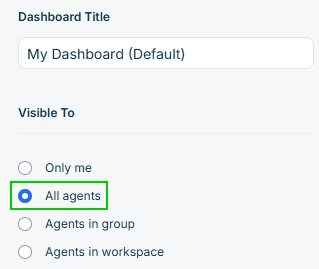
I make this dashboard visible to all agents.


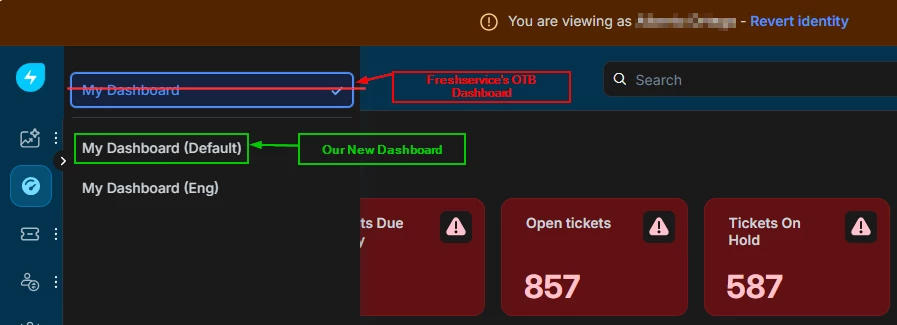
For new agent accounts, after creation I assume the identity of the new agent and change their dashboard from Freshservice’s OTB dashboard to the one labelled as default. When we do this, the last dashboard selected will be remembered.


New Dashboard


However, it would be nice to have a way to set it from settings, so we don’t have to do this for each new agent, but this is quick enough, takes about 30 seconds.


Forum|alt.badge.img+2
  • Contributor
  • Oct 5, 2026 7:15 AM UTC

I usually create a new “default” dashboard that is generic using ticket list view filters; for Agents, I set it to “Me”, for Groups, I set it to “My Groups”. This is a 1-time setup. I have a few different default dashboards depending on the agent's workspace, but the dashboard I create with “Default” within the name can be used by all agents.


I make this dashboard visible to all agents.


For new agent accounts, after creation I assume the identity of the new agent and change their dashboard from Freshservice’s OTB dashboard to the one labelled as default. When we do this, the last dashboard selected will be remembered.


New Dashboard


However, it would be nice to have a way to set it from settings, so we don’t have to do this for each new agent, but this is quick enough, takes about 30 seconds.

I tried this, but it keeps reverting to the “My Dashboard” instead of my updated dashboard. Right now our agents have to manually select the new dashboard every time they login. How do you force this ​@OG Bobby Johnson ?


OG Bobby Johnson
Skilled Expert
Forum|alt.badge.img+5

I usually create a new “default” dashboard that is generic using ticket list view filters; for Agents, I set it to “Me”, for Groups, I set it to “My Groups”. This is a 1-time setup. I have a few different default dashboards depending on the agent's workspace, but the dashboard I create with “Default” within the name can be used by all agents.


I make this dashboard visible to all agents.


For new agent accounts, after creation I assume the identity of the new agent and change their dashboard from Freshservice’s OTB dashboard to the one labelled as default. When we do this, the last dashboard selected will be remembered.


New Dashboard


However, it would be nice to have a way to set it from settings, so we don’t have to do this for each new agent, but this is quick enough, takes about 30 seconds.

I tried this, but it keeps reverting to the “My Dashboard” instead of my updated dashboard. Right now our agents have to manually select the new dashboard every time they login. How do you force this ​@OG Bobby Johnson ?

I do not see a way to force it. The only reason it remembers the view is if you do not require force log out. Consider increasing session time out. Although i agree, we shouldn't have to do this, if they offered the ability to ‘remember’ we would be good.