

Closed for Voting

Setting Business Hours

Related products:Freshdesk
  • February 23, 2016
  • 6 replies
  • 31 views

I have a few issues setting Business hours.

1) I'd much rather have to deal with 24-hour settings than PM/AM.

I'd also like to have both a 24:00 and a 00:00 option:

"From 20:30 to the end of the day" would be 20:30 to 24:00
"From beginning of day to 14:00" would be 00:00 to 14:00

I believe this format is more intuitive for most people, especially if English isn't their first language.

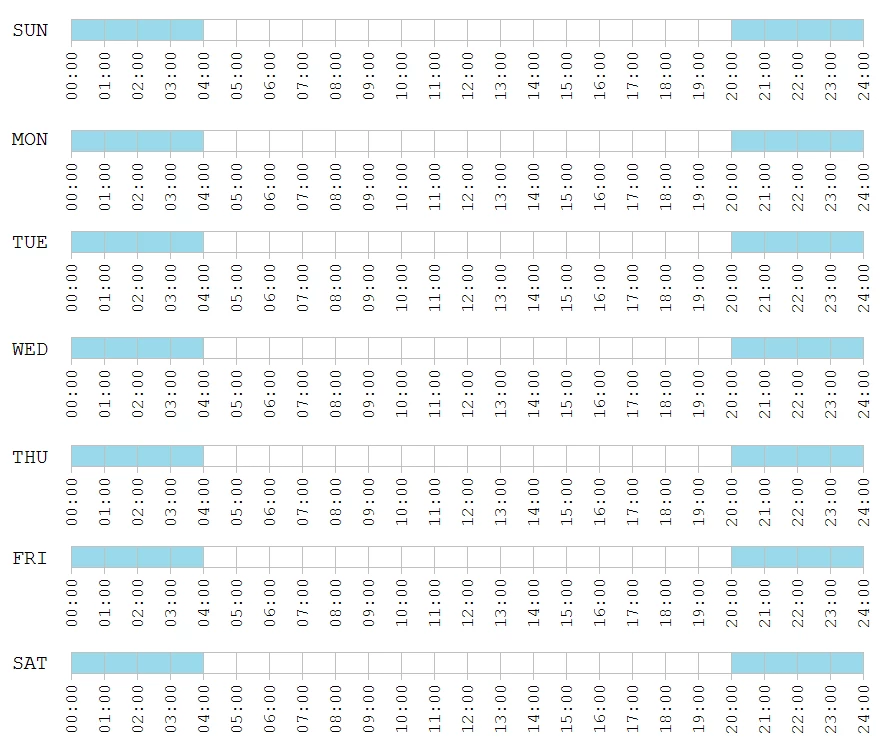
2) There are cases where you need to set more than one ranges of hours per day. Example 1: When a period traverses midnight, like when we have weekly shifts from 17:00 to 05:00 next day. For Tuesday I'd have to set 2 ranges: 00:00 to 05:00 (for the shift that started on Monday and crossed into Tuesday) and 17:00 to 24:00 (for the shift that started on Tuesday). There is no way I can set this in Freshdesk in just one Business Hours rule as it stands now. I doubt that the solution would be to create two complementary Business Hours rules as that would create a mess with, for example, SLAs.

In my view, a control where you slide the mouse and can select one or more time ranges per day would be much preferable (this is the type of control that Zendesk uses in Settings > Schedule > Business hours ).

Alternatively, even allowing for just 2 time ranges per day, using conventional drop-down controls, should be enough for the majority of your customers.



6 replies

  • Author
  • Contributor
  • February 24, 2016
Perhaps I am missing something here. Let me rephrase:
Is there a way I can set the Business Hours shown in the attached image ( the blue cells: shift starts at 20:00 and ends at 04:00 the next day ) in Freshdesk ?


hours_21752.png

Hi Thanos, 


Thanks for writing.


I am supposing that you have such a business hour because you are supporting customers from a different time zone. 

So, would configuring the business hours in the time zone of the customer would be possible  ?


Pulkit.


  • Author
  • Contributor
  • March 10, 2016

 Hello Pulkit,


that is a clever workaround. Yes, I can set the Time Zone for these Business Hours to something that would prevent them from crossing the boundary from one day to the next. If the Time Zone is only a point of reference for the Business Hours, then there is no problem with that.


  • Author
  • Contributor
  • March 10, 2016
Still, the way hours are selected right now is awkward. Example: I can't find how to set a 24 period for a day. The closest thing I got was 12:30 am to 12:00 pm (23 hrs 30 mins). Using a 24-hour clock (from 00:00 to 24:00) I would select 00:00 to 24:00 and be done with that. I firmly believe that a 24-hour clock, from 00:00 to 24:00, is a more intuitive option for most users.


You need to select 12:00 AM to 12:00 AM for that day. 


  • Author
  • Contributor
  • March 10, 2016

Thanks. This works.