Closed for Voting

Solutions templates

Related products:Freshservice
  • May 2, 2015
  • 27 replies
  • 307 views

Is there any way to establish a template, either through fields or just starter language, to ensure consistent formatting and content for authored Solutions?

27 replies

  • Contributor
  • August 11, 2015

Or even a template document that we can import back into the solutions that would keep images and formatting?


  • Contributor
  • August 20, 2015

We look forward to this function. Its currently a pain to keep the same format every time an article is created.


  • Contributor
  • September 29, 2015
How is this request progression through the dev channel?
Some feedback would be greatly appreciated.


  • Contributor
  • October 26, 2015

+1


  • Contributor
  • December 11, 2015

This feature would be extremely beneficial and much appreciated. We have a large knowledge base and it would be great to be able to make things a little easier!


venkat.balasubramanian
Community Debut
Forum|alt.badge.img+1

Thank you for your feedback. 


We understand that self-service and a robust knowledge base is important to maintain a high level of service to your customers. I can also see how this would be valuable when you have a large knowledge base and are trying to keep solutions content/styling consistent.


We'll look into this and update you in the coming weeks.  


Thanks,

Freshservice Product Team


Forum|alt.badge.img+5
  • Skilled Expert
  • February 1, 2017

Can we get an update on this? I was using a Google Wiki page for my Knowledgebase prior to FreshService and having this feature in that system really helped.


  • Community Debut
  • February 11, 2017

Would love an update on this as well. The current Solutions input is fairly cumbersome for your end users and would benefit from the ability to read directly from a Word document or the like. As our IT department begins to utilize the Solutions section, we are finding it difficult to achieve a standardized format that is to our standards/liking.


  • Community Debut
  • August 15, 2017

Hi, is there any update on this?


  • Contributor
  • February 1, 2018

I know you guys are hard at work, continuing the development of Freshservice, but it would be nice to see more frequent responses to community questions. There are many topics with multiple users posting the same question "is there any update on this." 


Forum|alt.badge.img+1
  • Apprentice
  • April 9, 2018

Any update fresh service?


  • Contributor
  • April 11, 2018

@Freshservice Team, this is a request that needs some attention. Having a template would be a major time saver. The knowledge base and nice, but you cannot copy and save from a Microsoft Word document into a solution article. The format gets all "jacked" up and you have to select the remove format tool and essentially start from scratch.


This looks like it been in development for 2 years now and requires an update on it's status.


  • Contributor
  • April 11, 2018

.


  • Community Debut
  • April 12, 2018

Echoing Clay, James and everyone else here. Can we get an update on this? This must be floating around in the backlog somewhere


  • Community Debut
  • June 6, 2018

Ditto, templates for solutions is a must have.  Please update us as to the development status.


Please implement templates! We've been waiting for so long...


  • Apprentice
  • January 14, 2019

The ability to start a solution article based on a predefined template would be wonderful. It would make it much easier to get my department to actually create articles, rather than me having to frequently remind them to do so.


  • Community Debut
  • January 18, 2019

indeed this would be very nice to have


  • Contributor
  • January 21, 2019

When writing Knowledge Base articles, we want to follow the KCS-style of delivering solutions. Since we can't create custom fields in Solutions, being able to use a template as a starting point would be a great workaround. It would help us ensure the needed information is included in an article and follow any specific stylings that should be used.


  • Contributor
  • February 1, 2019

Any update on this?  I can take any news, good, bad, ugly anything.

Thanks!


  • Contributor
  • February 1, 2019

Due to the fact that this has been open for 4 years and has had ZERO traction, I took it upon myself to make something that would work for us so I thought I'd share in case it helps anyone else!


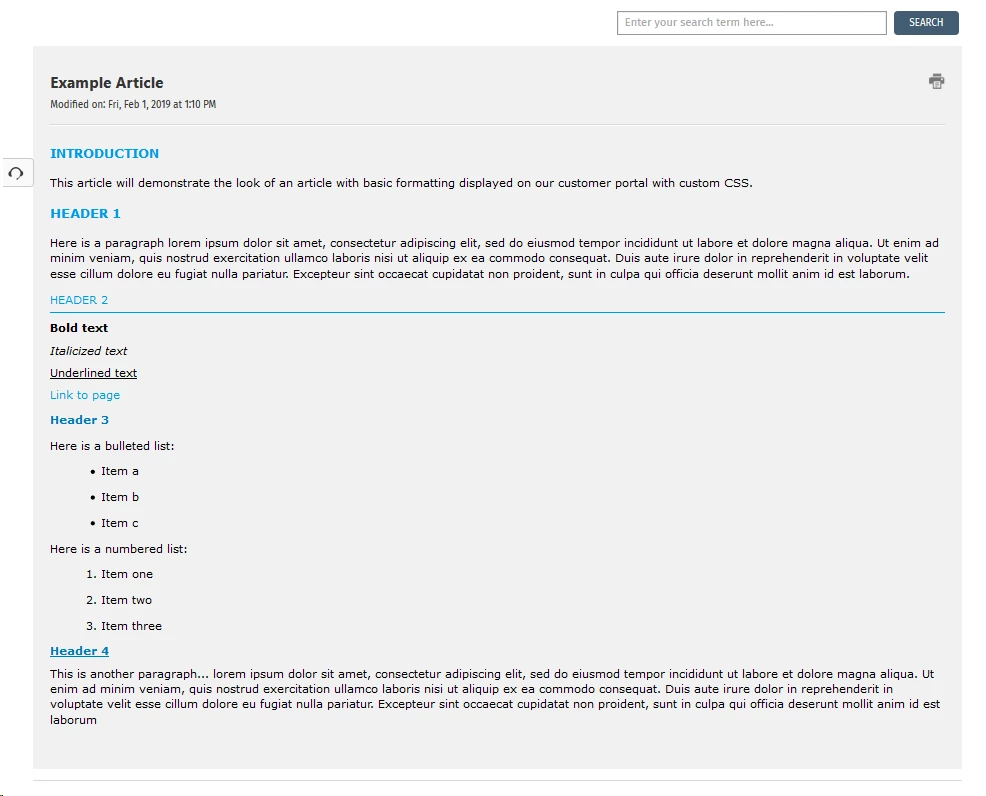
We wanted consistency across all of our articles, but struggled with the awful WSYWIG editor when it came to picking a font family, a size, and well, things just kept getting all mixed up and it was nearly impossible to fix it without having to remove all formatting and start from scratch. I don't know if the editor is still as bad, as we have moved away from any custom formatting aside from the basics (headings, paragraphs, bold, italic, underline, bullets and numbers). All our custom styles are now built into the article view page on the customer portal via custom CSS. Check it out...


In your portal, navigate to Admin > Helpdesk Rebranding > Customize portal > Stylesheet and add in some custom styles. These are the ones I have for our articles (feel free to use what I have or create your own!):


/* Article Body Fonts */
.articlebody {
  font-family: "Verdana", Times, serif;
  font-size: 16px;
  color: #000; }

.articlebody h1 {
  font-family: "Verdana", Times, serif;
  font-size: 18px;
  color: #0099e6;
  font-weight: bold;
  text-transform: uppercase; }

.articlebody h2 {
  font-family: "Verdana", Times, serif;
  font-size: 16px;
  color: #0099e6;
  font-weight: normal;
  text-transform: uppercase;
  border-bottom: 1px solid #0099e6;
  margin: 5px 0px 10px; }

.articlebody h3 {
  font-family: "Verdana", Times, serif;
  font-size: 16px;
  color: #0077b3;
  font-weight: bold; }

.articlebody h4 {
  font-family: "Verdana", Times, serif;
  font-size: 16px;
  color: #0077b3;
  font-weight: bold;
  text-decoration: underline; }

.articlebody p {
  font-family: "Verdana", Times, serif;
  font-size: 16px;
  color: #000; }

.articlebody ul, .articlebody ol {
  display: block;
  width: 100%; }

.articlebody ul li, .articlebody ol li {
  margin: 15px 50px;
  list-style-position: outside; }

.articlebody div, .articlebody p {
  margin: 10px 0; }


And here is what it ends up looking like (keep in mind that the CSS I provided is for the text, not the page background/layout)...

image


If you have any questions, feel free to ask!


  • Community Debut
  • February 4, 2019

 Dear Jess,


this looks indeed already a lot better then the default.

Unfortunately I don't see the stylesheet in our customized portal.


This would be awesome to have. Thinking of using the Solutions for internal system documentation, too.


Forum|alt.badge.img+8
  • Skilled Expert
  • February 4, 2020

I would also love to see a Solutions Templating option


chris.young
Community Debut
  • Community Debut
  • August 15, 2022

It’s insane that this request is 7 years old and the formatting tools and lack of templates is still a thing. Where is the dev team on this? And why are all of these functions available in Freshdesk? Can there be just a little bit of code/feature sharing? Even the formatting tools in this text box that I’m typing in now are massively better than the FreshService tools.