

New Idea

Swap between public and private note

Related products:FreshdeskFreshservice
  • May 2, 2025
  • 5 replies
  • 90 views

Karel_Vlček
Top Contributor ⭐
Forum|alt.badge.img+5

Hi,

this is an easy thing and it will help to all of distracted technicians, who just add a note and realize that the note should be public from private and vice versa. If it will be possible in no more than two clicks, it will be great!.
In these days you have to delete the note and write it again with the correct private/public settings.

Thanks :)

5 replies

mskotko
Top Contributor ⭐
Forum|alt.badge.img+6
  • Top Contributor ⭐
  • May 2, 2025

Not sure if this fits your communication model but we use “reply” for things that are supposed to be public and “note” for things that are private. Reply has a better template for communication and its easier than trying to remember to tick a box.


Karel_Vlček
Top Contributor ⭐
Forum|alt.badge.img+5
  • Author
  • Top Contributor ⭐
  • May 5, 2025

Hi,

we use “reply” only if there is a need to communicate with the requester user. Notes are usually used to track the progress in the ticket. Sometimes you just want to inform co-technicians sometimes requesters too.


mskotko
Top Contributor ⭐
Forum|alt.badge.img+6
  • Top Contributor ⭐
  • May 5, 2025

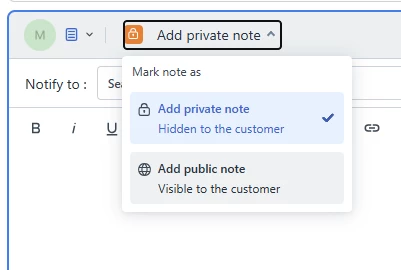
Understood. It is technically only two clicks to get that private note over to a public one but your agents need to remember to do it. Click on add private note at the top then click on add public note.


Karel_Vlček
Top Contributor ⭐
Forum|alt.badge.img+5
  • Author
  • Top Contributor ⭐
  • May 6, 2025

Yes, it is. As you wrote, you have to “remember” every time. Because once you send it, it can’t be changed. And I don’t understand why? This is the first application, I know about, which prohibits changing of privacy setting on already sent items…

I just want to have freshdesk more user friendly and usefull tool which saves you a lot of time (even if you make a mistake).


mskotko
Top Contributor ⭐
Forum|alt.badge.img+6
  • Top Contributor ⭐
  • May 9, 2025

Now I understand. I suspect the issue largely stems from the automated email under Email Notifications for “Agent adds comment to Ticket”. When the note is submitted and it is set to public, it triggers that email notification. Fixing the portal visibility for the note is likely simple but having it go back and trigger the email command so the requestor actually knows there is a public note is probably more difficult. I hope they can find a solution for you.