Closed for Voting

System Status Alert & Important Message Banner

Related products:Freshdesk
  • February 1, 2015
  • 8 replies
  • 84 views

We are using FreshDesk for internal tech support requests at a school.


I would like some capabilities to let our staff know when systems are down or maintenance is being performed.


I will list a couple of capabilities that would be nice; since some are easier to implement than others, I would appreciate any combination of the following features:


  1. The ability to turn on a System Alert Message Banner that is prominently displayed at the top of the customer portal. It could be used to notify staff of known problems or upcoming maintenance. The background color and text size/color should be customizable.
  2. A System Status Tab on the customer portal which lists the status of critical systems. At the top of the page would be space where we could enter a message. Then it would be a grid of "stop light" type colored icons for each of our critical systems. Maybe with a small area for text input to clarify status condition. Technicians would be able to click on a system to change its status.
  3. The same as #2 above, but with the ability to dynamically read and update the status of each system based on information coming from a network monitoring app.


8 replies

aravind.sundararajan
Skilled Expert
Forum|alt.badge.img+12

Hi,


Although the option isn't available as a plug n play feature, it is still achievable using the portal customisation feature available on the Estate plan and upwards. If you need assistance in setting this up, please write to support(at)freshdesk(com) .


Cheers!


  • Community Debut
  • December 18, 2018

+1 on the original posting -- it would be very handy to have a simple toggle in the Portal customization setting, to enable a custom system message alert or status banner.  How is this achievable on the Estate plan and upwards (i.e., what's the process)?


mrenaud
Skilled Expert
Forum|alt.badge.img+6
  • Skilled Expert
  • December 21, 2018

Hello Aravind. We are displaying alerts about our System's Status on the customer portal for our customers. What we did is we customized the Header and use another application to change what is displayed (red, yellow & green lights images as well as status information). Since we are offering multilingual services, we also had to find ways to display the information depending on the user's language. However, it would be a lot easier if a solution like the one proposed here was native in Freshdesk. I am also curious as to what portal customization you were referring to, that might do the job, and how you would go about it?


aravind.sundararajan
Skilled Expert
Forum|alt.badge.img+12

@Michel@Adrian@Joel Customising the header information based on the user language is what I was referring to. You can customise the portal home or any other page to reflect the status information based on the user language. This isn't an option that you can find in the helpdesk settings but has to be coded (using HTML&CSS) in the portal pages.


We've recently launched Freshping, a free monitoring tool that can help you to track your websites' availability. We'd be integrating it with Freshdesk so that every time there's a downtime alert, a banner message starts showing up on the portal with the link to the issue on Freshping. Do you think a similar experience can work for the monitoring tools that you use?


Cheers!


mrenaud
Skilled Expert
Forum|alt.badge.img+6
  • Skilled Expert
  • January 3, 2019

@Aravind, thanks for the information. I took a look at Freshping and this is an interesting tool however, in our case, we need to monitor more than just ensuring that our servers can be pinged. We actually execute templates on our servers and ensure the document generation is successful. However, we have other servers that would only need this kind of monitoring. I will let our IT people take a look and see if that could be useful to them.


Best regards


aravind.sundararajan
Skilled Expert
Forum|alt.badge.img+12

Thanks @Michel. I certainly understand that you need to monitor more than just the availability of your websites/servers. How do you envision integrating your custom tools with the Freshdesk portal?


Cheers!


mrenaud
Skilled Expert
Forum|alt.badge.img+6
  • Skilled Expert
  • January 3, 2019

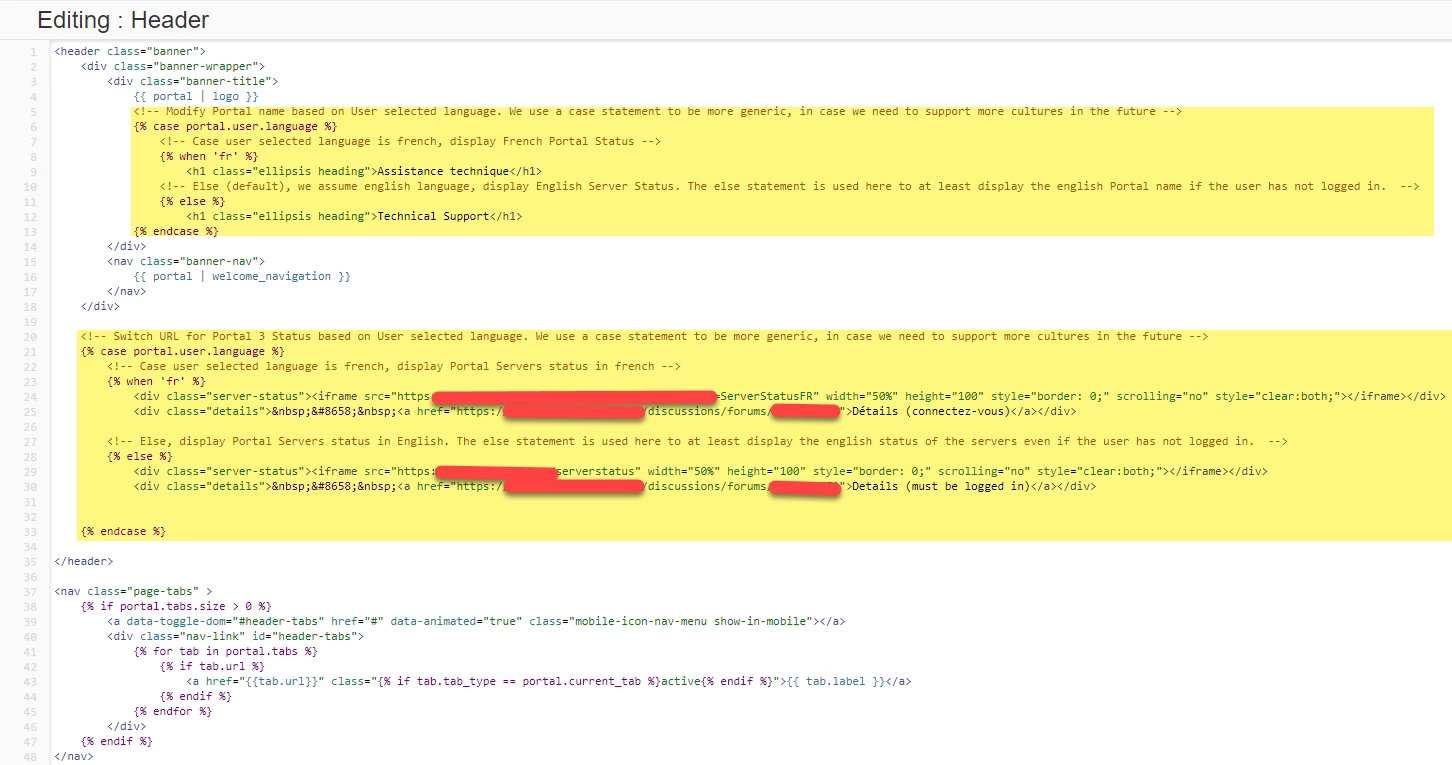
Hello again @Aravind. It is already integrated, we use an iframe to display the information in the Header, sourced from our. Here is the code we use:


image


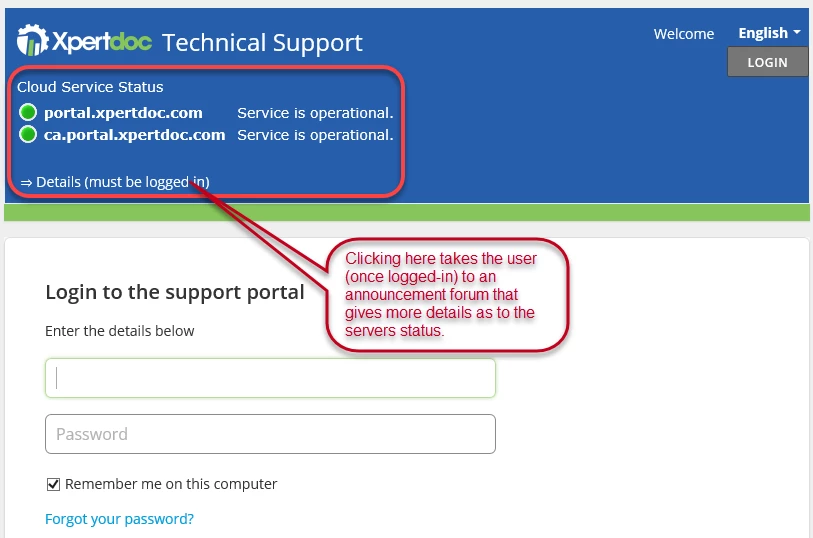
To change the status information we use an external application and when required we change the status manually in that application. The code in the Header simply fetches the text and the correct status indicator image (green, yellow or red, depending on the status of our servers) and displays it in an iframe, in the Freshdesk's header. The header also provides a link that takes the user (once logged-in) to an announcement Forum in the Helpdesk that gives more details as to the servers' activities. Here is how it looks to our customers:


image


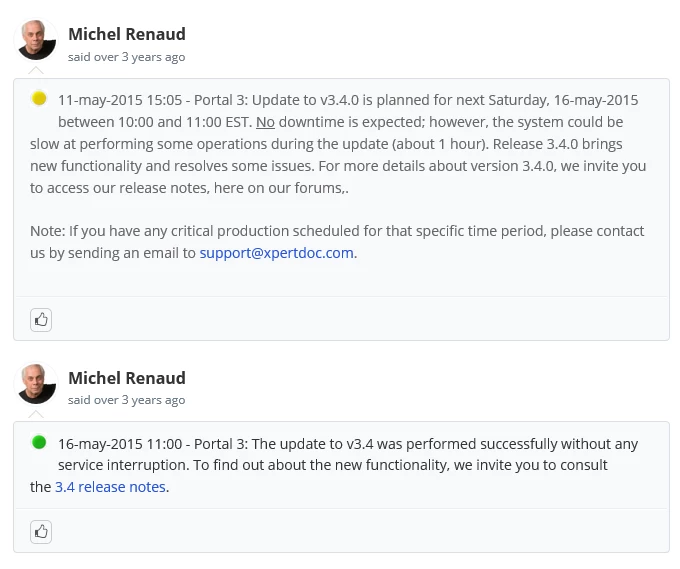
Here is a sample of the forum information (filled manually, of course):


image

Of course, it would be much easier if this was available natively within Freshdesk. It is a quite a tedious task having to login to the external application and manually changing the status as well as entering the details in Freshdesk's forums, and also sending an email to a bcc distribution list to all customers' primary contacts. On top of that, since the Freshdesk forums are not yet multilingual, we need one forum for each language we support (two at the moment, four in the future). Fortunately, our servers seldom fail, most of the warnings are for updates.


Hello All,


Thank you for writing! We appreciate your feedback and perspective.


We'll keep your suggestions in mind and reach out to you if there are any updates.

@MichelGlad you were to achieve it.


Cheers!