


We are using Freshmarketer as part of Freshworks CRM. When we are drafting either a Journey or a Campaign email, we can send a test using the “Send Test” button in following dialog:
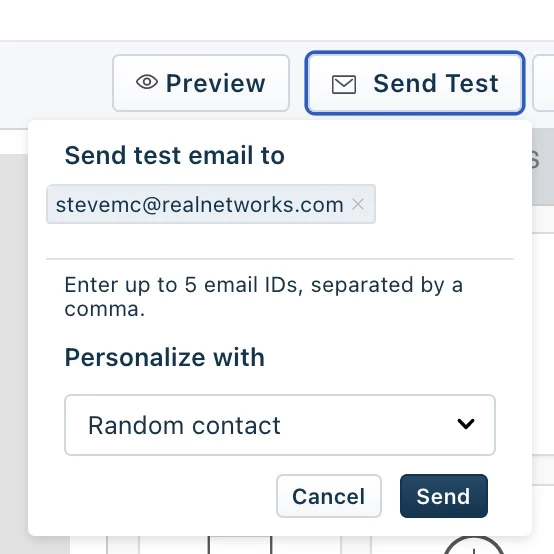
This is a very convenient way to test the copy, layout, formatting and Merge Tags for the email.
One problem we have found is that Merge Tokens will not be filled in if the Journey or Campaign that you are working on only represents a small cohort of the entire Contacts database. It would be extremely useful to be able to pick a specific contact to use to personalize the email when sending. This would be of use both in journey and campaign emails.
A little more background on why this would be useful:
Here is the journey we developed for managing our online training program:
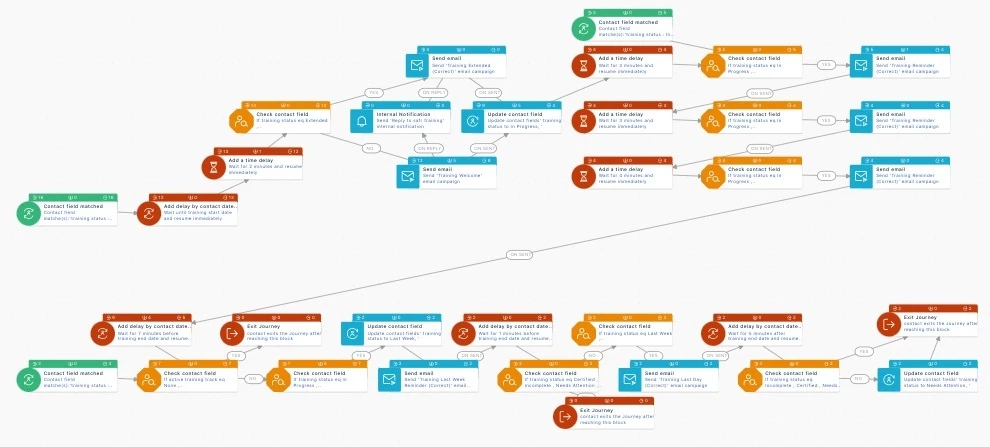
There are 5 different emails sent as part of this journey (welcome, reminder send 3x, “Last Week” reminder, “Last day” reminder and a Certificate email. Optionally there are also “Course extended” email. There are many steps in between and conditions that must be met that determines if the email is sent or not.
Each email has Merge Tags specific to training program (Training start date, Training end date, Training track and current progress.
This journey depends upon attributes that will only be populated for subjects who are registered for training. We have 70,000 contacts in our DB. Thus, when sending a test email using the “Send Test” button (shown above), the option to “Personalize with Random contact” will almost certainly not include values for the Merge Tags.
Today the way to test Merge Tags to make sure they are correctly populating in the email and formatting looks good with the values populated is to start the journey with a specific test subject. And then ensure that the conditions are sufficient so the test subject reaches each email in the flow.
Feature Request: To make the process of testing the email easier, we would like to be able to pick which contact to personalize the email with. We would like the “Personalize with” dropdown to allow search and then select which contact to send the test email to. Similar to how adding contacts to Deals works.
Hope that clear.
Note; This is more of a nice to have feature because we are able to test the way things are today. But I think this would make the product better and easier to use for cases like ours above..