Closed for Voting

Ticket fields on Portals with different language

Related products:Freshdesk
  • June 6, 2018
  • 9 replies
  • 43 views

Hi,


We currently run two different portal via FD, in each their language, Danish and Swedish. 


I have edited the ticket fields for what customers need to fill out when submitting a support ticket. 

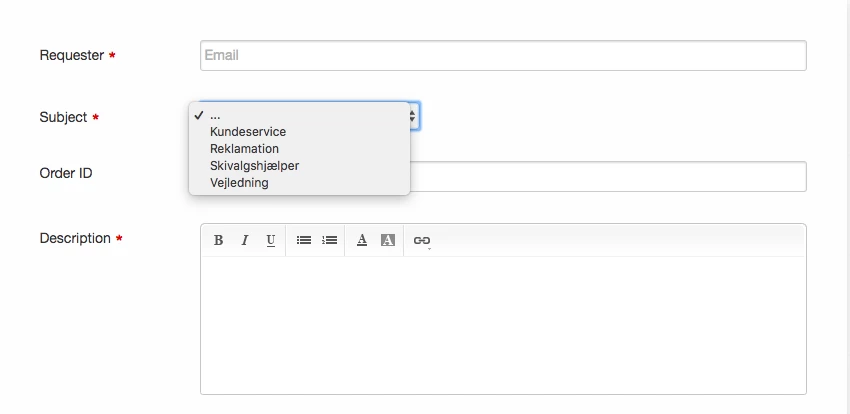
One of the tickets field is a drop-down menu linked to each support group with us, in order to place each subject in the right support group.


However, ticket fields and groups are all linked back to the main language we have on our freshdesk account, which is quite inconvenient when our two FAQ portal are run in each their language. To give an example, the drop-down menu in question is currently for our support groups, which have been named in Danish, but for our Swedish FAQ portal, we need this drop-down menu to show support groups in Swedish. 


Can this in any way be changed so that we have the ability to change languages for ticket setup on each of the portals, or do we need completely different FD accounts for Danish and Swedish to make this work?


Thank you in advance. 


/ Danni
sk_c3_a6rmbillede2018-06-06kl.09.09.18_33125.png

9 replies

aravind.sundararajan
Skilled Expert
Forum|alt.badge.img+12

Hello Danni,


This can be done using Portal Customisation if you've subscribed to either the Estate or the Forest plan. All you have to do is to identify the element ID and then use jQuery to change the label value. Here's a sample on how you can modify the value for a dropdown field if the user loads the new ticket screen in French.


English version:


If the user loads the screen in French, here's how the options are displayed:


Code snippet:


<script>
   jQuery(document).ready(function() {
     var url=window.location.href; // to find the current url of the user
     if(window.location.href.indexOf("/fr/support/") > -1){
     jQuery('#helpdesk_ticket_custom_field_cf_dropdown_797184 option:contains("First Choice")').text('premier choix'); //jQuery to change the value label

 jQuery('#helpdesk_ticket_custom_field_cf_dropdown_797184 option:contains("Second Choice")').text('seconde choix');
     }

});

</script>


Cheers!


  • Author
  • Contributor
  • June 6, 2018

Hi Aravind,


Thank you very much for the reply :-)


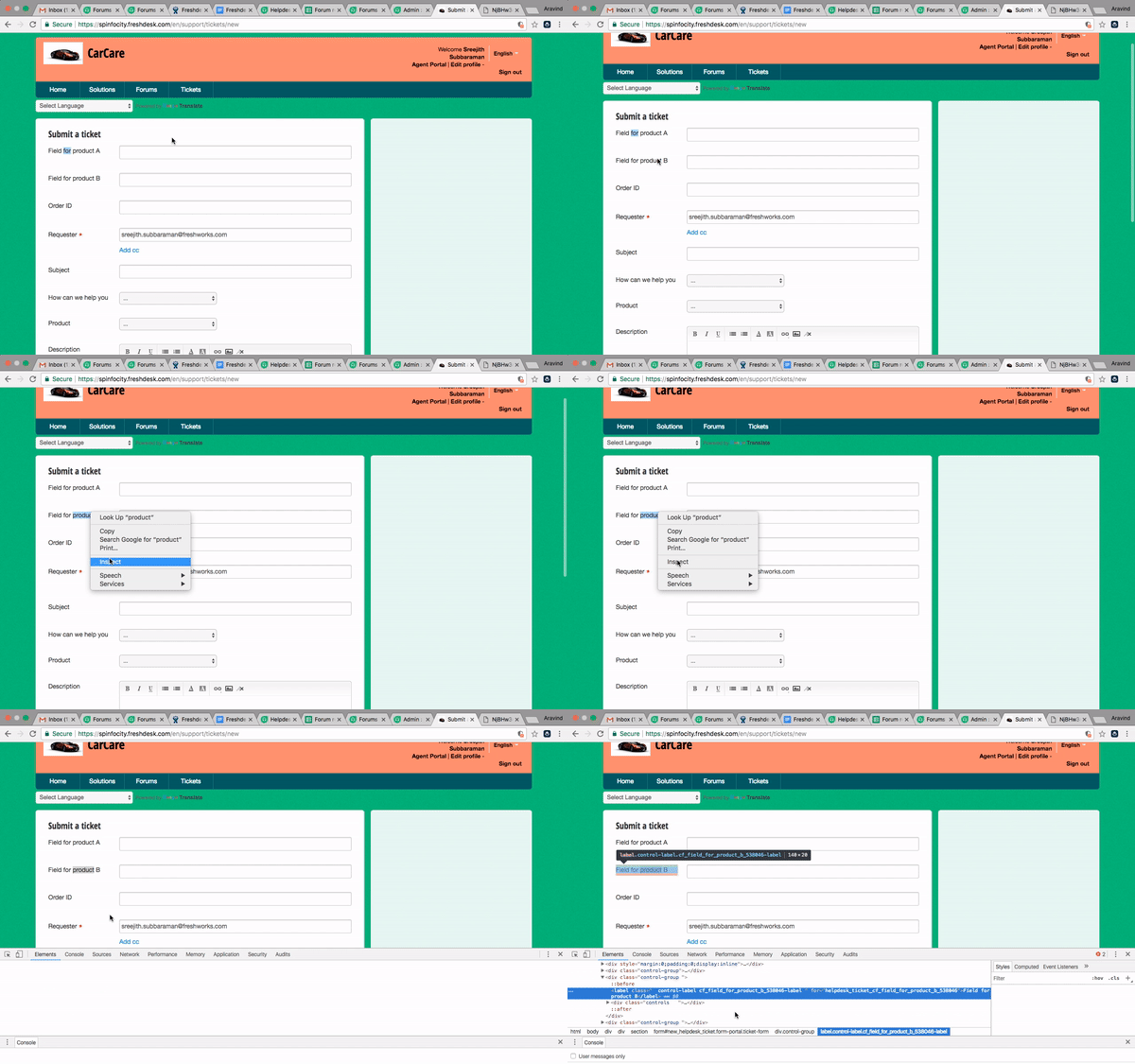
In the code snippet you have attached, the value "797184" I suppose links back to the specific drop-down menu. But how do I identify this value for our specific drop-down menu?


aravind.sundararajan
Skilled Expert
Forum|alt.badge.img+12

Sorry Danni. I should have included this in my reply! Here's a video I made sometime back to demonstrate on how to pick the ID value for any element on the new ticket page.


Hope this helps!


Cheers!


  • Author
  • Contributor
  • June 6, 2018

I assume that, where I customize our portals, I have to insert this code, from Admin -> multiple products -> customize portal -> layout & pages -> portal pages -> new ticket.


This is the code we have in this field right now. Where do I need to insert the line of code you refer to?


<div class="container">

<div class="row" style="padding-top:10px;">

<div class="col-md-3 col-sm-3 col-xs-12">

<address class="get-touch">

<h1 class="hc_title text-uppercase">Kontakta oss</h1>

<div class="more-info">

<p><strong>Du kan kontakta oss här:</strong></p>

<p>Vår kundsupport sitter redo att hjälpa dig med dina frågor. Nedan ser du vårt telefonnummer och mailadress. Vi ser fram emot att tala med dig.</p>

<ul class="info-section">

<li><i class="fa fa-phone-square" aria-hidden="true"></i> <a href="tel: 87300634">040 606 08 03</a></li>

<li><i class="fa fa-envelope" aria-hidden="true"></i> <a href="mailto:shop@skisport.dk">shop@skidresor.com</a></li>

<li><i class="fa fa-map-marker" aria-hidden="true"></i> Damvej 114, 8471 Sabro, Danmark</li>

</ul>

</div>

</address>

</div>

<div class="col-md-9 col-sm-9 col-xs-12">

<section class="">

<h1 class="hc_title text-uppercase">{% translate ticket.submit_ticket_title %}</h1>

<div class="f-tick">

{% snippet new_ticket_form %}

</div>

</section>

</div>

</div>

</div>

<section class="sidebar content-light rounded-6 hide ticket-search" id="new-ticket-search">

<br>

</section>


Thank you.


aravind.sundararajan
Skilled Expert
Forum|alt.badge.img+12

You can add it right after the existing content, Danni. Since, it is a script that gets called on page load, the position of the script in this section shouldn't be a concern.


Cheers!


aravind.sundararajan
Skilled Expert
Forum|alt.badge.img+12

No worries, Danni! Amazed at how you managed to pull it off despite not being a coding expert :O I'm also not an expert by any means but just googled my way to arrive at this!


A slight modification will make your script to work - The numerical representation is required only when you're referencing an element and not for the options listed under it. So, it works when you just add 'helpdesk_group_id' instead of the current values.


As you can see from the screenshot, the element is referred as 'helpdesk_ticket_group__id'


So, here goes your modified code:


<script>

   jQuery(document).ready(function() {

     var url=window.location.href;

     if(window.location.href.indexOf("/sv-SE/support/") > -1){

       jQuery('#helpdesk_ticket_group_id option:contains("Kundeservice")').text('TEST');
 jQuery('#helpdesk_ticket_group_id option:contains("Reklamation")').text('TEST');

     }

});

</script>


Give this a try and hopefully it should work this time :)


Cheers!


  • Author
  • Contributor
  • June 6, 2018

Thank you! It worked perfectly. 


Haha, I'll try google next time, if I know how to phrase my search :-)


Thank you very much for your support in this matter. 


Have a nice day!


aravind.sundararajan
Skilled Expert
Forum|alt.badge.img+12

Thank you, Danni! I'll be looking forward to see you write some snippets and  make them available for the community ;)


Cheers!


aravind.sundararajan
Skilled Expert
Forum|alt.badge.img+12