Closed for Voting

Ticket fields per customer

Related products:Freshdesk
  • October 9, 2012
  • 13 replies
  • 33 views

It would be nice if (certain) ticket fields could be set per customer.

Example: for customer A I want an extra ticket field which indicates the website/project he's creating an issue for. This ticket field shouldn't be visible to another customer.

13 replies

  • Contributor
  • June 21, 2013

This is especially useful as we have specific requirements from certain companies that are completely irrelevant to others.


Alternatively, can I create different ticket pages with different questions available to the end user?


Hi Guys


If you're using Estate plan, this can be easily achieved


Based on different customers, you can create different forms and fields.

We've done a few samples in this site - 2 forms - duebysample.freshdesk.com


You can place these Forms anywhere using the Portal Customization feature and achieve this requirement.


Its a test site


regards
Vijay


  • Community Debut
  • August 13, 2013

Can you explain how this is done?


  • Contributor
  • August 27, 2013

Yes, please list how this is done.


  • Community Debut
  • August 29, 2013

I'm interested to know how this is done.


Me too...


  • Community Debut
  • May 21, 2014

I'm also interested in, where we can find a tutorial for that?


  • Contributor
  • August 30, 2014

Vijay this would be very valuable to me.  I see in your test site that all of the detail fields are the same once you click on the new ticket link.  Can that be customized?  Some guidance would be terrific.


  • Contributor
  • February 26, 2016

Hi,


How is this done, site doesn't work (Wants a login) so cannot look but see url variables used??


Thanks


Dan


  • Community Debut
  • May 30, 2017

Just wanted to bump this to see if we can get the explaination for how this feature works.


I'm also interested in this solution.


aravind.sundararajan
Skilled Expert
Forum|alt.badge.img+12

Hello,


This can be setup using Portal Customisation option available on the Estate & Forest plans. You can either use a custom contact field or the contact ID to identify the user to whom you'd like to show a different ticket form. Let me break this down here.


1. Create all the ticket fields (general & also specific to the customer) under Admin-> Ticket fields section. 


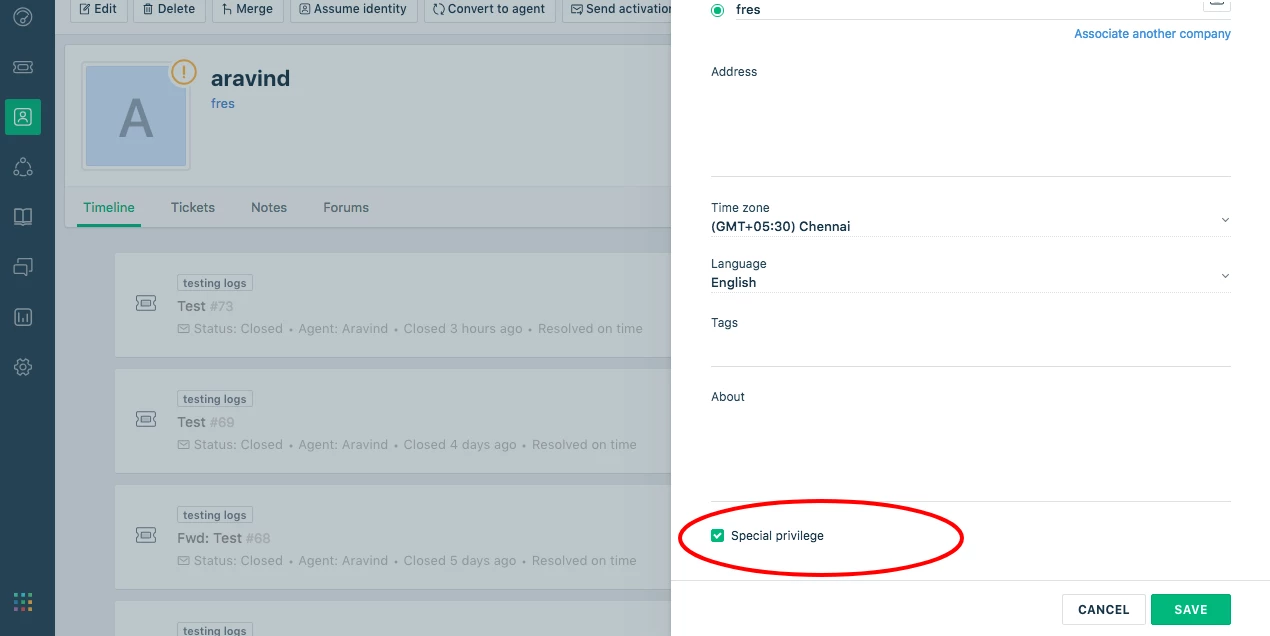
2. Navigate to Admin-> Customer Fields section and create a custom field, say a checkbox field "Special privilege". This property is used to identify the contact and so, you can edit the contact profile and check this option.


3. Now, go to Admin-> Portals -> Customise portal -> Portal pages and then select New ticket page. You'll have to identify the field name and the user custom field name prior to setting up the code. To find the ticket field ID, you can go the new ticket page on the customer portal and then use the browser console to get the value. For the custom contact field, it generally gets generated in this format: portal.user.cf_special_privilege


<script type="text/javascript">
jQuery(document).ready(function(){
{% if portal.user.cf_special privilege == false %}
jQuery('#ticketfieldID').hide();
{% endif %}
});
</script>


This will hide the ticket field from showing up for other users and display it only for the user who has the special privilege field checked.


Cheers!


  • Community Debut
  • April 11, 2019

Hi,


This is great, but is it possible to connect it to a custom field on the company instead of on the contact? We have a custom field on our companies called Customer group, and I want one of our ticket fields to be visible only for one customer group. Can I use the script above, but change portal.user.cf_special_privilege to something else?