Closed for Voting

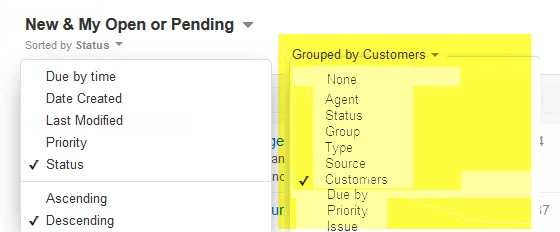
Tickets - Group by Company/Requester/Priority and then do a sort.

Related products:Freshdesk
  • October 25, 2012
  • 21 replies
  • 43 views

I would like to have the ability to group/sort by company and have an overlying grouping.

eg. group by priority and then sort by company.
or  
group by customer and then sort by priority.

21 replies

  • Contributor
  • October 26, 2012
Hi Erik

I think you're referring to multiple Sort in the Tickets page ?

Not sure if this is planned, but maybe you can can use the Ticket Filters now, select the Customer from the filter and sort by Priority and save this view.

regards
Vijay

  • Author
  • Contributor
  • October 26, 2012
Not exactly more like:

Company A
 
Ticket 3 (Urgent)
  Ticket 5 (High)
  Ticket 6 (High)
Company B
 Ticket 10 (High)
 Ticket 4 (Medium)
Company C
 
Ticket 1 (High)
 Ticket 2 (High)
 Ticket 8 (High)
 Ticket 9 (Low)

That way agents working on tickets for a particular client for a few minutes can solve cases in order of importance. And they dont have to change the filters every time.

Other examples would be.

Priority (Urgent)
 Ticket 3 - Company A
Priority (High)
 Ticket 5 - Company A
 Ticket 6 - Company A
 Ticket 10 - Company B
 Ticket 1 - Company C
 Ticket 2 - Company C
 Ticket 8 - Company C
 Ticket 9 - Company C
Priority (Medium)
 
Ticket 4 - Company B
Priority (Low)
Ticket 9 - Company C

Which is similar to a regular sort but instead of sorting by ticket number when priority is the same you then sort by Company (and finally by number)

This gives a better visibility of tickets especially once you get to more than 50 open tickets and you have > 6 agents working on stuff.

  • Community Debut
  • August 9, 2013

+1 for this functionality!


  • Community Debut
  • March 19, 2014
+1 for this as well!!


  • Contributor
  • November 2, 2014

This is exactly what we need!!


  • Community Debut
  • December 24, 2014


Adding a GROUP BY option will allow us to manage our people, products, issues, customers more effectively. 

This is important.


  • Community Debut
  • March 3, 2015

This option would be perfect for us and techs who look after certain customers


  • Community Debut
  • March 3, 2015

This is something we defiantly need as well. This option would give us a better overview of all our customers on one page.


  • Community Debut
  • May 29, 2015

+1, the ability to sort by company and then priority, or vice versa, would be great


  • Contributor
  • July 17, 2015

+1 here too.  This would be a very valuable addition.


  • Community Debut
  • December 1, 2015

This would be really helpful? Any update on if/when this might be added?


  • Contributor
  • February 14, 2016
This is the one thing that I have found so far that is missing for my company's use of the system.  I spoke with Support about this and they have indicated that this item is not being ignored but also not actively developed.  I don't know if it's just not a popular enough request or something that Freshdesk themselves don't find important for their own use.
For those of us who are MSPs (especially), identifying all of the tickets by each company we support is really important.  Filteringby those companies is one thing, but if you have hundreds of clients, only 10 of which might have tickets open at any one time, filtering becomes useful only when focusing on the client and not the open ticket list.

Please vote for the idea of sorting by Company or grouping by company so maybe it can get put in the development pipeline!


  • Community Debut
  • February 24, 2016

Im struggling with the ticket view at the moment. We find our support guys are calling a client dealing with an issue, and then calling back to deal with another issue when if grouping was available they could have had a better overview and dealt with multiple things for the same client at the same time. Im considering not taking up the product when the trial finishes because of this but as simple as it sounds this would really make all the difference.


  • Contributor
  • February 25, 2016
Billy - I get what you are saying.  In our case, filtering by client accomplishes what you are loking for in the product.  It's really in the "group meeting" where we go over all of the tickets of each company at once that it causes us a problem.  Personally, I don't really often "need" to sort by the company name or even group by them, but for our team meetings, it's a definite help.  I don't think this will stop us from picking up the product, but it seems like such a simple thing to do on the surface.
In fact, I setup a trial account with Klipfolio and I was pretty easily able to put together a list that looked like I wanted it to.  Here's the problem with using a tool like that:
1. I don't want to have to pay for another tool to get one feature (even though Klipfolio may show some others)
2. It's not an interactive list.  We often click through to tickets as we go through them as a team, make updates, and often close them as we go through them.  It's not unusual for us to put updates in 10 tickets and close 3 or 4 in this meeting.  So, a non-interactive "report" is not what I'm looking for.
This just seems like it would be a pretty easy report to put together.  With the tables seemingly setup such that the ticket has the customer name on it, the customer has the company ID on it, and the Company ID has the company name associated, it's not really a far cry from pulling together a pretty quick table.
In fact, I'd like to see more admin side configuration/customization in general.  This would be just one simple example. 


Using the filters for this is cumbersome as you have to create filters for every clients. 


It would be absolutely beneficial to be able to automatically sort by client and then priority or vice-versa, on the fly. 


Thank you.


+1 

Essa funcionalidade seria ótima!

Alguém conseguiu uma maneira de fazer isso?


I am bringing this back into light as well as this is a highly needed feature.


This would be a great functioanlity please make it available


aravind.sundararajan
Skilled Expert
Forum|alt.badge.img+12

Hello,


Thanks everyone for your suggestions, please keep them coming! We're working on a few ideas to improve your experience on the ticket list page. Please take a moment to fill this form and help us understand how you use the ticket views better.


Cheers!


Hi, what has happend with the survey?

Will you make changes to the view?


MythHunt
Community Debut
  • Community Debut
  • October 12, 2023

10 years later and still not here.

Makes me sad.