Closed for Voting

Times New Roman is the default font?!

Related products:Freshdesk
  • August 16, 2012
  • 56 replies
  • 125 views

Show first post

56 replies

  • Apprentice
  • October 16, 2013
Can you not just add this into the custom style sheet? You can over right the H1, H2, H3 etc. settings and set the font and size to what you want.  Or am I missing something?


  • Contributor
  • October 17, 2013

@Kevin- you can do that for customising the layout of the web page but not on email responses that are sent to a customer.


It seems like such a simple thing to do - I don't understand why heels are being dragged so much over this!


Uhm.. care to share more details about that?


Nice one, works for me ;) Thanks!!


  • Contributor
  • October 18, 2013

For me to! Great!


I'd also like to suggest a different kind of reply separation for emails. The indentation between consecutive replies, as it is shown in e-mail, is too large. Something like a blue side line with small spacing (as can be seen on other systems) works better, in my opinion. 


  • Contributor
  • November 13, 2013

We would certainly really appreciate being able to change the fonts and their size in the E-Mail and the notifications.


My mail box is being spammed by "suma"... bunch of "1" replies in several different topics...


  • Contributor
  • January 7, 2014

Hey Mathias,


Can you give me some pointers if you have some time?  I've made the changes as you advised however I find that although the font appears correctly in freshdesk it remains as times new roman in emails.  I've set the font-family to calibri...any pointers?


Thanks,

Grant


  • Contributor
  • January 7, 2014

Hi Mathias,


Thanks for your speedy response, looking in to it further I believe it may be an issue within Outlook - I've opened the email in a web browser and it is formatted with different text.  I ponder if it is a setting within Outlook 2013.


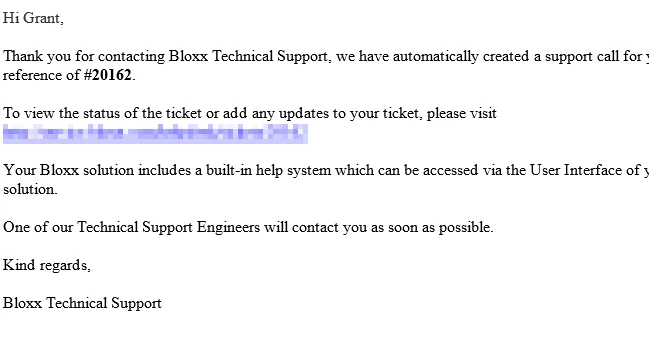
Email looks like the below: 


Please bring it font customisation. it should not be freshdesk who is worried about how emails are received by customers. For me i can see it shows as helvetica on reply emails to my customers. but the font is size 12. too big!!


  • Contributor
  • January 8, 2014

Guys,


I've had some great help from Vijay at Freshdesk, it turns out if you write up your template and design as you want you'll be able to get your email templates looking how you like.


Cheers,

Grant


Grant,


Could you clarify a bit more? Are you able to change font size and style? Where is it you are editing the template?


  • Contributor
  • January 8, 2014

Hi Ronnie,


Sure no problem.  Under admin > email notifications > requester notifications


Select the notification you want to modify.  First of all it is worth pointing out that you shouldn't copy this content directly to word, modify and then paste back in as I found it somehow managed to keep some of the original formatting which made for half formatted emails!


So, I went through the following:

  • Selected template
  • Copied content of template to notepad
  • Opened MS Word
  • Typed out content from scratch and modified the content.
  • Once I was happy with the template in word, I then deleted everything from the template in freshdesk and then pasted in the content copied from word and saved.

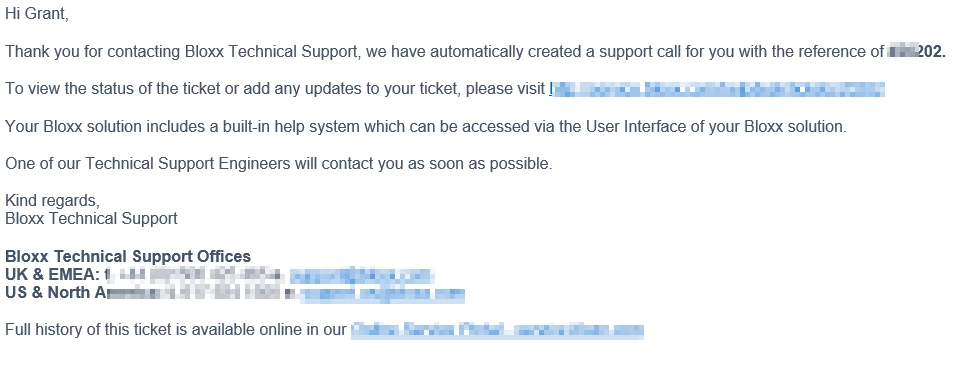
Tested and everything looks as it should such as:


I appreciate it is a bit long winded however it works perfectly well and will do as a workaround until the functionality is in the product.

Cheers,
Grant :)

  • Contributor
  • January 29, 2014

This is more than a request - it also creates weird bugs, I think, when copying and pasting canned responses, sometimes resulting in blank responses sent out to requesters. Please update the text editor options ASAP.


  • Contributor
  • January 30, 2014

We really need a full functioned text editor within the UI, I know we can bolden text etc however we need to be able to highlight text and change font sizes and types etc...


When inserting solution articles in to responses that have large headers (which work in solution view) but they do not work in emails unless we're able to change the font style..


Come on FD, this must be easy to implement - what is the latest?!?! 


:) thanks!


  • Contributor
  • April 12, 2014
We just bought 'Garden' and prepared to launch. This is a "show stopper" and we'll have to review if we can accept Times New Roman in our support email - being a company helping clients with consistant branded emails. Not the best recommendation if we cannot make our support emails follow our own style guide. I raised a ticket and the ticket was closed with information about a future release. No dates.

  • Community Debut
  • June 30, 2014

Grant Girdwood,


Is your workaround still working for you?  I tried it and the default font and font size still persisted on email notifications.  I was wondering if maybe the workaround stopped working when Freshdesk changed the defaults.


I would be interested in hearing from anyone else, if they have found a suitable workaround.


Thanks,

Murry


  • Contributor
  • July 14, 2014

I am noticing that changing font size and family seems to be primary requirement. We will take that up. How important is the ability to customise the html/css compared to having the ability to change fonts?


  • Contributor
  • July 14, 2014

Being able to change the font is our main priority.


  • Community Debut
  • July 14, 2014

Yes, ability to change the font, rather via a toolbar selection, or via HTML, plus the font size, is really what we need.  However, if you are going to tackle this, you might as allow full HTML customization.


  • Contributor
  • July 15, 2014

This is great!

Indeed, being able to change the font is the main priority. Full HTML customization is a pro.


  • Community Debut
  • August 28, 2014

please please please

the ability to customise the html/css


we want every mail shipping in our Corperateidentiy


  • Community Debut
  • October 3, 2014

 I agree completely. The feature doesn't even need to allow selection of different fonts initially, just a decent looking font to be used universally. Calibri seems to be the default for Microsoft products, why not go with something like that? Just not Times New Roman. It makes the software appear archaic.


Hello Everyone,


Account level font can now be modified  from Admin Tab > Email Notifications

All outing emails and replies will be in the selected font.


Hope this addresses the main concern. Thanks a lot for being patient with us. 

Do check out the font settings and let us know your feedback.