

New Idea

Toast Notification for Closed Tickets

Related products:Freshservice
  • August 31, 2023
  • 7 replies
  • 71 views

Leighanne
Skilled Expert
Forum|alt.badge.img+3

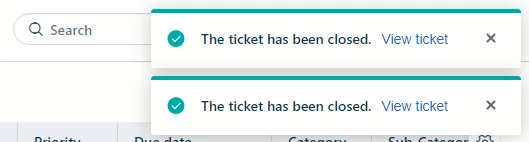
Currently, toast notifications will ‘go away’ on their own with the exception of closed tickets that will just stay there for seemingly ever. This is really frustrating to have to manually close out of every time we close a ticket. I like the toast notification and have had to click back into the ticket, so I don’t want it gone forever, just to go away on its own. Can we please make it so? 

Alternatively, if anyone has a solution to this issue, sharing is caring! Thank you! 😊
 

7 replies

Forum|alt.badge.img+1
  • Apprentice
  • September 14, 2023

Hi Leighanne,


In Belgium it’s quite common to “Solve” tickets and use an supervisor rule to close them automatically after 48 hours. 


nisarjohnysins
Community Debut
  • Community Debut
  • September 14, 2023

I completely understand your frustration with toast notifications. It's essential for them to be helpful without causing inconvenience. I recommend checking your notification settings to see if there's an option to adjust how long notifications stay on the screen raposo or if there's a way to dismiss them manually without having to click back into the ticket. If you can't find a solution there, it might be worth reaching out to the platform's support or community forums to see if others have encountered a similar issue and found a workaround. 


Leighanne
Skilled Expert
Forum|alt.badge.img+3
  • Author
  • Skilled Expert
  • September 14, 2023

Hi Leighanne,


In Belgium it’s quite common to “Solve” tickets and use an supervisor rule to close them automatically after 48 hours. 

Interesting, however, we would not close tickets with an arbitrary rule of time passed. My issue is with the notification. The notification only for closed tickets (as my image shows) does not go away until you “X” out of the notification. I’ve even kept a window open over night and the notification was still present, which is just crazy. I appreciate it’s presence, but after 3-5 seconds, it should go away.


I completely understand your frustration with toast notifications. It's essential for them to be helpful without causing inconvenience. I recommend checking your notification settings to see if there's an option to adjust how long notifications stay on the screen raposo or if there's a way to dismiss them manually without having to click back into the ticket. If you can't find a solution there, it might be worth reaching out to the platform's support or community forums to see if others have encountered a similar issue and found a workaround. 

The only notification options in the admin settings are for emails only and the only settings options for my “account” do not solve the issue. In fact, I turned off the “status updated on my ticket” option, and still have the “closed ticket” toast notification stuck on the screen. Again, I am just asking for the “close ticket toast notification” to disappear like the rest of the toast notifications. Below are the only settings options available:

“Notify me when:

Service Request sent for my approval

Approval decision on service request

New tickets created

Customer responded to ticket

Private note added to ticket

Public note added to ticket

Ticket assigned to my group

Ticket assigned to me

Status updated on my ticket

Solution article sent for my approval

Approval decision on solution article”


I have been told by support time and time again to post my change requests to these locations, so here I am. 🙂

-Leighanne


chipotlesmenu
Forum|alt.badge.img

Explore the full Chipotle menu with updated 2026 prices, delicious burritos, tacos, and bowls. Find nutritional info, combo deals, and catering options for all events. Make your meal choices easier with a complete guide to Chipotle’s flavors and offerings.


chipotlesmenu
Forum|alt.badge.img

Explore 2026 Chipotle Mexican Grill app updates with fresh, customizable burritos, tacos, bowls, and drinks. Find complete prices, nutrition info, and catering options. Make your Chipotle dining experience simple and enjoyable with a detailed menu guide for every craving.


chipotlesmenu
Forum|alt.badge.img

Access the full chipotle menu with prices 2026. Check prices, nutrition facts, and popular combo options. From burritos to tacos and sides, find all your favorites. Plan meals, events, or catering with an easy-to-navigate menu guide for every Chipotle enthusiast.


chipotlsmenu
Community Debut
  • Community Debut
  • April 29, 2026

This section helps you explore Chipotle burrito prices, calories, and nutrition information in one place. It’s ideal for visitors who want to compare options, check portion value, or plan a filling meal before ordering. With clear pricing and ingredient flexibility, Chipotle burritos remain a go-to option for both quick lunches and satisfying dinners.This section helps you explore Chipotle Menu prices, calories, and nutrition information in one place. It’s ideal for visitors who want to compare options, check portion value, or plan a filling meal before ordering. With clear pricing and ingredient flexibility, Chipotle burritos remain a go-to option for both quick lunches and satisfying dinners.