New Idea

Unable to group service requests together in a ticket view

Related products:Freshservice
  • November 8, 2024
  • 1 reply
  • 27 views

mfahey
Active Contributor
Forum|alt.badge.img+2

There is not a way to create a view of like service requests.

I.E. I have a service request form for chromebook repairs.


The “workaround” was to assign the tickets to a group and tag them. Then You can create a ticket view based on this.


However, with “work flow automator” you can’t reference any of the service request fields. 


Also from the service request, you can’t set the location of the ticket. It sets the location of the service request.


IDEA:

The ability to create a saved view based on “type = service request” and servicecatalog.formname = “chromebook repair”.


This would eliminate  all of the “hacks” that support keeps suggesting. 



1 reply

Forum|alt.badge.img+3
  • Contributor
  • December 18, 2024

There is not a way to create a view of like service requests.

I.E. I have a service request form for chromebook repairs.


The “workaround” was to assign the tickets to a group and tag them. Then You can create a ticket view based on this.


However, with “work flow automator” you can’t reference any of the service request fields. 


Also from the service request, you can’t set the location of the ticket. It sets the location of the service request.


IDEA:

The ability to create a saved view based on “type = service request” and servicecatalog.formname = “chromebook repair”.


This would eliminate  all of the “hacks” that support keeps suggesting. 



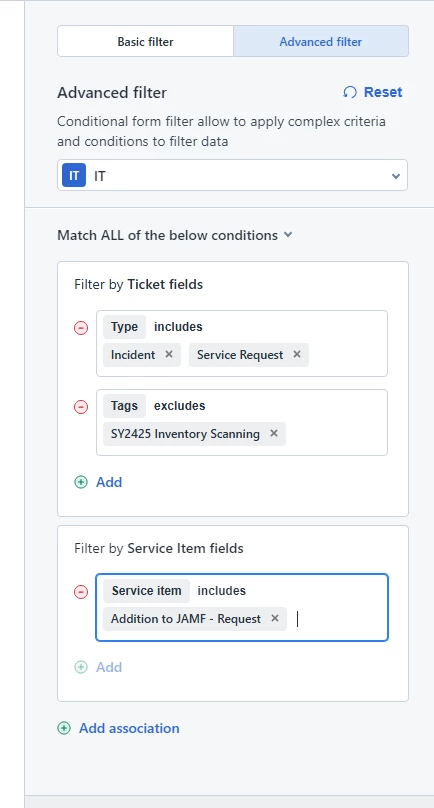
 You can do this already from your ticket lists. I recently discovered this myself as it wasn’t available previously. 

Open the ticket filter then go to Advanced Filter. You will need to click on add association then select Service Item fields. You will then be able to select the respective service item you want to filter by. 


Hope this helps.