

New Idea

Unread Alert Notification

Related products:Freshservice
  • May 19, 2025
  • 4 replies
  • 121 views

mbutler
Top Contributor ⭐
Forum|alt.badge.img+10

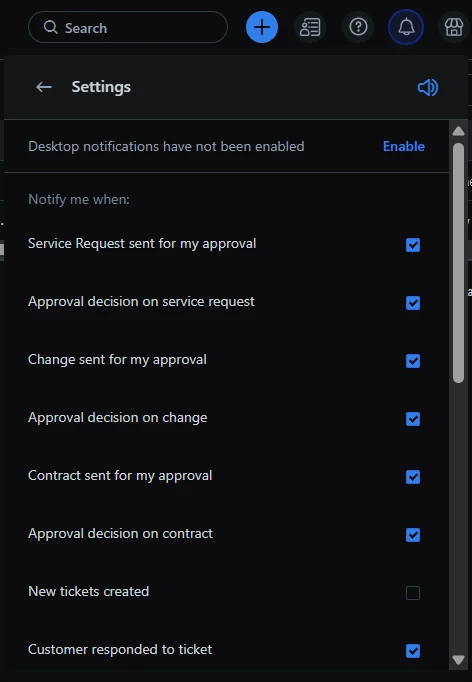
I have been building more and more alerts into FreshService. It has been really helpful to aggregate alerts and turn off ticket generation for much of the noise we used to get from our NMS. However, one thing I really would like to see is a “New Alerts” icon in the top right of FreshService. I’m alerted to new tickets & approvals, but not new alerts. I should have the ability to see that new alerts came into FreshService.

Notification Area

It would be nice to see the Alert icon here and have a notification bubble of the qty of new/missed alerts.

This is a very simple idea, but it will have a huge impact for our organization. You wouldn’t need to show it if the user isn’t using the Monitoring Tools, but if they are, I believe it should be there. These are alerts after all, so they are important to the organization.


4 replies

Forum|alt.badge.img+11
  • Skilled Expert
  • May 20, 2025

What a cool idea!

At the very least perhaps grant Agents the ability to monitor alerts via the dropdown menu under ‘Notifications’


Medic1334
Top Contributor ⭐
Forum|alt.badge.img+9
  • Top Contributor ⭐
  • May 22, 2025

If you’re following ITIL, wouldn’t it make more sense to have the alert generate an incident to accurately represent the service impact if you aren’t able to handle it via an automated mitigation?  Not sure of your circumstance, but for example, you have an alert that says HDD usage is over 90% on a device, you could have an alert based automation that runs a script to clear out a folder that is used for temporary file storage, etc. If this doesnt drop your usage below 90, you generate an incident to have someone look into it for the appropriate group for that device and the alerts are automatically hooked into that incident so the responding agent can see them.


mbutler
Top Contributor ⭐
Forum|alt.badge.img+10
  • Author
  • Top Contributor ⭐
  • May 22, 2025

If you’re following ITIL, wouldn’t it make more sense to have the alert generate an incident to accurately represent the service impact if you aren’t able to handle it via an automated mitigation?  Not sure of your circumstance, but for example, you have an alert that says HDD usage is over 90% on a device, you could have an alert based automation that runs a script to clear out a folder that is used for temporary file storage, etc. If this doesnt drop your usage below 90, you generate an incident to have someone look into it for the appropriate group for that device and the alerts are automatically hooked into that incident so the responding agent can see them.

We do follow the ITILv3 framework. In this particular case, a ticket isn’t warranted. We wanted to keep track of the reboots, but don’t necessarily need tickets to do it. The Alerts module was perfect for this since it aggregates alerts based on criteria. I’d still like a way to be notified when a new alert hits just through the UI.

I do have other alerts that follow the model where a ticket is created automatically; but those are different types of alerts. Think of them almost as syslog levels - I don’t need tickets for INFORMATIONAL. I might want them for WARNING. I’m definitely creating a ticket for CRITICAL.


chanley
Community Debut
Forum|alt.badge.img+1
  • Community Debut
  • June 5, 2025

An alert widget to drop on our workspace dashboard would be great as well!