Open : Open for Consideration

User Asset View

Related products:Freshservice
  • January 5, 2022
  • 17 replies
  • 556 views

Keats
Apprentice
Forum|alt.badge.img

We would like the user to be able to view their assigned assets via the support portal. We often get asked by managers and employees what assets they have on record.



17 replies

manns
Skilled Expert
Forum|alt.badge.img+10
  • Featured Influencer
  • January 6, 2022

@Keats this is a great capability for asset audits and identifying missing or unused assets that can be tracked down and redistributed.


JiriGrohmann
Skilled Expert
Forum|alt.badge.img+3
  • Skilled Expert
  • March 7, 2022

We would like the user to be able to view their assigned assets via the support portal. We often get asked by managers and employees what assets they have on record.



I agree this would be a very useful functionality to offer users/requesters the ability to review what hardware/software assets are registered under their name in the assets module in Freshservice - great for asset audits. 


raymondcanilao
Top Contributor ⭐
Forum|alt.badge.img+9
  • Top Contributor ⭐
  • March 10, 2022

Hope this will be considered  int next roadmap.  it will be beneficial for both users and agents.

But right now, if they really need to view all asset assigned to them, I suggest to go to the submit ticket page then click the ‘associate asset’, then all asset assigned to them will appear.


rashmi.nag
Skilled Expert
Forum|alt.badge.img+9
  • Skilled Expert
  • May 12, 2022
Updated idea statusNewOpen

DanielRuff
Top Contributor ⭐
Forum|alt.badge.img+9
  • Top Contributor ⭐
  • June 9, 2022

This could be very useful. Especially if you think of an additional field where they can confirm that they have the device or not and this confirmation gets written into the asset (separate field or an existing field like assigned on). If they are missing an asset a ticket for research gets created. 


zachary.king
Top Contributor ⭐
Forum|alt.badge.img+16
  • Top Contributor ⭐
  • June 9, 2022

We currently have created a service item that allows users to make this request. We do it on the backend and then send the results via a reply to the service request ticket. I have not looked to see if this could be automated, but it would be nice for the user to view this information inside the support portal at their convenience. +1 vote from me!!!


DanielRuff
Top Contributor ⭐
Forum|alt.badge.img+9
  • Top Contributor ⭐
  • June 9, 2022

We currently have created a service item that allows users to make this request. We do it on the backend and then send the results via a reply to the service request ticket. I have not looked to see if this could be automated, but it would be nice for the user to view this information inside the support portal at their convenience. +1 vote from me!!!

We will try something like this with the automation tool appian. We plan to get the users assets via API, list them in a view in appian with alle the options I mentioned. This will work for sure but it could be easier tbh. 


mmardini13
Community Debut
Forum|alt.badge.img
  • Community Debut
  • August 2, 2023

We currently have created a service item that allows users to make this request. We do it on the backend and then send the results via a reply to the service request ticket. I have not looked to see if this could be automated, but it would be nice for the user to view this information inside the support portal at their convenience. +1 vote from me!!!

Hey @zachary.king do you mind sharing the web request you used to list assets of a given user or requester? I’m trying to figure out how to list all assigned assets of a user in an offboarding ticket but for the life of me can’t figure it out. Any help would be greatly appreciated!


Forum|alt.badge.img
  • August 2, 2023

@mmardini13 Have you tried a query like:

api/v2/assets?filter="user_id: USER_ID"


The assets endpoint supports filtering by a ‘requesters’ user_id. This should give a list of all assets assigned to the person. https://api.freshservice.com/#filter_assets

You do however first need know the persons user_id. I usually do that by first querying the requesters endpoint by primary_email like so:

api/v2/requesters?query="primary_email: 'example.user@example.com' "


Consider that ‘agents’ can also be assigned assets and that your API credentials will not be able to query for any information on an agent unless the user attached to those credentials has the correct permissions to do so. (From memory you need to be able to manage agents in order to make queries for them). 


zachary.king
Top Contributor ⭐
Forum|alt.badge.img+16
  • Top Contributor ⭐
  • August 2, 2023

@mmardini13 Have you tried a query like:

api/v2/assets?filter="user_id: USER_ID"


The assets endpoint supports filtering by a ‘requesters’ user_id. This should give a list of all assets assigned to the person. https://api.freshservice.com/#filter_assets

You do however first need know the persons user_id. I usually do that by first querying the requesters endpoint by primary_email like so:

api/v2/requesters?query="primary_email: 'example.user@example.com' "


Consider that ‘agents’ can also be assigned assets and that your API credentials will not be able to query for any information on an agent unless the user attached to those credentials has the correct permissions to do so. (From memory you need to be able to manage agents in order to make queries for them). 

Thank you @mbft!

@mmardini13 This is exactly how I would do it. Give that a shot and I think you should see what you need.


mmardini13
Community Debut
Forum|alt.badge.img
  • Community Debut
  • August 3, 2023

Thank you @zachary.king & @mbft for the solution, that totally worked! I am able to query for the user id using this: 


/api/v2/requesters?query="primary_email: '{{ticket.actual_requester.email}}' "

but how do I use the User ID from that query in here? 


api/v2/assets?filter="user_id: USER_ID"

I’ve tried this with no luck:

https://brilliantearth.freshservice.com/api/v2/assets?filter="user_id:{{W1.id}}"

Thanks in advance for your help!


Forum|alt.badge.img
  • August 4, 2023

api/v2/assets?filter="user_id: USER_ID"

I’ve tried this with no luck:

https://brilliantearth.freshservice.com/api/v2/assets?filter="user_id:{{W1.id}}"

Thanks in advance for your help!


That query looks correct to me, assuming W1.id corresponds to a valid user_id that exists within your freshservice environment. What response are you getting?


mmardini13
Community Debut
Forum|alt.badge.img
  • Community Debut
  • August 5, 2023

Here is the WF that I’m using: 


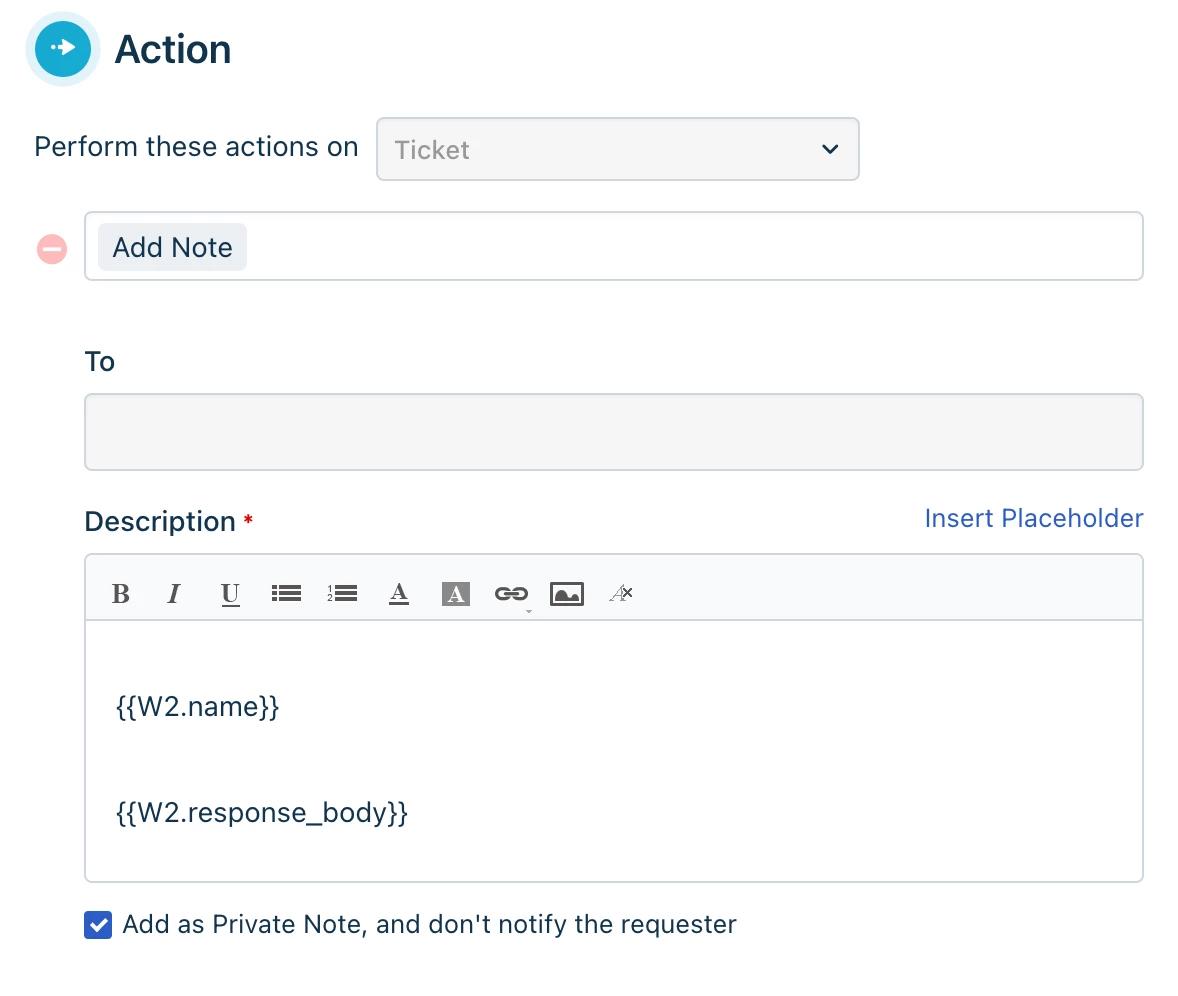
The last part adds a private note in the ticket:


and this is the result:

{"description":"Validation failed","errors":[{"field":"filter","message":"Given query is invalid, expected format \"keyword:value OPERATOR keyword:'string' OPERATOR keyword:>'yyyy-mm-dd' OPERATOR keyword:


Thanks in advance for your help!


Forum|alt.badge.img+3
  • Skilled Expert
  • August 25, 2023

This would be a great help as mentioned above, for auditing and letting the users know what they have.


Forum|alt.badge.img+4
  • July 12, 2024

2 years ago.. Zzzz Fresh :D


paulroberts89
Top Contributor ⭐
Forum|alt.badge.img+5
  • Top Contributor ⭐
  • August 23, 2024

Great idea!

This could potentially be taken further as well and provide an option to show the user other information about assigned access, for example: 

  • Applications assigned in SSO platforms
  • Membership of email distribution lists / mailboxes
  • The same details but for their direct reports - and allow them to manage the access from within the view (tying back to workflows, ticketing to trigger the outputs). 

Forum|alt.badge.img+1
  • Apprentice
  • June 5, 2026

I have placed my upvote for this much wanted feature.

To add weight to this, this was also suggested at a roundtable held by Freshservice in the Freshworks London office last year. All 10 other participants from a range of large public sector organisations agreed this would be a beneficial feature.