New Idea

When using tags in automation the tag needs to exist before you can use it

  • April 27, 2022
  • 3 replies
  • 32 views

Forum|alt.badge.img+2

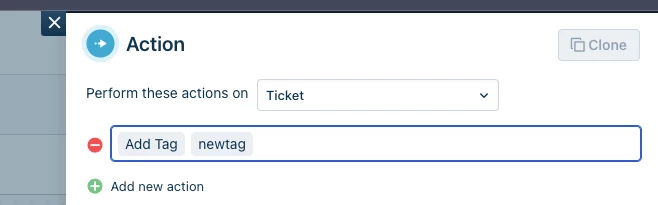
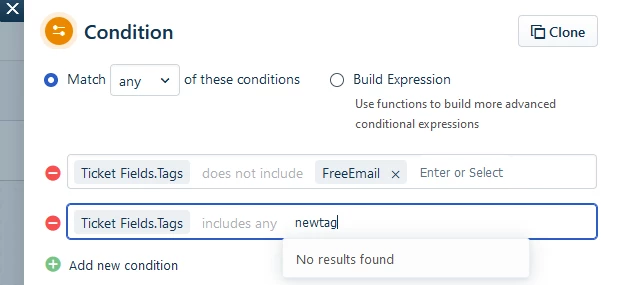
When using the automation designer you cant use a Ticket Fields.Tag for a tag that doesnt’ yet exist.
You need to create a ticket, assign it that tag before it can be used in the automation designer.

Would be alot more useful if you could just type the tag in there and it automatically create the tag to simplify the process.



3 replies

zachary.king
Top Contributor ⭐
Forum|alt.badge.img+16
  • Top Contributor ⭐
  • April 27, 2022

Hello @bmumpower. Just for clarity you are trying to run a conditional using a tag that doesn’t exist? Is that in anticipation that the tag would eventually be added to a ticket? The functionality exists to be able to add a new tag to a ticket using the action block.

If it is needed in the conditional block then maybe they can add the same functionality from the action block into the operations of the conditional block.


Forum|alt.badge.img+2
  • Author
  • Contributor
  • April 27, 2022

That is correct,

Basically i use the tags as “flags” that a condition has been met already
Such as for example if when the ticket is raised i want to notify the sender of something
Then i tag it as having been notified that way every update they do doesn’t re notify.

So, i wouldn’t want to add the tag because im seeing if the tag exists.

Workcase scenerio.

Check to see if afterhours Tag is set
If it’s not Email the user let them know that the ticket was received but if they need emergency assistance to call
Set tag of after hours so that way if they respond they don’t keep getting the email.

I could split this off into an action ticket raised vs ticket updated but in my mind it’s cleaner to have the whole process in one flow.

But yes, You can add a tag that doesn’t exist. But you cant check to see if the tag is on the ticket until it’s added to atleast 1 ticket.

Hope that makes sense.


zachary.king
Top Contributor ⭐
Forum|alt.badge.img+16
  • Top Contributor ⭐
  • April 27, 2022

Makes perfect sense, and a valid usecase should help others see the need behind this request. I like your use of tags, we have resulted to using form fields for ticket identifiers in a similar fashion. We just hide them from agent view. Yours seems cleaner. +1 vote from me!!!