Closed for Voting

Widget in context with page

Related products:Freshdesk
  • December 5, 2011
  • 4 replies
  • 49 views

It would be great to have the page URL where the widget was summoned is saved in the ticket's information. There we would know that person had that problem in that specific page (not conclusive, but it can help).


Also, I would like to be able to set a link such as: "Ask a question regarding this product". When clicked, the widget would show up already populating the subject field with "Question about product X".


4 replies

  • Community Debut
  • June 20, 2012
It would also be useful if such a widget accommodates links such as those on the Freshdesk knowledgebase pages:

Was this page accurate and useful? Yes / No 

This could be inserted in footer of the page template for our documentation site.  Of course the issue that is opened _must_ have a link to the page, and the site admin must be able to associate these issues with specific ticket types.  Server context is static pages served by Amazon's S3+CloudFront


  • Community Debut
  • August 26, 2013

Any news on this feature?  We would very much like the capability to see the users current URL, and/or access a current snapshot of the source of the page they are on.  This would be invaluable for supporting a web application.


aravind.sundararajan
Skilled Expert
Forum|alt.badge.img+12

Hello,


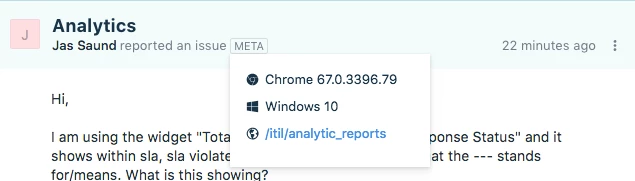
The tickets created through the feedback widget will bear the META tag in the description part where you'll see information about the browser, origin page, etc. 


Also, you can pre-populate the widget with specific input for fields based on the page/any other attribute.


Cheers!


Forum|alt.badge.img+7
  • Community Manager
  • March 10, 2020

Hello everyone,


Using the new help widget from Freshdesk, you can prefill the subject field based on a specific link that your customer clicks.


You can have a link on your website that says, "Ask a question regarding this product". When clicked, the widget can show the contact form with the subject field prefilled with any text.


This can be done using the help widget APIs:


Hope this helps,

Karthik