New Idea

Workflows associated directly with a service request

Related products:Freshservice
  • January 15, 2026
  • 4 replies
  • 186 views

Forum|alt.badge.img+4

A majority of our workflows start with “Service request is submitted → if requested item = “request” continue along this workflow”. Then in each node that we need placeholder information I have to re-select the service item to bring up the appropriate placeholders, its already established we are working with one specific request. Or, if I need a conditional further down the line it needs to be a two level conditional with the first level confirming the service item, and the second checking specific fields. 

If we could have workflows associated directly to a service item I think it could streamline creating the workflows, prevent mistakes, and organize the workflows tab. Instead of having 10+ service quests that all start with “SR -”Requested item” do these 4 things for a specific situation”, all of those could just be collapsed under “”requested item” specific workflows”. These could potentially be accessed right from the screen the request is created/configured from?

 

4 replies

Forum|alt.badge.img+4
  • Active Contributor
  • January 22, 2026

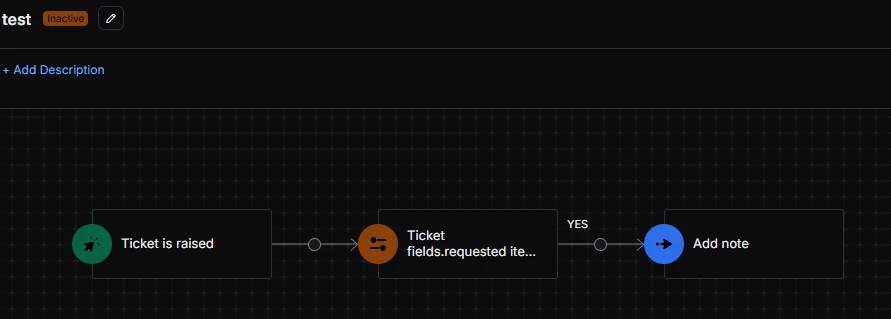
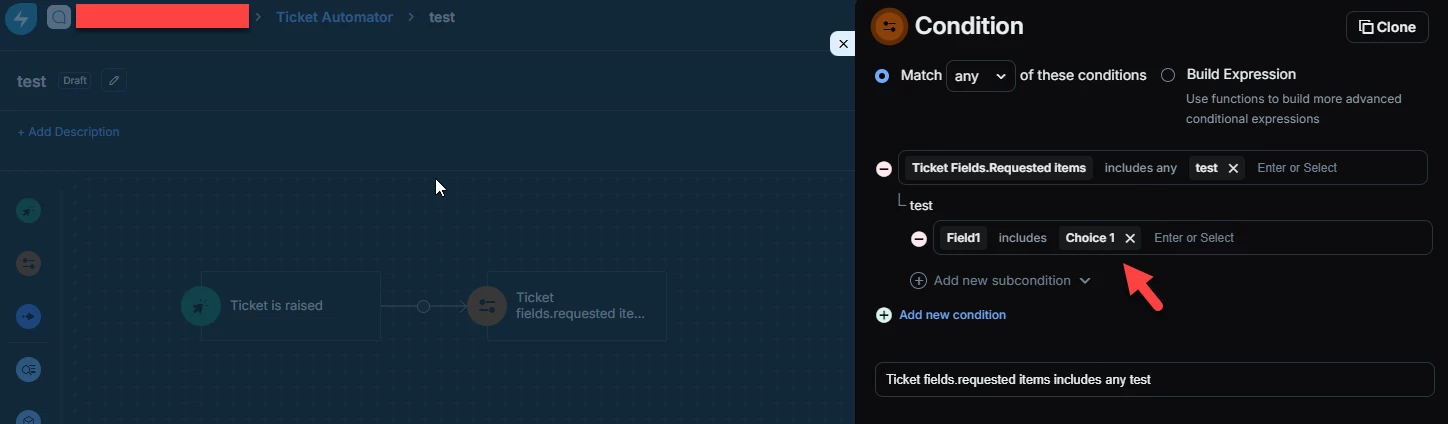
I hope I’m understanding your question correctly.  But, I think FreshService workflows already handle what you want.  

I made a quick Service Catalog item called ‘test’ with a field called single drop down field called ‘Field1’

So sample workflow would be: 

  1. Ticket Created
  2. If ticket created that is the service item ‘test’ and the user picked ‘Choice 1’ in the drop down field.
  3. If user did instruction 2.  Then a note is added to the ticket with the value of ‘Field1’ .  Which in this case is just ‘Choice 1’ 

Some screenshots below.

Overall Workflow


Forum|alt.badge.img+4
  • Author
  • Contributor
  • January 27, 2026

I hope I’m understanding your question correctly.  But, I think FreshService workflows already handle what you want.  

I made a quick Service Catalog item called ‘test’ with a field called single drop down field called ‘Field1’

So sample workflow would be: 

  1. Ticket Created
  2. If ticket created that is the service item ‘test’ and the user picked ‘Choice 1’ in the drop down field.
  3. If user did instruction 2.  Then a note is added to the ticket with the value of ‘Field1’ .  Which in this case is just ‘Choice 1’ 

Some screenshots below.

Overall Workflow


Hi,

The behavior you’re showing is what we are currently doing and what I’m suggesting improvements on. I’ve got one service request with ~20 workflows that all start this way. Many of them serve to just add a single task to the request depending on what was entered in a certain field, but some are longer, looking at multiple conditions..

My idea here is more a quality of life improvement on this. Instead of having to do this on all of these workflows, why not allow us to have workflows associated directly to the service request. Basically lump the “Ticket is raised and requested items is ___” in the trigger. Then in longer workflows the conditionals don’t need to be two step “Requested item is  ___ AND Field one is ___”, we’ve already confirmed the first condition in the trigger.

I think this could also serve to organize the “Workflow Automator” tab. I would love to take all 20 workflows I have associated to this one service request and put them into a collapsible folder of all requests associated to the one request. 


kpatterson
Top Contributor ⭐
Forum|alt.badge.img+8
  • Top Contributor ⭐
  • February 9, 2026

Add to this, would love if pulling fields to include on tasks, etc being added via the workflow didn’t require drilling in to the “requested item” again.  Makes for a lot of extra clicks.  Since we’ve established the requested item in the workflow already, would be great if those fields are automatically included in the fields available to choose from.


Daniel Söderlund
Top Contributor ⭐
Forum|alt.badge.img+14

I use Custom Object for things like this. Both in the service item and in the workflow to stream line automation. 

So one workflow + Custom object to control all my service items.