Closed for Voting

WYSIWYG HTML editor update

Related products:Freshdesk
  • March 25, 2014
  • 67 replies
  • 130 views

Show first post

67 replies

Would also love to try out the new editor. Could you also set me up with a demo account?


Lavanya


sajesh.krishnadas
Contributor
Forum|alt.badge.img+6

I will setup the demo environment and share the details shortly. 


  • Community Debut
  • July 29, 2016

This is perhaps too late to do much good, since they're apparently about to roll out an improved version, but I created a Javascript bookmarklet that resets the Redactor WYSIWYG editor to include the full range of toolbar buttons, including source toggle. The actual code is very simple:

for (name in window.redactors) { window.redactors[name].destroyEditor(); window.redactors[name].redactor(); }

You should be able to drag the link below onto your browser toolbar to create a bookmarklet:


REDACTOR FIX


You can then use this button on any page that has an active Redactor editor to reset the toolbar. Use the source toggle button on the far right to edit the HTML source. Note that it appears to be necessary to re-toggle back to HTML view before saving, if you want your changes to stick. I think. Maybe I'm just being paranoid.


Also, I cannot guarantee that the rest of the new toolbar buttons work. Use this at your own risk.


  • Community Debut
  • July 29, 2016

UPDATE: Well, the editor appears to have wiped out my "javascript:..." link target (no real surprise, as it could be a bit of a security risk). You can create the toolbar bookmarklet manually by adding a new page/link and using this as the URL:

javascript:for (name in window.redactors) { window.redactors[name].destroyEditor(); window.redactors[name].redactor(); }

Note the "javascript:" URI at the beginning. This is important to make it work correctly.


sajesh.krishnadas
Contributor
Forum|alt.badge.img+6

Just a quick update. We have been working on improving the copy-paste experience in the new editor and we are in the final phase of development. We will be ready to open up beta in your accounts soon. In case you want early access, do reply to this post and we will get in touch with you. 


Sajesh, can we try?


sajesh.krishnadas
Contributor
Forum|alt.badge.img+6

@Alessio, sure why not. Once we open up beta, I will drop you an email and get it enabled in your account.


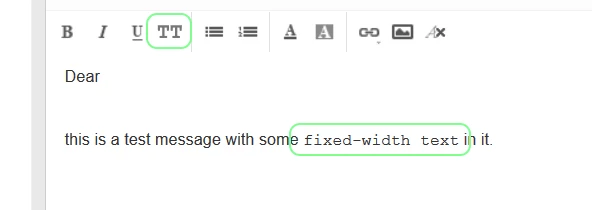
Nothing important but could there be support for marking text as using a fixed-width (monospace) font ? I would use this to indicate keyboard input, computer output ( screen or  logfiles ) and even pieces of code ( unless something more sophisticated is already included ).


sajesh.krishnadas
Contributor
Forum|alt.badge.img+6

Hi Thanos,


In our current editor, we support the font family 'Andale Mono' which is a monospaced font type. We will be adding the same in our upcoming new editor as well. Let me know whether you were looking for this. 


Dear Sajesh,
I am not talking about global preferences for fonts but for an option to include text with a fixed-width font in a reply or forward, as in this example:


PS: I do not want to set a particular font. What I want, in HTML terms is:
... with some <span style="font-family: monospace">fixed-width text</span> in it.</p>


Dear Sajesh,

I just noticed you are talking about the editor for Solutions. I was thinking about the editor for replies ( ticket view ). Sorry for that misunderstanding and please ignore my comments.


sajesh.krishnadas
Contributor
Forum|alt.badge.img+6

Not a problem at all, thanks for the clarification. You are right we have been talking about the Knowledge Base editor specifically in this topic. 


  • Community Debut
  • October 12, 2016
I'm about to completely redo my company's Solutions articles, and I'm planning on including lots of crosslinks. Is there a timeframe for the beta yet?


sajesh.krishnadas
Contributor
Forum|alt.badge.img+6

We will be opening up the beta mostly from tomorrow. I will drop you an email separately once we are ready with it.  


  • Contributor
  • October 18, 2016
Great news!

  • Community Debut
  • October 18, 2016

Sajesh,


I am in the middle of a bunch of solution edits. Can you please add me to this Beta?


sajesh.krishnadas
Contributor
Forum|alt.badge.img+6

Absolutely Jason, I have added you to the beta list. I will reach out to you once we are ready with it. 


  • Community Debut
  • October 24, 2016

Hello Sajesh,


We are interested in seeing the beta version as we are currently having issues with our knowledge base formatting. Can you please add me to the beta list ASAP? 


Hi Sajesh Krishnadas, the new editor is available for the new accounts? froala?


sajesh.krishnadas
Contributor
Forum|alt.badge.img+6

The beta version of the new editor is now available. We have started rolling out the early access for the requested customers. Let us know if you want it to be enabled in your account. 


  • Community Debut
  • November 8, 2016

Hi Sajesh, Please enable the editor in our account.


  • Contributor
  • November 8, 2016
Please enable this editor for my account. Let me details you need to enable this editor into our Freshdesk and any document related to this would be helpful.


sajesh.krishnadas
Contributor
Forum|alt.badge.img+6

We have enabled the new editor in your accounts and you should have received an email. Thanks. 


  • Contributor
  • November 11, 2016

Is this for knowledge base articles? Yes please! 


  • Community Debut
  • November 12, 2016

me too!