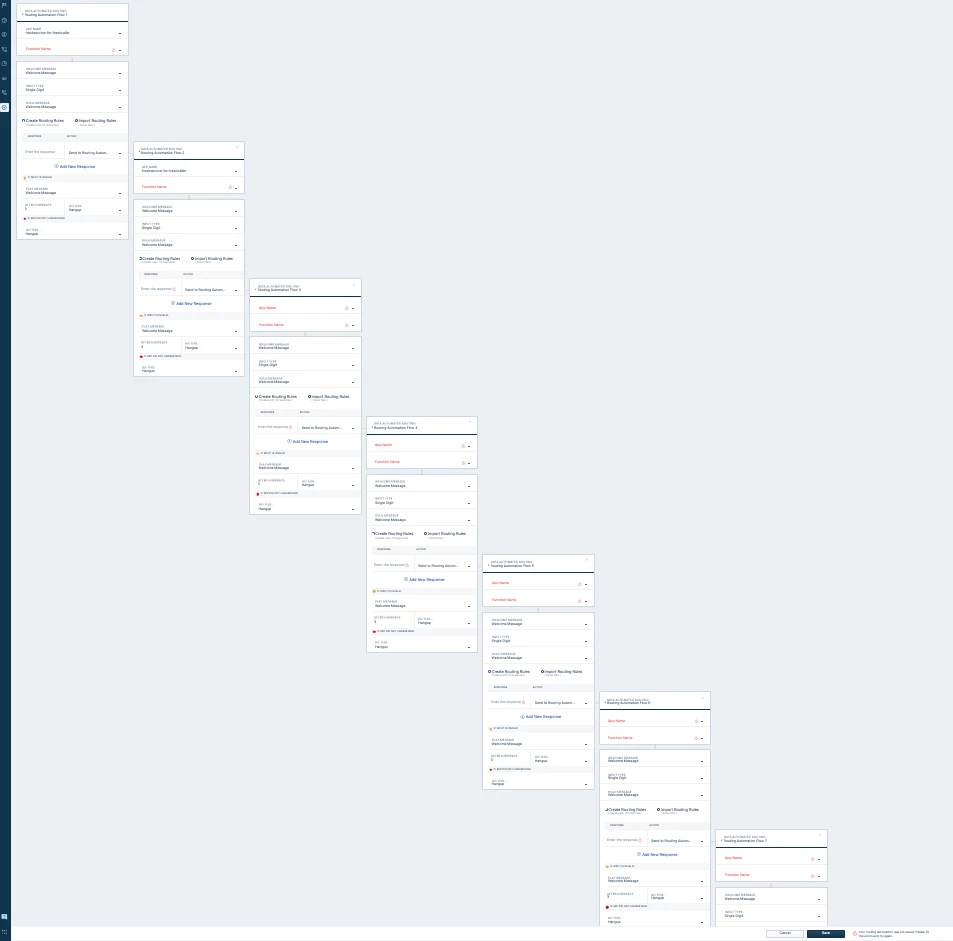
Hello. I’m making a call workflow in which I want to ask the customer a few questions and then send the answers to an API
For this, I need to store my customer’s answers somewhere. I didn’t find the way to do this in the call workflow tool.
As a workaround, I want to send the inputs to a database I’m running. But I can’t do this neither because custom actions can’t get more than value as input.
Does anyone know how can store my customer’s input?
Best answer by Arputha G
Hi @fayala123
Greetings from Freshworks Community! I hope you’re well.
Apologies for the delay on this thread but I’ve reached out to the Product Experts to furnish a solution for your requirement - sharing it below:
We can utilize the Routing Automation feature in Freshcaller. For this, we would need to build a custom app, such as a serverless application, that can be linked to your database to validate the input. We would need to take a custom app approach here as the entire use case is not feasible directly in Freshcaller, as you are looking to collect multiple inputs through different questions.
Freshcaller currently supports only one execution per request. As a workaround, if you need to ask multiple questions, you can route the call to another Routing Automation queue based on the response, which can run the same application.
This can be repeated for multiple questions, up to 15 iterations, which is our highest recommended value. However, storing of data and processing it entirely depends on the custom application as Freshcaller doesn't support direct integration of your database with the product.
For example, if the application responds with true, the call can be routed to the next Routing Automation flow, where the second question can be asked. If the response is false, the call can instead be routed to a different fallback flow.
The input can be passed from Freshcaller to your database using Custom Actions (Please note that Routing Automation is available only on the Pro+ plans).
The type of custom actions can be referred to here: https://developers.freshcaller.com/docs/routing-automation---custom-actions.
And about routing automation: https://crmsupport.freshworks.com/support/solutions/articles/50000005740-overview-of-routing-automation.
How does the routing automation call flow work with custom apps? The routing automation call flow/engine communicates with the custom app via APIs.
The agent receives an incoming call on the Freshcaller account.
The routing engine sends the function name and the caller's input (received via IVR) to the custom app through a callback method.
The app verifies the caller's input against your database and sends the response to Freshcaller.
Based on this response, you can configure relevant actions to take in the call flow.
In addition to the actions configured in the call flow, the app can also receive variables and pass them to Freshcaller as dynamic messages.
Quick Summary of above content:
Single-Execution Limitation: Each Routing Automation flow in Freshcaller handles exactly one input request (e.g., keypress, multi-digit, or speech) and returns one response. Collecting multiple data points sequentially in a single node is directly restricted by the schema/architecture.
Iterative Workaround / Chaining: The recommended solution for multi-question flows is chaining sequential Routing Automation flows. Flow 1 evaluates Question 1 -> passes response to flow 2 -> flow 2 evaluates Question 2 -> repeat (up to the recommended maximum depth limit of 15 chained flows) and then final routing to a call queue (Team).
We’d be happy to guide you on this further or have a discussion to help you chart out your next steps. Please shoot me a DM with your email address or you can directly contact us at support@freshdesk.com - we’d be right with you. :)
Greetings from Freshworks Community! I hope you’re well.
Apologies for the delay on this thread but I’ve reached out to the Product Experts to furnish a solution for your requirement - sharing it below:
We can utilize the Routing Automation feature in Freshcaller. For this, we would need to build a custom app, such as a serverless application, that can be linked to your database to validate the input. We would need to take a custom app approach here as the entire use case is not feasible directly in Freshcaller, as you are looking to collect multiple inputs through different questions.
Freshcaller currently supports only one execution per request. As a workaround, if you need to ask multiple questions, you can route the call to another Routing Automation queue based on the response, which can run the same application.
This can be repeated for multiple questions, up to 15 iterations, which is our highest recommended value. However, storing of data and processing it entirely depends on the custom application as Freshcaller doesn't support direct integration of your database with the product.
For example, if the application responds with true, the call can be routed to the next Routing Automation flow, where the second question can be asked. If the response is false, the call can instead be routed to a different fallback flow.
The input can be passed from Freshcaller to your database using Custom Actions (Please note that Routing Automation is available only on the Pro+ plans).
The type of custom actions can be referred to here: https://developers.freshcaller.com/docs/routing-automation---custom-actions.
And about routing automation: https://crmsupport.freshworks.com/support/solutions/articles/50000005740-overview-of-routing-automation.
How does the routing automation call flow work with custom apps? The routing automation call flow/engine communicates with the custom app via APIs.
The agent receives an incoming call on the Freshcaller account.
The routing engine sends the function name and the caller's input (received via IVR) to the custom app through a callback method.
The app verifies the caller's input against your database and sends the response to Freshcaller.
Based on this response, you can configure relevant actions to take in the call flow.
In addition to the actions configured in the call flow, the app can also receive variables and pass them to Freshcaller as dynamic messages.
Quick Summary of above content:
Single-Execution Limitation: Each Routing Automation flow in Freshcaller handles exactly one input request (e.g., keypress, multi-digit, or speech) and returns one response. Collecting multiple data points sequentially in a single node is directly restricted by the schema/architecture.
Iterative Workaround / Chaining: The recommended solution for multi-question flows is chaining sequential Routing Automation flows. Flow 1 evaluates Question 1 -> passes response to flow 2 -> flow 2 evaluates Question 2 -> repeat (up to the recommended maximum depth limit of 15 chained flows) and then final routing to a call queue (Team).
We’d be happy to guide you on this further or have a discussion to help you chart out your next steps. Please shoot me a DM with your email address or you can directly contact us at support@freshdesk.com - we’d be right with you. :)