Question

How to Prioritize Automation Rules in Freshdesk Without Conflicts?

  • March 12, 2026
  • 2 replies
  • 43 views

mrjohn-23
Forum|alt.badge.img+1

I’m trying to automate ticket assignments in Freshdesk, but I’ve noticed that some rules conflict and tickets end up unassigned or routed incorrectly.

Has anyone found a reliable approach to prioritize automation rules to avoid conflicts? How do you usually test them before going live?


2 replies

Forum|alt.badge.img+2
  • Active Contributor
  • March 13, 2026

hi ​@mrjohn-23,


Have you thought about implementing the "Waterfall" strategy for prioritization:
Freshdesk processes Ticket Creation and Ticket Update rules sequentially from top to bottom. Once a ticket meets the criteria of a rule and an action is triggered, it may be modified in a way that makes it eligible for a later rule, causing a conflict.

  • The Hierarchy of Priority:
    Hard Exclusions (The "VIP" Lane): Place rules for high-priority customers or urgent keywords at the very top.
  • Specific Triggers: Use niche criteria next (e.g., "Subject contains 'Refund' AND Type is 'Billing'").
  • General Routing: Place your broad, "catch-all" rules (e.g., "All tickets from Facebook go to Social Team") at the bottom.

As for testing, you can try and use the "Shadow Test" Method. Instead of setting the action to "Assign to Group," set the action to "Add Private Note" or "Add Tag: Test_Route_Group_A."

  • Let the rules run for a few hours.
  • Filter your ticket view by the test tags to see if the logic held up.
  • If the tickets have the correct tags, you can safely flip the switch to "Assign."


Summary Checklist for Rule Health

Step     Action                                    Why?

1           Order Matters               Move specific rules to the top: general to the bottom.

2            Mutual Exclusivity      Ensure a ticket can't logically meet two rules at once.

3            Tagging                         Use tags to "lock" a ticket once it's been routed.

4             The Note Test              Use Private Notes to verify logic before changing assignments.


Thomas H
Top Contributor ⭐
Forum|alt.badge.img+2
  • Top Contributor ⭐
  • March 18, 2026

Hey ​@mrjohn-23 

Some more insights on your issue at hand would be useful.
Especially with Creation Automation there always can be conflicting rules with unwanted sideeffects if they are not mutually exclusive.

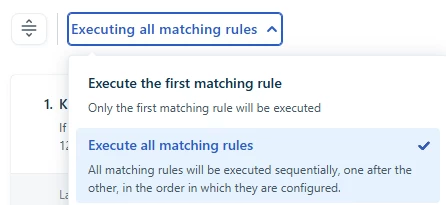
What is your current setting for Creation Automations:

This setting changes heavily how these rules perform.


Some other notes which may be helpful:

  • If you have any apps or third party tools, which are changing tickets via API, be careful as they run parallel to Creation Automations
  • Outbound Emails do not run through Creation Automations, so routing of outbound emails needs to be done in the “New email” UI itself or via Update Automations
  • If your setting is on “execute all rules”, you can already check for ticket fields set from earlier rules.
    So if your ticket comes without a Group set and Rule 1 does set a Group, you can already check for “Group is empty” or “Group is not empty” in Rule 2.

Hope that helps.

Best Tom