Solved

Captcha Too Small

  • Oct 11, 2023 4:05 AM UTC
  • 5 replies
  • 396 views

WaixYourLegs
Apprentice

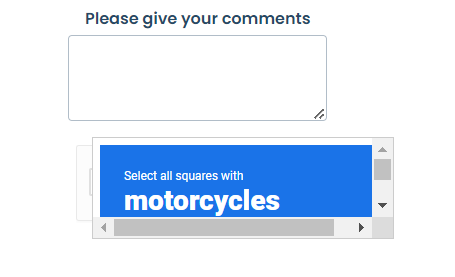
When submitting a ticket our Captcha section doesn’t change size. It starts off requesting a tick. If it goes to the click on the X pictures the captcha window stays the same size.Users have to scroll vertically and horizontally to view the pictures. How can I resolve this?

Best answer by estebanib

We ended up submitting a support case for this and we were told the ETA for this fix is November 15th, 2023.


View original

5 replies

Leon85
Community Debut
  • Community Debut
  • Oct 13, 2023 4:41 AM UTC

We are having the same issue.


eeha0120
Top Contributor ⭐
Forum|alt.badge.img+12
  • Top Contributor ⭐
  • Oct 13, 2023 10:07 AM UTC

Hi.

I’d suggest to submit a support case for this.

In an old thread, FW also suggested to temporarily disable captcha (it was for another issue, but it may help with this one while support troubleshoots and resolves):

CAPTCHA Fails on Widget | Freshworks Community


Regards,


estebanib
Community Debut
Forum|alt.badge.img
  • Community Debut
  • Oct 27, 2023 4:19 PM UTC

It is also happening to me. I set the height of the iframe to a large value and even then the Recaptcha challenge is collapsed.


estebanib
Community Debut
Forum|alt.badge.img
  • Community Debut
  • Answer
  • Oct 30, 2023 10:06 PM UTC

We ended up submitting a support case for this and we were told the ETA for this fix is November 15th, 2023.


Marc Delfin ICONN
Community Debut

Is there an update regarding captcha? Still too small