Solved

Limiting metric results

  • Mar 23, 2021 8:47 PM UTC
  • 3 replies
  • 332 views

sakhlaghi
Apprentice

I’ve created a report in Freshdesk to show customers with the most unresolved tickets.  It works, but I get too many results to be readable.  Is there a way to limit the amount of results, something “list only top 10”?

Best answer by hemanth.ramya

Hello ​​​​​​@sakhlaghi 


You can make use of the Rank order option under the widget filters (Edit widget section) to show top/bottom ‘n’ results in the widget of a report.
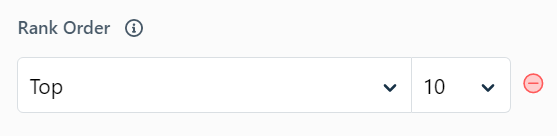


Please refer to the article link to get detailed insights on the Analytics features supported in each plan: https://support.freshdesk.com/en/support/solutions/articles/50000001108-analytics-features-for-each-plan


Cheers,

Freshdesk Community Team

View original

3 replies

hemanth.ramya
Contributor
Forum|alt.badge.img+9
  • Contributor
  • Answer
  • Mar 24, 2021 6:07 AM UTC

Hello ​​​​​​@sakhlaghi 


You can make use of the Rank order option under the widget filters (Edit widget section) to show top/bottom ‘n’ results in the widget of a report.


Please refer to the article link to get detailed insights on the Analytics features supported in each plan: https://support.freshdesk.com/en/support/solutions/articles/50000001108-analytics-features-for-each-plan


Cheers,

Freshdesk Community Team


ourcare131
Community Debut
Forum|alt.badge.img
  • Community Debut
  • May 9, 2025 6:34 PM UTC

Limiting metric results means restricting the number of data points or values returned for a metric query, usually to improve performance or focus on the top results. This is commonly done using functions like topk() in Prometheus or filters in dashboards like Grafana.


  • Community Debut
  • May 16, 2025 12:11 PM UTC

Limiting metric results refers to the practice of narrowing down data outputs to focus on the most relevant performance indicators, improving clarity and decision-making in analysis or reporting.



