Answer

Problem with attachments

  • October 28, 2021
  • 4 replies
  • 565 views

Forum|alt.badge.img

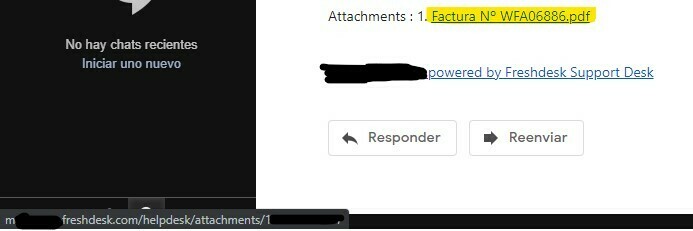
Hi, whenever I add an attachment to a reply via email, our customers receive a link at the bottom of the page to download the file, but it is added as a http link, so google chrome automatically refuses to open it.

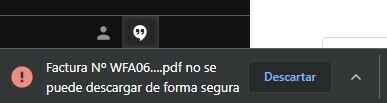
When you right click on it and use “save as...”, you can download the file, after disabling a warning “xxxxxxxxx.pdf can’t be downloaded in a secure way”.

I’ve tried adding https to the link and I can download the attachment without problems. Why is freshdesk using http as default on attachment links if the https version is available?
 

Best answer by Keer

Hello @rubens77, can you DM us your Freshdesk account URL which would be in the format of yourcompanyname.freshdesk.com so that we can check why the link is not secured?


Also, if you have enabled ‘Secure attachments’ in Admin > Security, all attachments would be sent in links that’d prompt the user to login before accessing them. Here’s an article explaining the feature: https://support.freshdesk.com/en/support/solutions/articles/50000001751-secure-attachments

4 replies

Forum|alt.badge.img
  • Author
  • Apprentice
  • October 28, 2021

Link without https:


Trying to download a file:


Images seem to work fine, but when I try a pdf or any other kind of file, it doesn’t work.


Keer
Community Debut
Forum|alt.badge.img+12
  • Community Debut
  • Answer
  • October 29, 2021

Hello @rubens77, can you DM us your Freshdesk account URL which would be in the format of yourcompanyname.freshdesk.com so that we can check why the link is not secured?


Also, if you have enabled ‘Secure attachments’ in Admin > Security, all attachments would be sent in links that’d prompt the user to login before accessing them. Here’s an article explaining the feature: https://support.freshdesk.com/en/support/solutions/articles/50000001751-secure-attachments


Forum|alt.badge.img
  • Author
  • Apprentice
  • October 29, 2021

Hello @rubens77, can you DM us your Freshdesk account URL which would be in the format of yourcompanyname.freshdesk.com so that we can check why the link is not secured?


Also, if you have enabled ‘Secure attachments’ in Admin > Security, all attachments would be sent in links that’d prompt the user to login before accessing them. Here’s an article explaining the feature: https://support.freshdesk.com/en/support/solutions/articles/50000001751-secure-attachments

Thank you. I’ve sent you a DM.


  • Community Debut
  • November 20, 2024

We use the FreshService portal for service requests, and most of our requests require attachments. Prior to the latest release on November 14th, attachments were visible in the ticket and were included in all outgoing emails. However, with the recent product update, we’ve encountered an issue: files are now being attached as Service Request items, rather than being included in the emails sent out.

Without this functionality, the attachments are essentially useless, as they are not included in approval emails or any email workflows.

We have already contacted the help desk about this issue, but so far, we have not received a resolution.